Java Edition 25w44a
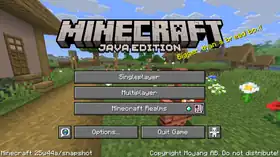
Minecraft 25w44a

| Edition | |||||||
|---|---|---|---|---|---|---|---|
| Release date |
October 28, 2025 | ||||||
| Type | |||||||
| Snapshot for | |||||||
| Downloads | |||||||
| Obfuscation maps | |||||||
| Protocol version |
dec: 1073742102 | ||||||
| Data version |
4660 | ||||||
| Resource pack format |
72.0 | ||||||
| Data pack format |
92.0 | ||||||
| Minimum Java version | |||||||
| |||||||
{
    "title": "Minecraft 25w44a",
    "images": [
        "25w44a.jpg",
        "Java Edition 25w44a.png"
    ],
    "rows": [
        {
            "field": "''(link to Java Edition article, displayed as Java Edition)''",
            "label": "(link to Edition article, displayed as Edition)"
        },
        {
            "field": "October 28, 2025",
            "label": "Release date"
        },
        {
            "field": "(link to Snapshot article, displayed as Snapshot)",
            "label": "(link to Version types article, displayed as Type)"
        },
        {
            "field": "(link to Java Edition 1.21.11 article, displayed as 1.21.11)",
            "label": "Snapshot for"
        },
        {
            "field": "[https://piston-data.mojang.com/v1/objects/839501bddfec06cafdf010d8bb8619a57dcb4fd0/client.jar Client] ([https://piston-meta.mojang.com/v1/packages/eec78103f710b67908bd6f2f366cd9fd0bab1fed/25w44a.json .json])<br />[https://piston-data.mojang.com/v1/objects/1ade1ebd6affbfed6dbfb2ce8864cf19efed07ba/server.jar Server]",
            "label": "(link to Tutorial:Installing a snapshot#Manual version installation article, displayed as Downloads)"
        },
        {
            "field": "[https://piston-data.mojang.com/v1/objects/6ea9e28c3df5a16c143ab6fa2b5bbfcbf05c12c9/client.txt Client]<br />[https://piston-data.mojang.com/v1/objects/cacf13cd11a519f28f05a9a342c6b82f20a6a5ce/server.txt Server]",
            "label": "(link to Obfuscation map article, displayed as Obfuscation maps)"
        },
        {
            "field": " <span style=\"font-size:smaller\"><abbr title=\"decimal\">dec</abbr>: </span>1073742102<br /> <span style=\"font-size:smaller\"><abbr title=\"hexadecimal\">hex</abbr>: </span>40000116",
            "label": "(link to Protocol version article, displayed as Protocol version)"
        },
        {
            "field": "4660",
            "label": "(link to Data version article, displayed as Data version)"
        },
        {
            "field": "72.0",
            "label": "<span style=\"white-space: normal;\">(link to Pack format#List of resource pack formats article, displayed as Resource pack format)</span>"
        },
        {
            "field": "92.0",
            "label": "<span style=\"white-space: normal;\">(link to Pack format#List of data pack formats article, displayed as Data pack format)</span>"
        },
        {
            "field": "<span class=\"plainlinks\">[https://en.wikipedia.org/wiki/Java_version_history#Java_SE_21_.28LTS.29 Java SE 21]</span>",
            "label": "<span style=\"white-space: normal;\">Minimum Java version</span>"
        }
    ],
    "invimages": [],
    "footer": "<table style=\"margin: auto; word-break: break-word;\">\n<tr style=\"background: inherit;\">\n<td style=\"padding: 0.4em\" >[[Java Edition  1.21.10|<span style=\"margin-right:-0.35em\">◄</span>◄   1.21.10]]</td>\n<td style=\"padding: 0.4em\">'''[[Java Edition 1.21.11|1.21.11]]'''</td>\n<td style=\"padding: 0.4em\" ></td>\n</tr>\n<tr style=\"background: inherit;\">\n<td style=\"padding: 0.4em\">\n[[Java Edition  25w43a|◄   25w43a]]\n</td>\n<td style=\"padding: 0.4em\">''' 25w44a'''</td>\n<td style=\"padding: 0.4em\">\n[[Java Edition  25w45a|  25w45a ►]]\n</td>\n</tr>\n</table>"
}
25w44a is the fourth snapshot for Java Edition 1.21.11,[unofficial name] released on October 28, 2025, which adds camel husks and parched.[1]
Additions
Items


- Added camel husk and parched spawn eggs.
Mobs
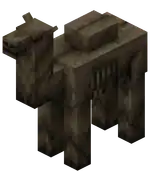
- New undead variant of the camel.
- Spawns at a light level of 0 in deserts.
- Does not burn in sunlight.
- Has 32HP
.png) × 16 health.
× 16 health. - Is hostile if the rider is a hostile mob (similar to the zombie horse). Is passive without a rider.
- Despawns like other hostile mobs, but becomes persistent while ridden by a player.
- Favorite food is rabbit foot, but it cannot be bred.
- Drops 2-3 rotten flesh when killed, with an extra 0-1 for each level of Looting.
- Any husk riding it now has a chance of dropping a rabbit foot on death.
- As a mount, it works similar to a normal camel.
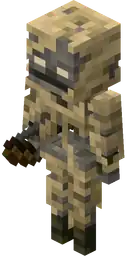
- New variant of the skeleton.
- Spawns at a light level of 0 in deserts replacing some of the regular skeletons.
- Does not spawn in caves, following the husk's spawning rules.
- Does not burn in sunlight.
- Has 16HP × 8 health.
- Shoots arrows of Weakness, and has a chance to drop them as well.
- Has a slower rate of fire compared to a normal skeleton, similar to the bogged.
General
- Added
minecraft:visual/water_fog_start_distance- The distance in blocks from the camera at which underwater fog starts to have an effect. If negative, the fog will start out with density as if it had started that many blocks behind the camera.
- Value type: float
- Default value:
-8.0 - Modifiers: Float Modifiers
- Interpolated: yes
- Resolved at the camera's position
- The distance in blocks from the camera at which underwater fog starts to have an effect. If negative, the fog will start out with density as if it had started that many blocks behind the camera.
- Added
minecraft:visual/fog_start_distance- The distance in blocks from the camera at which fog starts to have an effect (when the camera is not submerged in another substance). If negative, the fog will start out with density as if it had started that many blocks behind the camera. Note: the final value is also modified by weather.
- Value type: float
- Default value:
0.0 - Modifiers: Float Modifiers
- Interpolated: yes
- Resolved at the camera's position.
- The distance in blocks from the camera at which fog starts to have an effect (when the camera is not submerged in another substance). If negative, the fog will start out with density as if it had started that many blocks behind the camera. Note: the final value is also modified by weather.
- Added
minecraft:visual/fog_end_distance- The distance in blocks from the camera at which fog reaches its maximum density (when the camera is not submerged in another substance).
- Value type: non-negative float
- Default value:
1024.0 - Modifiers: Float Modifiers
- Interpolated: yes
- Resolved at the camera's position.
- Note: the final value is also modified by weather.
- The distance in blocks from the camera at which fog reaches its maximum density (when the camera is not submerged in another substance).
- Added
minecraft:visual/sky_fog_end_distance- The distance in blocks from the camera at which the fog that affects the sky reaches its maximum density (when the camera is not submerged in another substance).
- Value type: non-negative float
- Default value:
512.0 - Modifiers: Float Modifiers
- Interpolated: yes
- Resolved at the camera's position.
- Note: this value is restricted by the Render Distance option.
- The distance in blocks from the camera at which the fog that affects the sky reaches its maximum density (when the camera is not submerged in another substance).
- Added
minecraft:visual/cloud_fog_end_distance- The distance in blocks from the camera at which the fog that affects clouds reaches its maximum density (when the camera is not submerged in another substance).
- Value type: non-negative float
- Default value:
2048.0 - Modifiers: Float Modifiers
- Interpolated: yes
- Resolved at the camera's position.
- Note: this value is restricted by the Cloud Distance option.
- The distance in blocks from the camera at which the fog that affects clouds reaches its maximum density (when the camera is not submerged in another substance).
- Added
minecraft:visual/cloud_color- The color of the clouds. If fully transparent, clouds are entirely disabled and happy ghasts will not regenerate health faster when at cloud height.
- Value type: ARGB color
- Default value:
#00000000 - Modifiers: ARGB Color Modifiers
- Interpolated: yes
- Resolved at the camera's position for rendering, or at the position of a happy ghast for regeneration.
- The color of the clouds. If fully transparent, clouds are entirely disabled and happy ghasts will not regenerate health faster when at cloud height.
- Added
minecraft:fire_spread_radius_around_player- Controls the maximum distance in blocks that fire can spread around a player.
- This replaces the previous
doFireTickandallowFireTicksAwayFromPlayergame rules, which have now been removed. - Setting it to
0will disable fire spreading. - Setting it to
-1will allow fire spreading without players around. - Limit: Minimum
-1
- This replaces the previous
- Controls the maximum distance in blocks that fire can spread around a player.
- Added the anisotropic filtering graphics option.
- This new option improves the visual quality of blocks when viewed at a distance or at an angle.
- The default depends on the graphics preset, and the values are "off", "2x", "4x", and "8x".
- If the hardware does not support it, it will not be used.
- This significantly impacts video memory usage (especially combined with a high mipmap count).
- Added the chunk fade time option.
- Located in Video Settings.
- Controls the fade-in time of chunks.
- Added slot sources to allow the location of any inventory slot to be specified within datapacks.
- Format: object with fields.
type: the slot source type.<type-specific>: additional fields depending on the type.
- Format: object with fields.
minecraft:emptyType- Empty selection containing no slots.
minecraft:groupType- Merges several slot sources into one, with the resulting selection containing all slots from each slot source provided.
- If a slot is included in more than one slot source, it will be repeated in the resulting slot source.
- e.g.
[a, b] + [c, a]->[a, b, c, a]
- Format:
terms: list of slot sources to join.
- Can alternatively be written inline as a list of slot sources.
- Merges several slot sources into one, with the resulting selection containing all slots from each slot source provided.
minecraft:slot_rangeType- Selects slots within a slot range from the inventory of an entity or block entity.
- Mirrors the behavior of the
fromargument of the/itemcommand. - Format:
source: an entity or block entity from which the slots will be sourced, from loot context.- Can be
block_entity, this,attacking_entity,last_damage_player,direct_attacker,target_entity, orinteracting_entity
- Can be
slots: a slot range in the format of<slot_type>or<slot_type>.<slot_number>(e.g.armor.chestorcontainer.*).
minecraft:contentsType- Selects all non-empty slots from the inventory component of one or more items.
- If no item is stored inside that component, the resulting selection will be empty.
- The location of the item(s) whose inventory component to use is specified by another slot source.
- If the slot source includes more than one item with that component, the resulting selections will be merged identically as with the
minecraft:grouptype. - e.g.
Bundle [a, b] + Shulker Box [c, d]->[a, b, c, d]
- If the slot source includes more than one item with that component, the resulting selections will be merged identically as with the
- Format:
component: the inventory component to target.- Allowed values are
minecraft:bundle_contents,minecraft:charged_projectiles, andminecraft:container
- Allowed values are
slot_source: a slot source containing slots with item(s) to target.
- Selects all non-empty slots from the inventory component of one or more items.
minecraft:filteredType- Applies a filter to the selected slots, excluding any non-matching slots from the resulting selection.
- Format:
item_filter: an item predicate to match against the items in each slot.slot_source: the slot source to filter.
minecraft:limit_slotsType- Limits the number of slots provided, with the resulting selection containing at most that number of slots.
- Any slots bringing the number of slots above that limit will be excluded, in order of inclusion.
- e.g.
[a, b, c, d]->[a, b, c]if the limit is set to3
- Format:
limit: integer, the maximum number of slots to include in the resulting selection.slot_source: the slot source to limit.
- Limits the number of slots provided, with the resulting selection containing at most that number of slots.
- Example slot source selecting every slot with more than 16 items from the hotbar and armor slots of an entity:
{
    "type": "minecraft:filtered",
    "item_filter": {
        "count": {
            "min": 16
        }
    },
    "slot_source": [
        {
            "type": "minecraft:slot_range",
            "source": "this",
            "slots": "hotbar.*"
        },
        {
            "type": "minecraft:slot_range",
            "source": "this",
            "slots": "armor.*"
        }
    ]
}
- Item Tags
- Added
#camel_husk_food- Contains all items that can be used to feed a camel husk.
- Added
- Entity Tags
- Added
#can_float_while_ridden- Contains entities that can float on water while being ridden.
- Added
Changes
Items
 The textures of zombie horse spawn eggs have been updated to reflect the mob's updated appearance.
Mobs
- No longer spawn more frequently and in higher light levels between October 20 and November 3.
Horse, mule, donkey, and camel
- No longer sink in water while ridden by a player.
- Can now attack any mob if provoked by that mob, not just players.
- Now can mimic the sounds of zombie nautilus, zombie horse, camel husk and parched.
Command format
- The
timeargument for setting the size can now also specify seconds or in-game days using ansordsuffix. - The
timeargument for setting the warning distance now specifies ticks by default but can also specify seconds or in-game days using ansordsuffix.
Gameplay
- Updated "Monster Hunter" to include, and "Monsters Hunted" to require the camel husk and parched.
- Reduced the number of hunger points consumed by using Lunge across all Enchantment levels.
- Level I consumes 1 (
.png) ), level II consumes 2 (
), level II consumes 2 (.png) ), and level III consumes 3 ().
), and level III consumes 3 ().
- Level I consumes 1 (
- Added a durability cost of 1 for using Lunge across all Enchantment levels.
General
General
- Added support for KQueue on OSX to improve network connection performance.
- The LWJGL library was reverted to version 3.3.3.
- The following color fields in the
effectsdefinition now support colors as a string in the form "#rrggbb", or a float array in the form[red, green, blue]water_colorfoliage_colordry_foliage_colorgrass_colorgrass_color_modifier
- Now fade in instead of appearing out of nowhere, with the fade-in time adjustable through Video Settings.
- The pack format version is now
92.0.
- Modifiers on ARGB Color Values
override- Argument format: ARGB Color
add- component-wise additive color blending.- Argument format: RGB Color
subtract- component-wise subtractive color blending.- Argument format: RGB Color
multiply- component-wise multiplicative color blending.- Argument format: RGB or ARGB Color
- If specified, the alpha component is multiplied independently just like the other color channels.
alpha_blend- traditional alpha blending that might be seen in image editing software.- Argument format: ARGB Color
- When the argument alpha is
1, it will behave as an override with no blending.
- Renamed
minecraft:visual/water_fog_radiustominecraft:visual/water_fog_end_distance - Removed
minecraft:visual/extra_fog - Replaced
minecraft:visual/cloud_opacitywithminecraft:visual/cloud_color
- Environmental Fog in the Nether is no longer dependent on the render distance setting, and will consistently be applied from 10 to 96 blocks.
- Have been moved into a registry.
- With that, all game rules have been renamed from their previous camel case names to resource locations in snake case.
- Additionally, some game rules have been further renamed:
announceAdvancements->minecraft:show_advancement_messagescommandBlocksEnabled->minecraft:command_blocks_workcommand_modification_block_limit->minecraft:max_block_modificationsdisableElytraMovementCheck->minecraft:elytra_movement_check- The value is inverted accordingly in places that use the resource location.
disablePlayerMovementCheck->minecraft:player_movement_check- The value is inverted accordingly in places that use the resource location.
disableRaids->minecraft:raids- The value is inverted accordingly in places that use the resource location.
doDaylightCycle->minecraft:advance_timedoEntityDrops->minecraft:entity_dropsdoImmediateRespawn->minecraft:immediate_respawndoInsomnia->minecraft:spawn_phantomsdoLimitedCrafting->minecraft:limited_craftingdoMobLoot->minecraft:mob_dropsdoMobSpawning->minecraft:spawn_mobsdoPatrolSpawning->minecraft:spawn_patrolsdoTileDrops->minecraft:block_dropsdoTraderSpawning->minecraft:spawn_wandering_tradersdoVinesSpread->minecraft:spread_vinesdoWardenSpawning->minecraft:spawn_wardensdoWeatherCycle->minecraft:advance_weathermaxCommandChainLength->minecraft:max_command_sequence_lengthmaxCommandForkCount->minecraft:max_command_forksnaturalRegeneration->minecraft:natural_health_regenerationsnowAccumulationHeight->minecraft:max_snow_accumulation_heightspawnRadius->minecraft:respawn_radiusspawnerBlocksEnabled->minecraft:spawner_blocks_work
- Limits
- Some game rules that previously did not have a limited value range now do:
minecraft:max_block_modifications: Minimum1minecraft:max_command_forks: Minimum1minecraft:max_command_sequence_length: Minimum0minecraft:max_entity_cramming: Minimum1minecraft:max_snow_accumulation_height: Minimum0, maximum:8minecraft:players_nether_portal_creative_delay: Minimum0minecraft:players_nether_portal_default_delay: Minimum0minecraft:players_sleeping_percentage: Minimum0minecraft:random_tick_speed: Minimum0minecraft:respawn_radius: Minimum0
- Some game rules that previously did not have a limited value range now do:
- In the
game_rulestest environment the keysbool_ruleandint_rulehave been replaced with a single key rules.- It is a map from game rules resource locations to the game rules value. The value type is either integer or boolean depending on the game rule.
- Added new
minecraft:slotsloot pool entry.- Provides the items contained within the selected slots to the loot table.
- Format:
slot_source: a slot source describing where the items are located.
- Supports all standard loot pool entry fields.
- Removed
contentsas a supported value for thedynamicloot entry type.- Its behaviour of providing the contents of a Shulker Box was made redundant by the addition of the
slotsloot entry type, and can now be replicated with theslot_rangeslot source.
- Its behaviour of providing the contents of a Shulker Box was made redundant by the addition of the
Minecraft Server Management Protocol
- The version is now 2.0.0.
- In the
typed_game_ruleanduntyped_game_ruleschemas, the type of the value field has been changed from string to take either a boolean or an integer.- It now uses the game rule resource location as the key.
- The version is now
72.0. - block.vsh/fsh copies terrain.vsh/fsh and handles ad-hoc blocks (e.g. held by entities).
- Added
ChunkSectionuniform, used by terrain.vsh (which replacesDynamicTransforms). - New shaders have been introduced to perform GPU based sprite animations.
Globalsuniform now has camera coordinates.
Shaders & Post-process Effects
- Added
animate_sprite*core shaders, which use a newSpriteAnimationInfouniform.
Sprite Animations
- Sprites (textures as part of a larger atlas) are now animated on the GPU rather than per-tick on the CPU.
- For regular frame-based animations, animate_sprite.vsh and animate_sprite_blit.fsh are used to perform the draw.
- For interpolated animations, animate_sprite.vsh and animate_sprite_interpolate.fsh are used to perform the draw.
- The UBO
SpriteAnimationInfocontains information on where the sprite should be drawn to, within the greater texture atlas.
- Added
minecraft:nautilus_one_cmstatistic (Distance By Nautilus).
- Entity Tags
- Changed
#skeletonsto include parched. - Changed
#zombiesto include camel husk. - Changed
#can_equip_saddleto include camel husk.
- Changed
- "Interface" option inside the Video Settings screen has been renamed to "Preferences".
- The Single Biome Customization screen now has a search box.
- The language selection screen now has a search box to filter languages.
Fixes
From released versions before 1.21
- MC-2791 – The player model in the inventory screen renders in the wrong orientation when it's not standing up straight.
- MC-73186 – Gaps between the faces of item models and complex block models.
- MC-149630 – Some particles have very thin, vertical lines that flash in and out around the particles.
- MC-237158 – Magma blocks can generate on the ceilings of caves below aquifers.
From 1.21.6
- MC-298942 – Character body moves instead of the head when riding a happy ghast.
From 1.21.8
- MC-300642 – When texture atlases are large, gaps are rendered between blocks that have a low resolution.
- MC-301988 – Buttons in the telemetry screen are not aligned properly in some languages.
From 1.21.9
- MC-301311 – The “Transfer Now” button no longer renders highlighted when the java realms information box is selected.
- MC-301516 – The mouse cursor doesn’t change to the hand shape when hovering over tabs in the “Create New World” menu and similar screens.
- MC-301517 – The mouse cursor doesn’t change to the hand shape when hovering over arrows in the singleplayer, multiplayer, resource packs, and data packs menus.
- MC-301527 – The mouse cursor doesn’t change to the resize shape when scrolling in the advancements menu.
- MC-302111 – Elements within the resource pack and data pack menus are not selected in order when using the Tab ↹ key.
- MC-302325 – When the player toggles a debug renderer using its hotkey (F3 + B, F3 + G) while in the debug options screen, the corresponding entry is not updated.
- MC-302338 – The narrator button in the Accessibility Settings menu doesn't update upon pressing Ctrl + B.
- MC-302362 – Clicking on "Singleplayer" or "Multiplayer" in the main menu then immediately clicking on a world or server joins it even when not clicking the play button.
- MC-302482 – Resource and data pack names can overlap selection boxes when the scroll bar is present.
From the 1.21.11 development versions
- MC-302678 – Arrows and tridents get stuck on players and mobs.
- MC-303072 – Game crashes when a trident entity with PierceLevel ≥ 1 hits a mob or player.
- MC-303168 – Equipping a saddle onto a nautilus uses the "
subtitles.entity.horse.saddle" subtitle. - MC-303255 – Nautiluses do not deal damage if mobGriefing is false.
From the previous development version
- MC-303429 – Piglins and hoglins shake in the nether.
- MC-303432 – Chinese input is not recognized.
- MC-303434 – Japanese input is not recognized.
- MC-303439 – Held items in third-person view show strange artifacts when viewed at certain angles.
- MC-303455 – The cursor is no longer centered when opening a container or menu on Wayland.
- MC-303460 – The cursor no longer follows the look set by the system on Wayland.
- MC-303461 – The application icon shows the generic Wayland icon instead of the Minecraft icon on Wayland.
- MC-303478 – Cannot launch 25w43a on Linux with Nvidia Graphics.
- MC-303481 – Game has no audio and crashes with Mac Studio Display.
- MC-303485 – The game can no longer save chunks in custom dimensions.
- MC-303504 – Nether sprouts textures still expand when viewed from a sharp angle.
- MC-303506 – Control-key combinations additionally send the normal letter on Wayland.
- MC-303520 – Sweet berry bush textures still expand when viewed from a sharp angle.
- MC-303541 – The game doesn't boot on Wayland.
- MC-303651 – Rotating dropped items sometimes create visual artifacts.
Videos
Videos made by Slicedlime:
References
- ↑ "Minecraft Snapshot 25w44a" – Minecraft.net, October 28, 2025.


.png)


