Java Edition Beta 1.3
| Edition | ||||||
|---|---|---|---|---|---|---|
| Release date |
February 22, 2011 | |||||
| Downloads |
Original client
(.json) | |||||
| Protocol version |
9 | |||||
| Minimum Java version | ||||||
| ||||||
{
    "title": "Minecraft Beta 1.3",
    "images": [
        "Beta 1.3.png",
        "Beta 1.3 menu.png"
    ],
    "rows": [
        {
            "field": "''(link to Java Edition article, displayed as Java Edition)''",
            "label": "(link to Edition article, displayed as Edition)"
        },
        {
            "field": "February 22, 2011",
            "label": "Release date"
        },
        {
            "field": "[https://vault.omniarchive.uk/archive/java/client-beta/b1.3/b1.3-1713.jar Original client]\n([https://meta.omniarchive.uk/versions/v1/b1.3-1713.json .json])<br>\n[https://vault.omniarchive.uk/archive/java/client-beta/b1.3/b1.3-1733.jar First reupload client] <br>\n[https://piston-data.mojang.com/v1/objects/e19cfb3a2043f185c44237ef05eac80e8ad2d8e7/client.jar Second reupload client]\n([https://piston-meta.mojang.com/v1/packages/4bb25e224116e7e06e08f0edaea49320b5ecf591/b1.3b.json .json]) <br />[https://vault.omniarchive.uk/archive/java/server-beta/b1.3/b1.3-1647.jar Original server]<br>\n[https://vault.omniarchive.uk/archive/java/server-beta/b1.3/b1.3-1731.jar Reupload server]\n([https://vault.omniarchive.uk/archive/java/server-beta/b1.3/b1.3-1731.exe .exe])",
            "label": "(link to Tutorial:Installing a snapshot#Manual version installation article, displayed as Downloads)"
        },
        {
            "field": "9",
            "label": "(link to Protocol version article, displayed as Protocol version)"
        },
        {
            "field": "<span class=\"plainlinks\">[https://en.wikipedia.org/wiki/Java_version_history#Java_SE_6 Java SE 6]</span>",
            "label": "<span style=\"white-space: normal;\">Minimum Java version</span>"
        }
    ],
    "invimages": [],
    "footer": "<table style=\"margin: auto; word-break: break-word;\">\n<tr style=\"background: inherit;\">\n<td style=\"padding: 0.4em\" >[[Java Edition  Beta 1.2|<span style=\"margin-right:-0.35em\">◄</span>◄   Beta 1.2]]</td>\n<td rowspan=\"2\" style=\"padding: 0.4em\">''' Beta 1.3'''</td>\n<td style=\"padding: 0.4em\" >[[Java Edition  Beta 1.4|  Beta 1.4 <span style=\"margin-right:-0.35em\">►</span>►]]</td>\n</tr>\n<tr style=\"background: inherit;\">\n<td style=\"padding: 0.4em\">\n[[Java Edition  Beta 1.2_02|◄   Beta 1.2_02]]\n</td>\n\n<td style=\"padding: 0.4em\">\n[[Java Edition  Beta 1.3_01|  Beta 1.3_01 ►]]\n</td>\n</tr>\n</table>"
}
 There is a guide for this update!
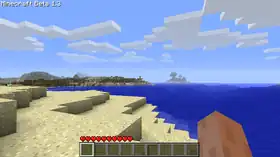
Beta 1.3 is a version of Java Edition Beta released on February 22, 2011,[1] which added redstone repeaters, beds, three types of slabs, and a new splash screen, notably among other changes and fixes, the world save format was changed from Alpha level format to McRegion.
Beta 1.3 was uploaded at 17:13 UTC, this version contained debug code that spawns the player with 64 torches, a diamond pickaxe, a diamond shovel, a diamond axe, and 64 beds upon respawning or creating a world. Beta 1.3 was reuploaded at 17:33 UTC to remove the debug code that the player spawns with items, listed above in a new world.[2] Beta 1.3 was then reuploaded again at 17:50 UTC[3] to fix a crash bug when opening the world menu without a saves folder. This last version is listed in the launcher as Beta 1.3b (old_beta b1.3b).
Additions


Blocks
_JE1.png)


_JE1.png)
- Allows for redstone to be powered further.
- Crafted from stone, redstone torch and redstone dust.


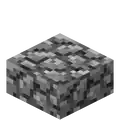
- Takes over the old recipe for the stone slab.
- Breaking a block made of two slabs now drops 2 slabs.
- Crafted from cobblestone.

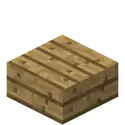
- Breaking a block made of two slabs now drops 2 slabs.
- Crafted from planks.
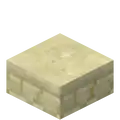
- Breaking a block made of two slabs now drops 2 slabs.
- Crafted from sandstone.

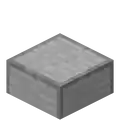
- Breaking a block made of two slabs now drops 2 slabs.
- Unobtainable.
Non-mob entities
New painting
- "Skull On Fire"
_JE2_BE1.png)
- Code to make this painting display was added in Beta 1.2_01, but the texture itself was not added until this version, resulting in the use of the painting placeholder texture.
Command format
- Added whitelisting to multiplayer servers.
- Can turn on/off the whitelist.
- Can add/remove players from the whitelist.
- Can give a list of whitelisted players and reload that list.
Textures
_JE0_BE0.png)
- Added a texture for crying obsidian to terrain.png.
- Texture went unused and removed in Beta 1.5, but re-added in 20w10a via the Programmer Art Resource Pack.
General

- Smooth lighting engine added with the help of MrMessiah.
- New graphics setting screen.
- Added "Smooth Lighting" option.
- New Mojang logo.
Changes
Blocks

- Gets darker the farther away it is from a source of power.
- Unpowered redstone is purely black now.
- For these changes, they now use a dedicated tint system and new textures:
- For these changes, they now use a dedicated tint system and new textures:
_JE2.png)
_JE2.png)
_JE2.png)
_JE2.png)
_JE2.png)
_JE2.png)
_JE2.png)
_JE2.png)
_JE2.png)
_JE2.png)
_JE2.png)
_JE2.png)
_JE2.png)
_JE2.png)
_JE2.png)
_JE2.png)
_JE2.png)
_JE2.png)
_JE2.png)
_JE2.png)
_JE2.png)
_JE2.png)
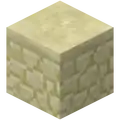
- Now found at the bottom of naturally generated sand.
- Mine time for sandstone has been decreased.
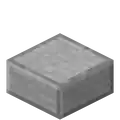
- Are now created by using 3 of the stone.

- Breaking a block made of two slabs now drops 2 slabs.

- Now require two of its materials, instead of 3.

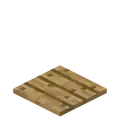
- Now require two of its materials, instead of 3.

Items

- Renamed from "Sulphur".
Mobs
General
- Fewer passive mobs spawn when on harder difficulties.

- Now spawn again.

- Can no longer be milked.
- Squid now have the ability to move in three dimensions (rather than only along the bottom of the body of water)
World generation
- Players can now choose the name of the world before creation.
- Players can now choose the seed of the world before creation.
- More than 5 worlds can now be created at once.
- Delete world message now includes "(A long time!)" after "(world name) will be lost forever!".
- Prior to this, it just says "'<world name>' will be lost forever!".
Gameplay
- View bobbing now applies while in third person, if enabled.
General
- F1 and F3 are now toggled when pressed.
- When F3 is toggled on, mobs display their unique entity ID numbers over their heads.
- F8 toggles mouse smoothing.
- Scrollbars added in the world selection screen.
- Players can now change the names of existing worlds.
- This doesn't change the world's save id.
- Worlds now use a generic McRegion chunk save format, with a built-in auto conversion.
- Scrollbars added in the texture pack list.
Fixes
10 bugs fixed
- When breaking double slabs (one slab placed on another) it now drops two slabs instead of one.
- Wood doesn't burn forever anymore.
- Grassland/sand related biome border fixed (boundaries line up, rather than obviously show chunk borders).
- No longer receiving Java Log error .txt file spam in the minecraft.exe folder when closing the Minecraft client program.
- Players can no longer use the click-release to quickly mine blocks (referred to as "click mining") in multiplayer.
- Players no longer glitch when standing on fences in multiplayer.
- Players can no longer milk squids.
- When right-clicking on a wooden door while holding a bow or fishing rod, arrows no longer are fired into the door, nor is the fishing hook cast into the door.
- Hostile mobs can now be attacked properly in multiplayer.
- Lapis Lazuli Ore now drops 4-8 Lapis Lazuli in multiplayer.
Gallery
-
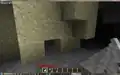 A screenshot depicting the generation of new sandstone blocks.
 -
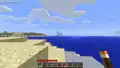 A pre-reupload screenshot, with the debug items.
 -
 The world selection screen in this version.
 -
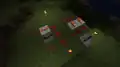 Screenshot of the new repeaters.
 -
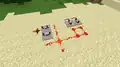 Screenshot of the new repeaters.
 -
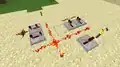 Screenshot of the new repeaters.
Videos
References
- ↑ Minecraft Beta 1.3 – The Word of Notch, February 22, 2011
- ↑ "Err, yes... as USUAL, we managed to release it with debug item spawning code in it. Re-download. :D" – @notch (Markus Persson) on X (formerly Twitter), February 22, 2011
- ↑ "@dw_edwin Try again now. Restart the client so it loads the new update.. Does it work any better?" @notch (Markus Persson) on X (formerly Twitter), February 22, 2011


.png)


.png)


.png)


