Melee attack

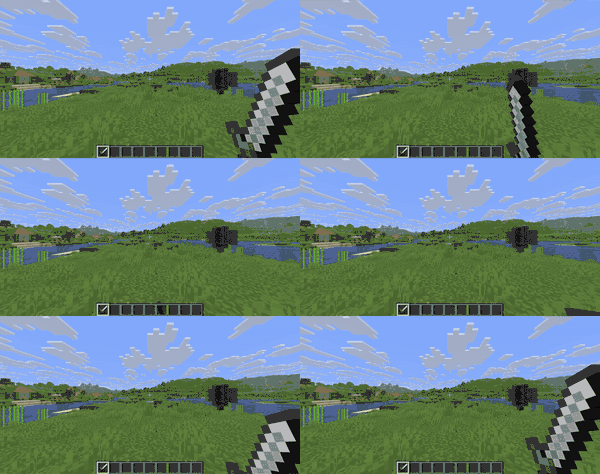
A melee attack is a type of attack that mobs and players use to cause damage through very close contact with a target.
Attack scenario
Melee attacks apply mob's base melee attack damage and deal damage to the target entity in mob_attack damage type. Most mobs perform one melee attack per second, targeting a single intended target for the melee attack, without accidentally harming other targets.
Some mobs melee attack in a different way and have special effects:
- Players can perform a melee attack on a mob or another player by clicking the attack button while holding any item to deal damage. Players have a greater melee attack range than most mobs and an unlimited attack frequency, allowing them to continuously attack targets without being reached by most mobs.
- When a player uses a trident enchanted with Riptide collides with an entity, they will automatically perform a melee attack on the entities they collide with.
- Cave spiders, husks, wither skeletons, and bees deal status effects to the entities they attack during a melee attack.
- Iron golems, hoglins, and zoglins knock their targets into the air during melee attacks.
- Polar bears stand on their hind legs and swing their front paws to perform melee attacks.
- Entities holding an axe, such as vindicators and piglin brutes, as well as wardens, will disable the target's shield during a melee attack for 100 game ticks (5 seconds).
- When a wither's health falls below 50%, it performs melee attacks in the form of a dash, destroying most blocks it touches during the dash.[Bedrock Edition only]
- Slimes and magma cubes attack all entities they push at once rather than focusing on a single target, and their melee attacks have no frequency limit, allowing them to continuously attack. The damage immunity mechanic means they can only deal damage twice per second to a single target, but in Java Edition if a shield blocks their attack, it does not trigger Damage Immunity, rapidly depleting the shield's durability.
Attack damage
All entities have a base melee attack damage. The final attack damage calculation includes the mob's base attack damage, main hand item damage, and status effects.
Base value
Java Edition
In Java Edition, base melee attack damage is the computed value of the attribute attack_damage. The damage from the main hand item and status effects are essentially Op0 attribute modifiers. Using the /attribute command to modify the base value or modifiers can change the base melee attack damage for the corresponding entity. For example, the base melee attack damage of a player holding a wooden sword with the Strength II effect would be calculated as:
  1 (Player base attack value)
+ 3 (Wooden sword damage, Op0 modifier, value 3)
+ 6 (Strength II effect, Op0 modifier, value 6)
= 10
The attack damage of the main hand items is shown in the table below (including the player's 1HP.png) base attack value, matching the value displayed in the tooltip):
base attack value, matching the value displayed in the tooltip):
| Item | Attack damage | ||||||
|---|---|---|---|---|---|---|---|
| Sword |  4HP 4HP.png)
|
 4HP 4HP
|
 5HP 5HP
|
 5HP 5HP
|
 6HP 6HP
|
 7HP 7HP
|
 8HP 8HP
|
| Axe |  7HP 7HP
|
 7HP 7HP
|
 9HP 9HP
|
 9HP 9HP
|
 9HP 9HP
|
 9HP 9HP
|
 10HP 10HP
|
| Spear |  1HP 1HP
|
 1HP 1HP
|
 2HP 2HP
|
 2HP 2HP
|
 3HP 3HP
|
 4HP 4HP
|
 5HP 5HP
|
| Pickaxe |  2HP 2HP
|
 2HP 2HP
|
 3HP 3HP
|
 3HP 3HP
|
 4HP 4HP
|
 5HP 5HP
|
 6HP 6HP
|
| Shovel |  2.5HP × 1.25 2.5HP × 1.25
|
 2.5HP × 1.25 2.5HP × 1.25
|
 3.5HP × 1.75 3.5HP × 1.75
|
 3.5HP × 1.75 3.5HP × 1.75
|
 4.5HP × 2.25 4.5HP × 2.25
|
 5.5HP × 2.75 5.5HP × 2.75
|
 6.5HP × 3.25 6.5HP × 3.25
|
| Hoe |       1HP 1HP
| ||||||
| Trident |  9HP 9HP
| ||||||
| Mace |  6HP 6HP
| ||||||
| Other Items | 1HP
| ||||||
The Strength status effect increases attack damage by 3HP per level, while the Weakness effect reduces it by 4HP per level.
Bedrock Edition
In Bedrock Edition, the base melee attack damage is calculated differently for different entities:
For players, the calculation sequence for base melee attack damage is as follows:
- Get the player's base attack value.
- Add the main hand item damage.
- Calculate the Strength status effect.
- Calculate the Weakness status effect.
For example, the base melee attack damage of a player holding a wooden sword with both Strength II and Weakness I effects would be calculated as:
1 (Player base attack value) + 4 (Wooden sword damage) = 5
(5 × 1.3 + 1) × 1.3 + 1 = 10.75 (Strength II)
10.75 × 0.8 - 0.5 = 8.1 (Weakness I)
For most non-player entities, the calculation sequence for base melee attack damage is as follows:
- Get the mob's base attack value.
- Calculate the Strength status effect.
- Calculate the Weakness status effect.
- Add the main hand item damage.
For example, the base melee attack damage of a zombie holding a wooden sword with both Strength II and Weakness I effects would be calculated as:
3 (Zombie base attack value)
(3 × 1.3 + 1) × 1.3 + 1 = 7.37 (Strength II)
7.37 × 0.8 - 0.5 = 5.396 (Weakness I)
5.396 + 4 (Wooden sword damage) = 9.396
The attack damage of the main hand items is shown in the table below (including the player's 1HP base attack value, so the values are 1 higher than what is displayed in the tooltip):
| Item | Attack damage | ||||||
|---|---|---|---|---|---|---|---|
| Sword | 5HP
|
5HP
|
6HP
|
6HP
|
7HP
|
8HP
|
9HP
|
| Axe | 4HP
|
4HP
|
5HP
|
5HP
|
6HP
|
7HP
|
8HP
|
| Spear | 2HP
|
2HP
|
3HP
|
3HP
|
4HP
|
5HP
|
6HP
|
| Pickaxe | 3HP
|
3HP
|
4HP
|
4HP
|
5HP
|
6HP
|
7HP
|
| Shovel | 2HP
|
2HP
|
3HP
|
3HP
|
4HP
|
5HP
|
6HP
|
| Hoe | 3HP
|
3HP
|
4HP
|
 4HP 4HP
|
5HP
|
6HP
|
7HP
|
| Trident | 9HP
| ||||||
| Mace | 6HP
| ||||||
| Other Items | 1HP
| ||||||
The Strength status effect can be calculated using the recursive formula or the general formula , where is the input attack damage, is the output attack damage, and is the level of the Strength status effect.
The Weakness status effect can be calculated using the recursive formula or the general formula , where is the input attack damage, is the output attack damage, and is the level of the Weakness status effect. If the result is less than 0, the output attack damage is 0.
Enchanted values
The enchantments on items in the main hand will affect attack damage, referred to here as enchantment attack damage.
For different entities, enchantments have different attack damage:
- Sharpness works on all entities. In Java Edition, it is calculated as , where is the level of the Sharpness enchantment; In Bedrock Edition, each level generates 1.25HP × 0.625 attack damage.
- Smite only works on undead mobs, generating 2.5HP × 1.25 attack damage per level.
- Bane of Arthropods only works on arthropods, generating 2.5HP × 1.25 attack damage per level.
- Impaling only works on aquatic mobs[Java Edition only] or mobs in water or touched by rain[Bedrock Edition only], generating 2.5HP × 1.25 attack damage per level.
The total of all enchantment attack damage is the current enchantment attack damage. In Bedrock Edition, enchantment attack damage is rounded down after summing, so if Sharpness I and Smite I are both active, the enchantment attack damage would be 3HP instead of 3.75HP × 1.875.
Bonus attack damage
After calculating the base melee attack damage and enchantment attack damage, the game also determines whether to add a bonus attack damage based on the nature of the current main hand item and the state of the attacked entity. Currently, only mace has bonus attack damage.
The bonus attack damage of the mace only takes effect when the entity falls from a height greater than 1.5 blocks and not gliding[Java Edition only], with the bonus attack damage adjusted according to the fall height:
- If the fall height f is greater than 1.5 blocks but not more than 3 blocks, the bonus attack damage is .
- If the fall height f is greater than 3 blocks but not more than 8 blocks, the bonus attack damage is .
- If the fall height f is greater than 8 blocks, the bonus attack damage is .
- If the mace has the density enchantment and the enchantment level is I, an additional bonus attack damage is added according to the fall height f.
Attack cooldown
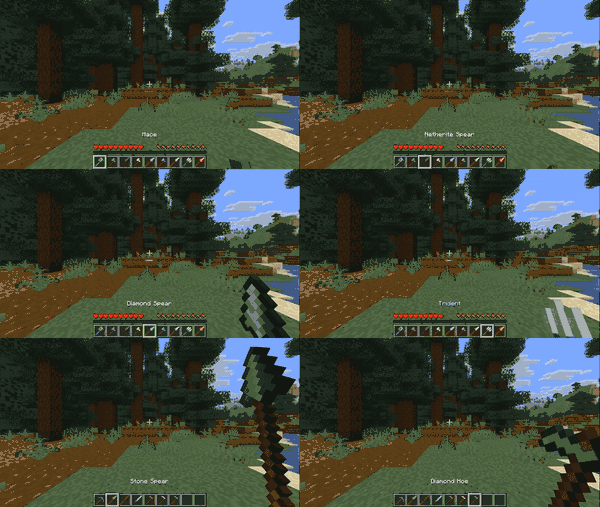


The attack cooldown is a meter below the crosshair that reduces damage when attacking before the meter is full. An attack cooldown percentage of 84.8% or above is also required for critical hits, sprint-knockback attacks, and sweep attacks to activate. The indicator can be optionally changed to display next to the hotbar instead of under the crosshair in Video Settings.
Attack speed is controlled by the attack_speed attribute. The default value is 4, meaning that 4 full-damage melee attacks can be performed per 20 game ticks (1 second), however damage immunity allows only 2 of these attacks to connect against a single target. The Haste effect increases attack speed by 10% per level, and the Mining Fatigue effect decreases it by 10% per level. Spear jab attacks specifically have a forced attack cooldown, meaning they cannot attack at all until they reach 100% cooldown charge.
Tools and weapons have different attack speeds that replace the base value of 4 when held in the mainhand. The following table lists all attack speeds from fastest to slowest:
| Item attack speeds | ||||||||
|---|---|---|---|---|---|---|---|---|
| Item type | Attack speed | |||||||
| Value | In seconds | In ticks | ||||||
 |
4 | 0.25 seconds | 5 ticks | |||||
|
3 | 0.333 seconds | 6 ticks | |||||
|
2 | 0.5 seconds | 10 ticks | |||||
|
1.6 | 0.625 seconds | 12 ticks | |||||
|
1.5384615659713745 | 0.65 seconds | 12 ticks | |||||
|
1.3333333730697632 | 0.75 seconds | 15 ticks | |||||
|
1.2 | 0.833 seconds | 16 ticks | |||||
|
1.1764705181121826 | 0.85 seconds | 16 ticks | |||||
|
1.1 | 0.909 seconds | 18 ticks | |||||
|
1.0526316165924072 | 0.95 seconds | 19 ticks | |||||
|
1 | 1 second | 20 ticks | |||||
|
0.9523810148239136 | 1.05 seconds | 21 ticks | |||||
|
0.9 | 1.111 seconds | 22 ticks | |||||
|
0.8695652484893799 | 1.15 seconds | 22 ticks | |||||
|
0.8 | 1.25 seconds | 25 ticks | |||||
|
0.6 | 1.667 seconds | 33 ticks | |||||
The time from one melee attack, breaking a block, or switching the main-hand item to the next melee attack that can deal full damage is called the attack cooldown time. The ratio of the time elapsed since the above actions to the total attack cooldown time is the attack cooldown completion. The number of full-damage melee attacks a player can perform per 20 game ticks (1 second) is the attack speed.
Attack cooldown time can be calculated from attack speed. If the attack speed is , the attack cooldown time is game ticks. Since game ticks do not have decimal values, the actual attack cooldown time is rounded: if the decimal part is greater than 0.5, it is rounded up; otherwise, it is rounded down.
Attack cooldown completion can also be calculated from these values. If the time since the last melee attack, block break, or main-hand item switch is game ticks, then the attack cooldown completion is . The visual component related to attack cooldown completion is the attack indicator, which has a slight difference in rendering percentage compared to the actual attack cooldown completion: , meaning the displayed value lags by half a game tick.
Attack cooldown affects base melee attack damage, enchanted attack damage, and additional attack damage differently. Given attack cooldown completion , the base melee attack damage is modified by , the enchanted attack damage by , while additional attack damage remains unaffected. The effect on base melee attack damage can stack with critical hits.
Calculator
Attack reach
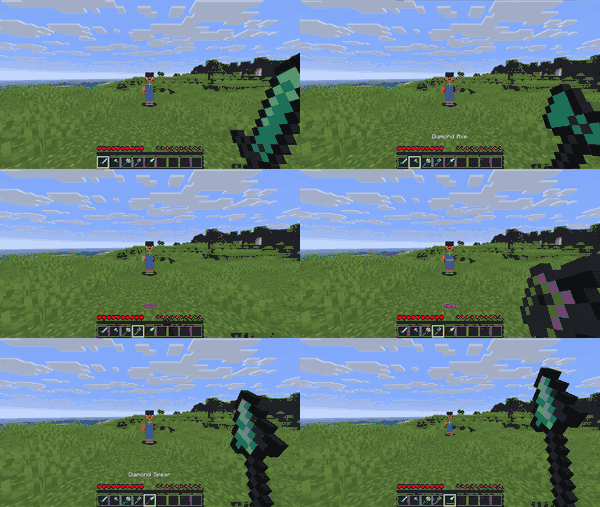
The reach in blocks of a given player attack is dependent on the player's weapon, and is controlled by the entity interaction range attribute. If the target is outside the range of the attack reach, the melee attack does not connect. For entities, it is instead dependent on the entity's attack bounding box.
Spear attacks
For both players using the jab or charge attacks of the spear and any entity that can use the spear's charge attacks, targets within reach are selected by first attempting to find an obstructing block for the attack, which will then become the maximum reach, then trying to find all entities within a bounding box representing the reach that are directly between the maximum and minimum reach (assuming no block intersections, 1-2.25 blocks for most entities, and 2-4.5 blocks for players) in the direction of the view vector (with inflated hitboxes of 0.125 blocks, effectively decreasing minimum reach and increasing maximum reach by that amount).
Player attacks
For players, the attack reach is the range they can physically reach with an attack. The default reach is 3 (3 blocks). In Java Edition, attack reach is dependent on the entity_interaction_range attribute. When in Creative Mode, the attack reach increases to 5 blocks according to attribute modifiers.
Entity attacks
For most entities, the attack reach is defined as a horizontally extended area beyond their collision box, referred to below as the attack bounding box. Similarly, the attacked entity has a range within which it can be struck, referred to as the hit bounding box. A melee attack can occur when the attack bounding box intersects with the hit bounding box. Entities performing melee attacks must also maintain a clear line of sight to the attacked entity, preventing attacks through blocks. Since entities cannot see themselves, they cannot perform melee attacks on themselves.
The attack bounding box of an entity is calculated as follows:
- Get the entity's collision box. If the entity is riding another entity, use the collision bounding box of both entities, with the height range taken from the entity's collision box.
- Horizontally extend this collision box by (approximately 0.828 blocks) to define the attack bounding box.
- If the entity is a ravager, reduce the attack bounding box by 0.5 blocks horizontally.
The hit bounding box is calculated as follows:
- If the entity is not riding another entity, the hit bounding box is the entity's collision box.
- If the entity is riding another entity, the lowest point of the hit bounding box is set to the higher of the entity's collision box bottom and the riding position of the entity.
Attack knockback
When melee attack damage is dealt, the attacked entity will be pushed backward; this is knockback. The horizontal direction of knockback aligns with the attacker's viewpoint. The knockback of an attack is dependent on the player's weapon, and is controlled by the attack knockback attribute.
The magnitude of knockback depends on whether the attacker is sprinting and the item in their main hand. This is described using knockback strength. Knockback strength is 0 by default. If the main-hand item has the knockback enchantment, the knockback strength increases by the enchantment's level.
In Java Edition, only players can knock back non-living entities. Knockback strength determines the knockback speed, which is half of the knockback strength. If the target of the knockback is a non-living entity, it receives a vertical motion of 0.1 blocks per tick (2 blocks per second) and a horizontal knockback speed. If the target is a living entity, the knockback speed is reduced based on its knockback resistance (attribute knockback_resistance). If the knockback resistance is 1, knockback does not occur. Next, the entity's horizontal movement speed is halved, and knockback speed is applied. If the entity is touching the ground, its vertical speed is also halved, and upward knockback speed is applied. However, the final vertical speed does not exceed 0.4 blocks per tick (8 blocks per second). After knockback occurs, the attacking entity immediately stops sprinting, and their horizontal speed is reduced to 60% of its original value.
Special attacks
Melee attacks can be special attacks when meeting certain conditions:
Critical hit
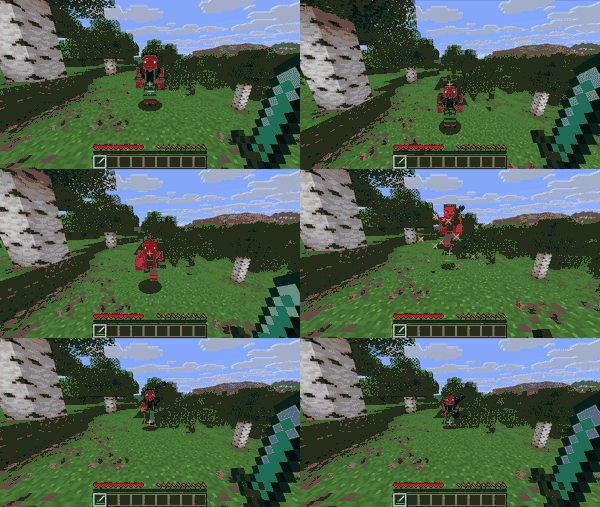
All weapons aside from spears have the ability to do critical hits, which deal 50% extra damage.
To perform a critical hit, the following conditions must be met:
- The player must be falling, meaning the fall height must be greater than 0. This also means the player cannot have the Slow Falling or Levitation effects.
- The player must not be touching the ground, meaning they must not be standing on any surface with block collision boxes.
- The player's attack cooldown must be at 84.8% or above.[Java Edition only]
- The player must not be performing a sprint-knockback attack.[Java Edition only]
- In Java Edition, players ordinarily cannot perform critical hits while sprinting, because a sprint-knockback attack is performed instead. However, by continuing to hold down the sprint key after performing a sprint-knockback attack, all successive hits can be critical hits, and sprint-knockback attacks become impossible until the sprint key is released.
- In Bedrock Edition, critical hits can be performed simultaniously with sprint-knockback attacks.
- The player must not be inside climbable blocks (like ladders, vines, cobwebs, or trapdoors that are open on the same side as a ladder).
- The player must not be in water (they can be in lava, however).
- The player must not be riding any entity.
- The player must not have the Blindness effect.
In Java Edition, critical hits increase damage before calculating damage enchantments, while in Bedrock Edition they increase damage after calculating damage enchantments. When a critical hit is successfully performed, small star-shaped particles will burst out of the hit entity, and a unique sound effect is played. The ender dragon is immune to critical hits in Java Edition.
Sprint-knockback attack

All weapons aside from spears have the ability to do sprint-knockback attacks, which deal extra knockback while sprinting and cancel the sprint. In Java Edition, sprint-knockback attacks play a unique sound when performed, and they require an attack cooldown charge of at least 84.8%.
In Java Edition, sprint-knockback attacks cannot be performed at the same time as critical hits or sweep attacks. If a sprint-knockback attack is performed at the same time as a critical hit, the sprint-knockback attack takes priority. They can however be performed at the same time as smash attacks and crushing blows.
The extra inflicted knockback stacks with the Knockback enchantment. Like the Knockback enchantment, sprint-knockback attacks do not increase knockback against entities that are immune to knockback, such as iron golems or shielding players. The only exception to this is armor stands, which ordinarily do not take knockback when hit but do when hit by a sprint-knockback attack.
Sweep attack
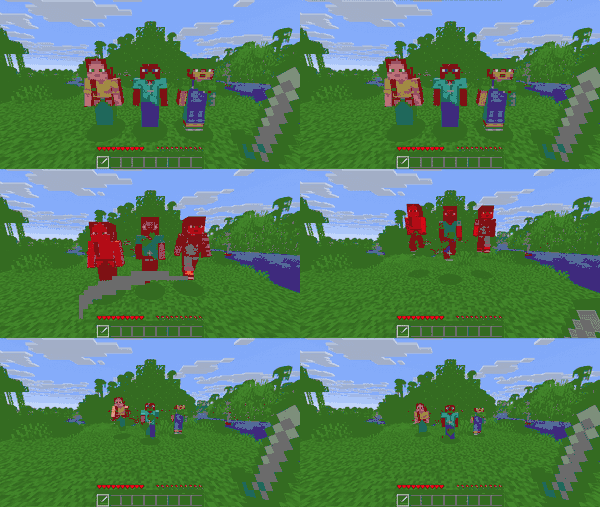
Swords have the exclusive ability to do sweep attacks, which damage nearby entities with a gale particle.
A sweep attack occurs only if all of the following conditions are met:
- The attack cooldown is at 84.8% or above.
- The player is not performing a critical hit.
- The player is not performing a sprint-knockback attack.
- The player is on the ground, meaning they must be standing on any solid surface.
- The player's main-hand weapon is a sword.
- The player's melee attack is successful.
- The difference in movement distance between the current game tick and the previous tick does not exceed the
movement_speedattribute value (default: 0.1 blocks per tick, or 2 blocks per second).
The range of a sweep attack is determined by both the attacked entity and the player's position. Based on the attacked entity's collision box, the range extends 1 block horizontally in all directions and 0.25 blocks vertically both up and down. All entities within 3 blocks of the player (excluding the attacking player themselves, the primary attacked entity, and armor stands with the [Boolean] Marker tag set to true) will be affected by the sweep attack.
By default, a sweep attack deals 1HP damage. However, this damage can be increased using the Sweeping Damage Ratio attribute. If the calculated value of sweeping_damage_ratio is r, and the sum of base melee attack damage and additional attack damage is d, the sweep attack damage is calculated as .
Sweeping damage ratio
The Sweeping Edge enchantment increases the sweeping damage ratio attribute, which increases the damage of the sweep attack damage to entities close to the attacked entity, but not the attacked entity itself. If the level of Sweeping Edge is n, then the Sweeping Damage Ratio increases by . By default, Sweeping Edge I, II, and III increase sweep attack damage by 50%, 67%, and 75% of the base melee attack damage plus additional attack damage, respectively.
Similar to melee attacks, sweep attacks also apply knockback. However, knockback from sweep attacks is not affected by the knockback enchantment or sprinting. If the affected entity has 0 knockback resistance, the sweep attack applies a knockback speed of 0.4 blocks per tick.
Crushing blow
Axes have the special ability to do crushing blows[1], which disable the use of all the target's shields for 5 seconds. Crushing blows are triggered only against targets that are actively holding their shield up, and do not trigger against targets whose shields are not yet past their 250ms activation delay. Crushing blows are triggered regardless of attack cooldown percentage and, unlike sweep attacks, they can be triggered at the same time as critical hits and sprint-knockback attacks.
Smash attack

Maces have the special ability to do smash attacks, which cause extra damage depending on how many blocks were fallen prior to attacking. Connecting a smash attack clears all fall damage that was accumulated prior to the attack. Like crushing blows, smash attacks are triggered regardless of attack cooldown percentage, and can be triggered at the same time as critical hits and sprint-knockback attacks. The damage of smash attacks is increased by the Density enchantment, and smash attacks trigger the Wind Burst enchantment.
Jab attack
Spears have the special ability to do jab attacks, which have 4.5 blocks of reach rather than the typical 3 blocks, can hit multiple entities with a single attack, and inflate the hitboxes of targets by 0.125 making attacks easier to land. Jab attacks have a minimum reach requirement however, where they cannot connect hits if the target is within 2 blocks or less of the user. Jab attacks have a forced cooldown effect that cannot be bypassed:
- In Java Edition, they use a variant of the attack cooldown where attacking is not possible until 100% charge, unlike other weapons.
- In Bedrock Edition, they instead have a use cooldown like that of an ender pearl, creating a similar forced-cooldown effect. The use cooldown triggers for all spear tiers in the inventory, not only the tier that was jabbed with.
A spear can still perform a charge attack while the jab attack is on cooldown, and thus by alternating between jab attacks and charge attacks the rate of attacks can be effectively doubled. Attacking with a jab attack and then following it up with a charge attack causes the charge attack to do less damage depending on the attack cooldown percentage of the prior jab attack.
Charge attack
Spears have the special ability to do charge attacks by holding the use button, which deal extra damage depending on the velocity of the user and the target. Like jab attacks, charge attacks have a 4.5 block attack reach, 0.125 hitbox inflation, and the 2 block minimum reach requirement, but do not have any sort of cooldown. Charge attacks can hit multiple entities, but only once for each entity.
Charge attacks can still deal damage while the user is standing still, if the target is moving towards the user. The damage done by the charge attack is its damage multiplier multiplied by the velocity of the attacker relative to the target in blocks per second. Charge attacks go through three stages when held out, and the tier of the spear influences the behavior of its charge attacks:
- Engaged
- Tired
- The second state of a charge attack, indicated by the spear rotating sideways and shaking.
- The attack deals damage and inflicts knockback.
- Disengaged
- The final state of a charge attack, indicated by the spear being lowered down to the bottom of the screen.
- The attack only deals damage.
Attack resolution and attack failure
When performing a melee attack, the game first calculates the attack damage the attacker can deal, then applies damage to the attacked entity and attempts to disable the shield. After damage is dealt, it calculates knockback, sweep attack[Java Edition only], and Fire Aspect, processes the Thorns enchantment's reflected damage, applies Slowness effect by the Bane of Arthropods to arthropods, and may generate critical hit particles. Finally, the player's exhaustion increases by 0.1 per successful melee attack.
Melee attacks can fail, and failed melee attacks do not deal damage.
- If an entity's base melee attack damage is 0HP
.png) and enchanted attack damage is 0HP, the melee attack always fails, making no sound and triggering no damage event. This also prevents players from damaging End crystals and armor stands with melee attacks in such cases.
and enchanted attack damage is 0HP, the melee attack always fails, making no sound and triggering no damage event. This also prevents players from damaging End crystals and armor stands with melee attacks in such cases. - If an entity can deal more than 0HP damage but the attacked entity is immune to this damage or is in a dying state, the melee attack fails, producing a special sound different from a successful melee attack.
- If an entity's attack damage is not greater than the last damage of the attacked entity's damage immunity, the melee attack fails, producing a distinct sound.
- In all other cases, a melee attack is considered successful, even if the damage is completely negated by the target's defense or damage immunity.
A failed melee attack does not consume item durability, does not apply knockback, sweep attack[Java Edition only], fire aspect, or shield disabling, and does not generate critical hit particles or increase the player's exhaustion.
Sounds
| Sounds | ||||||||
|---|---|---|---|---|---|---|---|---|
| Sound | Subtitles | Source | Description | Resource location | Translation key | Volume | Pitch | Attenuation distance |
| Strong attack | Players | When a player deals an attack that does not trigger any other attack sounds | entity | subtitles | varies [sound 1] | 1.0 | 16 | |
| Critical attack | Players | When a player deals a critical hit | entity | subtitles | 0.7 | 1.0 | 16 | |
| Knockback attack | Players | When a player deals a sprinting attack | entity | subtitles | 0.7 | 1.0 | 16 | |
| Sweeping attack | Players | When a player deals a sweep attack | entity | subtitles | 0.7 | 1.0 | 16 | |
| Weak attack | Players | When a player deals an attack with no damage | entity | subtitles | 0.7 | 1.0 | 16 | |
| Weak attack | Players | When a player attempts to attack without sufficient cooldown | entity | subtitles | 0.7 | 1.0 | 16 | |
- ↑ 0.6 for
strong1throughstrong4, and 0.7 forstrong5andstrong6
| Sounds | |||||
|---|---|---|---|---|---|
| Sound | Source | Description | Resource location | Volume | Pitch |
| Players | When a player dies | entity | 0.5 | 0.9-1.0 | |
| Players | When a player is damaged from a generic source | entity | varies [sound 1] | 0.8-1.2 | |
- ↑ Can be 0.5, 1.0, or 1.5
History
Java Edition
| Java Edition Classic | |||||||
|---|---|---|---|---|---|---|---|
| 0.24_SURVIVAL_TEST | Added the attack knockback mechanic. | ||||||
| Java Edition Beta | |||||||
| 1.5 | The player's base attack damage increased from 1HP to 2HP. | ||||||
| 1.8 | ? | The player's base attack damage decreased from 2HP to 1HP. | |||||
| Pre-release | Added the critical hit mechanic, which currently adds a random amount of damage using the formula and is calculated after enchantments are added. | ||||||
| Added the sprint-knockback attack mechanic. | |||||||
| Java Edition | |||||||
| ? | Melee attacks now fail if the attack damage does not exceed the target's last damage immunity threshold. | ||||||
| ? | Critical hits now add a flat 50% extra damage, replacing their previous damage formula, and they're now calculated before enchantments are added.[is this the correct version?] | ||||||
| 1.9 | 15w34b | Added the attack speed mechanic. | |||||
| 15w34c | Critical hits and sprint-knockback attacks now require an attack cooldown percentage of 84.8% or greater | ||||||
| Critical hits and sprint-knockback attacks can no longer be activated simultaniously, and instead the sprint-knockback attack takes priority. | |||||||
| Added the sweep attack mechanic for swords, which currently only deals knockback and requires the player to be standing still or be sneaking. | |||||||
| Added the crushing blow mechanic for axes, which is currently affected by random chance, with its likelihood of activation increased by Efficiency level and whether or not the user is sprinting. | |||||||
| 15w41a | Sweep attacks no longer require the player to be standing still or be sneaking. | ||||||
| 15w47b | Critical hits, sprint-knockback attacks, and sweep attacks now all have unique sound effects. | ||||||
| 15w49a | Sweep attacks now deal 1HP damage to entities. | ||||||
| 1.11 | 16w35a | Crushing blows are no longer affected by random chance, instead always activating 100% of the time, and thus the chance is no longer increased by Efficiency level and whether or not the user is sprinting. | |||||
| 1.15.2 | Pre-Release 1 | Removed an extra pixel from the bottom right corner of the critical hit particle texture. | |||||
| 1.20.2 | 23w33a | Changed the way melee attack reach is calculated for entities. | |||||
| 1.20.5 Experiment | 24w11a | Added the smash attack mechanic for maces, which currently adds 3HP for each block fallen. | |||||
| 1.21 | 24w18a | Sweep attack damage is now calculated based on base melee damage and additional damage rather than total melee attack damage. | |||||
| Smash attacks now add 4HP for the first 3 blocks fallen, 2HP for the next 5 blocks fallen, and 1HP for all subsequent blocks fallen, replacing their previous formula. | |||||||
| 1.21.11 | 25w41a | Added the jab attack and charge attack mechanics for spears. | |||||
| 25w42a | Charge attacks now have a delay for connecting repeatedly against a single entity, at 0.5 seconds (10 ticks). | ||||||
| Both jab and charge attacks no longer hit through solid blocks, but can still attack through non-solid blocks like cobwebs and tall grass. | |||||||
| 25w43a | The base damage of charge attacks has been increased from 0HP to 1HP, making it so charge attacks always deal at least 1HP damage.[note 1] This also increases the damage of all charge attacks by 1HP.
| ||||||
| Charge attacks now show a visual recoil animation in 1st person when successfully connecting. | |||||||
| 25w45a | The hitbox inflation on spear attacks that made attacks easier to land has been reduced from 0.25 to 0.125.
| ||||||
| Charge attacks are now affected by the attack cooldown of the jab attack. This makes it so attacking with a jab attack and then following it up with a charge attack causes the charge attack to do less damage depending on the recharge percentage of the jab attack. | |||||||
Bedrock Edition
| Bedrock Edition | |||||||
|---|---|---|---|---|---|---|---|
| 1.18.30 | beta 1.18.30.20 | Reduced unarmed damage from 2HP to 1HP to match Java Edition. | |||||
| 1.20.50 | Preview 1.20.50.22 | Changed the way melee attack reach is calculated for entities. | |||||
References
- ↑ "Minecraft 1.9 - Combat Update" (Archive) by Searge – Mojang.com, February 29, 2016.
Notes
- ↑ The extra 1 damage comes specifically from the bare hand fist damage now being added to charge attacks.
| General mechanics | |
|---|---|
| Technical mechanics | |
| Survival |
|
| Combat | |
| Environment |
More |
| Movement | |
| User interface | |
| Visuals | |
| Removed | |
| Unintended | |


.png)


.png)


