Add-on

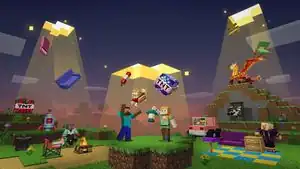
An add-on is a package format and a type of downloadable content which provides additional custom game features beyond the base game in Bedrock Edition. It contains a set of programming interfaces used for constructing and customizing certain game objects and elements, such as entity, block, item, biome, structure, user interface, and more. It's officially supported by Mojang Studios, which provide the Creator Documentation for developers.
Add-ons consist of three main APIs: a resource pack for managing assets and resources, a behavior pack for defining data-driven behaviors, and the Script API for writing a set of procedural instructions to perform custom behaviors and interactions. These functions and utilities are used for video game modding.
Add-ons are officially hosted on the Marketplace, where players can download or purchase them on their devices. They must be submitted by members in the Minecraft Partner Program and approved by the Minecraft Content Team.
Overview
Packs
Add-ons can be created with two types of data packs: behavior packs and resource packs. Behavior packs can be used to change gameplay and allow adding and customizing entity behaviors,[1] loot tables,[2] spawn rules,[3] item behaviors,[4] item recipes,[5] biome characteristics,[6] and much more. Resource packs affect how the game looks and has no effect on gameplay, and they allow adding and customizing textures, models, music, texts, and interfaces.
Definitions are written in JSON files, which are organized in multiple folders by their features. This system allows users to override and modify certain features in the base game, or add unique features with their own pack.
All contents of an add-on can be packaged together in a zipped .mcaddon file. An add-on file can be automatically imported by the game, which will organize all contents in the dedicated directories in com.mojang.
Sub-packs
Resource packs and behavior packs can contain other packs inside the root, known as sub-packs.[7] A sub-pack has the same format as the main pack and the directory of a sub-pack can have any name. Sub-packs need to be specified in the manifest.json file of the main pack, where a name and minimum memory tier can also be added. For example, a pack can have multiple less resource-intensive sub-packs for lower memory tiers, but it can also be used for other types of settings. The memory tier, affecting which sub-pack is used, can be adjusted in the pack's settings menu in-game.
Molang
Molang is a simple expression-based language designed for fast, data-driven calculation of values at run-time, and with a direct connection to in-game values and systems. It is used in Bedrock Edition in their add-on system with its purpose being enabling low-level systems like animation to support flexible data-driven behavior for both internal and external creators, while staying highly performant.[8]
Scripting
Scripting is an add-on feature used to write a set of procedural instructions for the game to perform custom behaviors and interactions. Compared to preset components and definitions provided by the game, users may control behaviors of entities, blocks, and items; characteristics of the world; or an entire game loop.[9]
Script files are written in the JavaScript programming language and loaded by the game under the scripts directory inside an add-on. Users may use TypeScript tooling which provide better error reporting and static type system.[9][10] The Script API provides multiple modules for users to interact with the game, each module must be added as a dependency in the manifest.json, some notable ones are:[11]
@minecraft/common– provides common resources, such as error classes or interfaces.@minecraft/server– provides interactions between the script engine and the game world, such as blocks, entities, items, players, and others.@minecraft/server-ui– provides players and server communication through customizable forms.@minecraft/server-net– provides access to the Internet through web requests, such as GET, POST, and others.@minecraft/server-gametest– provides the GameTest framework for testing behaviors and interactions within the game world. See GameTest § Bedrock Edition for further information.- And other modules, further reading.
The Script API also provide interfaces to define custom components, may change based on Scripting API v2.0.0;[12] with the upcoming API, they can also be used to define custom commands.[13]
Marketplace
The Marketplace is an in-game platform where creators may sell their add-ons to the player base. All Marketplace content must be submitted by members in the Minecraft Partner Program and approved by the Minecraft Content Team. A purchased content in the Marketplace is synchronized to the player's Microsoft account, and if they are not signed in, it is saved locally on their device.
Add-ons are usually added to the Marketplace every Tuesday (originally Wednesday), although occasionally appearing on other days. Free add-ons are released as part of special events, for occasions such as to promote the release of A Minecraft Movie for Minecraft's 15 Years celebration and the eventful McDonald's X A Minecraft Movie promotion.
In addition to the Marketplace, there are community websites dedicated to hosting community-made add-ons, although such add-ons may only be loaded on PCs and phones, whereas consoles can only access those add-ons through Realms.
History
Add-on was hinted at in a post by Searge on August 12, 2016, stating "There will be news about the API at Minecon."[14] The next day it was confirmed by Grum to be a modding API for Bedrock Edition (formerly called Pocket Edition, or MCPE),[15] and at MINECON 2016, the plan and roadmap for the development of add-ons were outlined.
Extra loading tips that appear when a world has add-ons applied have been added since Bedrock Edition Preview 1.20.70.21. By Bedrock Edition Preview 1.21.0.23, eight more of them were introduced which replaced the one from 1.20.70.21.
Previously, standalone add-ons from the Marketplace were not available, and needed to be packaged with a world to be sold on the Marketplace. However, as of February 2024, individual add-ons can now be sold separately on the Marketplace.[16]
Loading tips
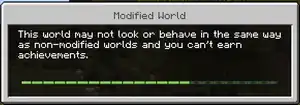
Extra loading tip messages would appear if the player is loading a world with add-ons applied. The loading message box is titled "Modified World", and loading tip messages would primarily warn the player about the add-ons or resource packs applied. Here's the list of add-on applied loading tips:
| # | In-game text | Version added |
|---|---|---|
| 1 | You're playing in a world with Add-Ons! This will add new features to your Minecraft world. | Preview 1.21.0.23 |
| 2 | Don't stop with just one! You can load multiple Add-Ons onto a single world at once. | |
| 3 | Advanced Tip: A Resource Pack can change the textures of different blocks and entities. | |
| 4 | Advanced Tip: A Behavior Pack can change how different items, entities, or blocks work. | |
| 5 | Advanced Tip: An Add-On includes both a Behavior Pack and a Resource Pack. Make sure both packs are activated to ensure the Add-On works! | |
| 6 | Add-Ons add new blocks, items, or mobs to your worlds. | |
| 7 | Worlds and Add-ons are complex! While some work great together, you might get funky results with others. | |
| 8 | More Add-Ons mean more fun, but the game might take longer to load. |
Videos
Tutorials from the official Minecraft Creator Channel
Quotes

Within Minecraft, there are so many ways to be creative and build the worlds of your dreams. But when you want to extend Minecraft even further and introduce new mobs, items and other artifacts into your world, you’ll want to go to the next level of creation by building new Add-On packs that can transform Minecraft.
Gallery
-
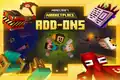 Promotional artwork released alongside the Change your game, your way! cinematic trailer.
 -
![Render of a "Cake Golem" add-on.[18]](./_assets_/5af80496508534f4cdd561aac15bbc50/Patrick-rodes-cake-golem.jpg) Render of a "Cake Golem" add-on.[18]
Render of a "Cake Golem" add-on.[18] -
![Artwork of a motorcycle add-on.[19]](./_assets_/5af80496508534f4cdd561aac15bbc50/Patrick-rodes-render-motorcycle-2.jpg) Artwork of a motorcycle add-on.[19]
Artwork of a motorcycle add-on.[19] -
Animation of the Merchant from the Lush Bath Bomb Add-On.[20]
-
 Promotional image for achievement compatibility with add-ons.
See also
References
- ↑ "Entity Behavior Introduction" – Microsoft Learn, September 19, 2023.
- ↑ "Introduction to Loot Tables" – Microsoft Learn, March 6, 2025.
- ↑ "Data-Driven Spawn Rules" – Microsoft Learn, November 8, 2023.
- ↑ "Custom Items" – Microsoft Learn, September 18, 2024.
- ↑ "Recipe Introduction" – Microsoft Learn, April 19, 2024.
- ↑ "Biome JSON and Overview" – Microsoft Learn, April 10, 2025.
- ↑ "Building Sub-Packs" – Microsoft Learn, August 28, 2025.
- ↑ "Molang Documentation - Introduction to Molang"
- ↑ a b "Introduction to Scripting in Minecraft" – Microsoft Learn, April 17, 2025.
- ↑ "TypeScript for JavaScript Programmers" – TypeScript, June 2, 2025.
- ↑ "API Modules" – Bedrock Wiki, June 8, 2025.
- ↑ "Introducing Custom Components" – Microsoft Learn, March 27, 2025.
- ↑ "Scripting Custom Commands Overview" – Microsoft Learn, March 27, 2025.
- ↑ "There will be news about the API at Minecon. I'll talk about the things I'm working on and what our plans are. But no more details for now." – @SeargeDP (Michael Stoyke) on X (formerly Twitter), August 12, 2016
- ↑ "the MCPE on, would be nice to say that too." – @_grum (Erik Broes) on X (formerly Twitter), August 13, 2016
- ↑ "Introducing add-ons" by Linn Viberg – Minecraft.net, February 20, 2024.
- ↑ "Building your first custom mobs and add-ons for Minecraft" by Mike Ammerlaan – Minecraft.net, September 11, 2021.
- ↑ "Cake Golem Blockbench Tutorial" by Patrick Rodes – ArtStation, July 15, 2024.
- ↑ "Animation Presets Blockbench Tutorial" by Patrick Rodes – ArtStation, July 15, 2024.
- ↑ "It was 1. Great work, everyone 👍" – @Minecraft (Minecraft) on X (formerly Twitter), August 12, 2024
External links
Official documentation
- Addons JSON Documentation
- Animation JSON Documentation
- Biome Documentation
- Block JSON Documentation
- Entity JSON Documentation
- Features JSON Documentation
- Item JSON Documentation
- Molang Documentation
- Recipe JSON Documentation
- Particle JSON Documentation
- Schema Documentation
- Script API Documentation
Official tutorials
- Getting Started With Minecraft Add-Ons
- Introduction to Resource Packs
- Introduction to Behavior Packs
- Getting Started with the Minecraft Entity Wizard
- Getting Started with the Minecraft Item Wizard
- Getting Started with the Minecraft Block Wizard
Tools and libraries
Unofficial resources
Templates
Resource and Behavior Example Packs
Script API Example Packs
| Events | ||
|---|---|---|
| Promotional |
| |
| Samples | ||
| China Edition |
|
|
| Other | ||


| General mechanics | |
|---|---|
| Technical mechanics | |
| Survival |
|
| Combat | |
| Environment |
More |
| Movement | |
| User interface | |
| Visuals | |
| Removed | |
| Unintended | |


.png)

.png)


.png)


.png)


| Editions |
| ||||||
|---|---|---|---|---|---|---|---|
| Development |
| ||||||
| Technical |
| ||||||
| Multiplayer | |||||||
| Exclusive features |
| ||||||
| Removed | |||||||











.png)


.png)
| Official | |
|---|---|
| By Minecraft Wiki |
|
| Add-ons (BE) | |