Tooltip
A tooltip is extra information that appears when hovering over or focusing on certain elements in the user interfaces, or when switching the held item.
Types of tooltips
Item tooltips
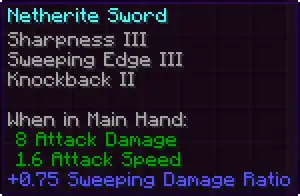
When hovering over an item with the cursor while in the inventory or a container screen, a tooltip with the item’s name appears next to the cursor. When playing with touch controls, tapping an item displays its tooltip on the bottom of the screen. Some items display extra information on their tooltips, such as enchantments and shulker box contents. In Java Edition, basic item tooltips are also visible in the "Items" section of the statistics menu when hovering over a block or item on the left side of the screen.
In Java Edition, advanced tooltips, including item IDs and the exact remaining durability of tools, can be displayed by pressing the debug hotkey F3 + H.
Description of item tooltip lines

The table below describes all possible tooltip lines, including these shown when advanced tooltips are enabled. Note that table preserves the order of these lines too.
In "Content" column, cells with yellow background means the exact text displayed. Additionally, cells marked "[...]" means that this field has variable lines count.
| Order | Content | Description | Common information |
|---|---|---|---|
| 0 | Item name | The item name. Some data components are able to alter the default item name (note that minecraft:custom_name component has highest priority and overrides any other alterations).
|
Item name |
| 1 | Can hold a mixed stack of items | Graphical representation of the bundle's contents and it's fullness bar. Shown only on bundle items. If bundle is empty, the description text will be printed, otherwise bundle contents stored in minecraft:bundle_contents will be shown.This is the only case where information is presented in other form than text. |
Yes |
| Bundle contents | |||
| Bundle fullness bar | |||
| 2 | Creative inventory section | Section name to which the item belongs. Shown when player is in Creative mode, and only in Search Items, Survival Inventory and Saved Hotbars tabs. Note that in most cases this text will not appear if item has additional data components [verify]. |
Yes |
| 3 | Smithing Template | Description of smithing template, shown only on smithing template items. | Yes |
| <empty space> | |||
| Applies to: | |||
| Applicable items | |||
| Ingredients: | |||
| Ingredients | |||
| 4 | Painting's name | Painting description, shown when item ID is minecraft:painting and have valid minecraft:painting/variant component.
|
Yes |
| Painting's author | |||
| Painting's dimensions | |||
| 5 | Tropical fish's pattern | The pattern of tropical fish, defined by minecraft:tropical_fish/pattern component.
|
Yes |
| Tropical fish's base and pattern color | The base and pattern colors of tropical fish, defined by minecraft:tropical_fish/base_color and minecraft:tropical_fish/pattern_color components.
|
Yes | |
| 6 | Goat horn's instrument | Goat Horn instrument, defined by minecraft:instrument component.
|
Yes |
| 7 | Unknown Map | Shown when item has minecraft:map_id component pointing to a unknown map.
|
Yes |
| Map ID | Shown when item has valid minecraft:map_id component.
|
Yes | |
| Locked | This line appears only if map with specified ID is locked. See this article for more information. |
Yes | |
| Map scaling | Additional information about map scaling and level. | No | |
| Map level | |||
| 8 | Number of bees | The number of bees (entities) hiding inside, defined by minecraft:bees component. Displayed naturally on beehives and bee nests.
|
Yes |
| 9 | ??????? [sic] | Indicates that this item has minecraft:container_loot component.
|
Yes |
| 10 | 1st item name + amount | Item names "held" in first five slots of this item, defined by minecraft:container component.When item count is 6 or higher, the line with remaining items will be shown. |
Yes |
| 2nd item name + amount | |||
| 3rd item name + amount | |||
| 4th item name + amount | |||
| 5th item name + amount | |||
| Count of the rest items (not their total amount) | |||
| 11 | 1st banner pattern | Six first banner patterns, defined by minecraft:banner_patterns component.Note that banners with more than 6 patterns are uncraftable, and can be obtained only with commands. |
Yes |
| 2nd banner pattern | |||
| 3rd banner pattern | |||
| 4th banner pattern | |||
| 5th banner pattern | |||
| 6th banner pattern | |||
| 12 | <empty space> | Materials used to craft this decorated pot, defined by minecraft:pot_decorations component.
|
Yes |
| Front side material | |||
| Left side material | |||
| Right side material | |||
| Rear side material | |||
| 13 | Book's author | Shown when minecraft:written_book_content component is present. Meant for written books.
|
Yes |
| Book's generation | |||
| 14 | Projectile name | A section describing charged projectile, defined by minecraft:charged_projectiles component. Meant to be used with crossbows.Note that this section may appear multiple times, if the item contains multiple projectiles loaded. |
Yes |
| Projectile's tooltip lines [note 1] [...] | |||
| 15 | Flight duration | Shown when item has flight_duration tag in minecraft:fireworks component.
|
Yes |
| Firework effects [...] |
All firework effects applied with firework stars. | Yes | |
| 16 | No Effects | Shown when item has minecraft:potion_contents component, but is empty.
|
Yes |
| Effect name | A single primary effect to be applied. Shown when item has filled potion tag in minecraft:potion_contents component.
|
Yes | |
| Custom effects [...] |
List of custom effects to be applied. Shown when item has entries in custom_effects list in minecraft:potion_contents component.
|
Yes | |
| <empty space> | A section describing how item will affect on player's attributes when consumed. | Yes | |
| When Applied: | |||
| Attributes [...] | |||
| 17 | Music disc name | Shown when item has minecraft:jukebox_playable component with valid value.
|
Yes |
| 18 | Upgrade: | Armor trim upgrade, defined by minecraft:trim component.
|
Yes |
| Trim pattern | |||
| Trim material | |||
| 19 | Stored enchantments [...] |
Enchantments stored in minecraft:stored_enchantments component. Meant to be used for enchanted books.
|
Yes |
| 20 | Applied enchantments [...] |
Enchantments applied on this item, stored in minecraft:enchantments component.
|
Yes |
| 21 | Dyed | Shown when item has minecraft:dyed_color component.
|
Yes |
| Color | A hexadecimal color code. Replaces text above, if advanced tooltips are enabled. | No | |
| 22 | Lore [...] |
Custom text shown in tooltip, defined by minecraft:lore component.By default it has "dark_purple" color and is italicized.
|
Yes |
| 23 | <empty space> | Attribute modifiers applied when this item is held or equipped, defined in minecraft:attribute_modifiers component.Note that this section may appear multiple times, if the component above contains many modifiers with different slot tags.
|
Yes |
| "When (...)" field [note 2] | |||
| Attributes [...] | |||
| 24 | Unbreakable | Shown when item is unbreakable, using minecraft:unbreakable component.
|
Yes |
| 25 [note 3] | No Effects | Shown when item has minecraft:suspicious_stew_effects component, but is empty.
|
Yes |
| Effects [...] |
List of effects passed in minecraft:suspicious_stew_effects list.
|
Yes | |
| <empty space> | A section describing how item will affect on player's attributes when consumed. | Yes | |
| When Applied: | |||
| Attributes [...] | |||
| 26 | Honey amount | Shown when item has honey_level tag in minecraft:block_state component. Displayed naturally on beehives and bee nests.
|
Yes |
| 27 | Disabled in Peaceful | Shown in Peaceful mode when item has id tag in minecraft:entity_data component, pointing to a mob which is not allowed in Peaceful.See this article for more information. |
Yes |
| 28 | <empty space> | Shown when item ID is minecraft:spawner or minecraft:trial_spawner.
|
Yes |
| Interact with Spawn Egg: | |||
| Sets mob type | |||
| Spawner entity name | Shown when item ID is minecraft:spawner or minecraft:trial_spawner and has SpawnData or spawn_data tag respectively in minecraft:block_entity_data component.
|
Yes | |
| 29 | <empty space> | Shows a list of blocks defined in minecraft:can_break component that can be mined with this item.
|
Yes |
| Can break: | |||
| Block names [...] | |||
| 30 | <empty space> | Shows a list of blocks defined in minecraft:can_place_on component on which this block can be placed.
|
Yes |
| Can be placed on: | |||
| Block names [...] | |||
| 31 | Durability | Remaining and total durability of the tool item. Hidden if item contains minecraft:unbreakable component.
|
No |
| 32 | Item ID | Internal item ID. | No |
| 33 | Number of components | Total number of data components. | No |
| 34 | Warning: | Usage warning, shown on block items with id tag in minecraft:block_entity_data component.This is the only section that cannot be hidden using minecraft:tooltip_display component.
|
Yes |
| Use of this item might lead to command execution | |||
| Do not use unless you know the exact contents! |
Held item tooltips
When switching the item being held, the name of the item appears above the hotbar. In Bedrock Edition, held item tooltips also show enchantments and shulker box contents. In Java Edition, the “Notification Time” option affects how long this type of tooltip appears on-screen.
Effect tooltips

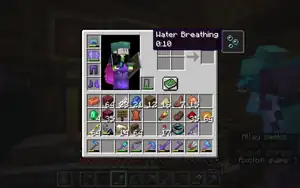
When effects in the inventory are displayed in the compact style, hovering over an effect icon displays more information about that effect.
Option tooltips
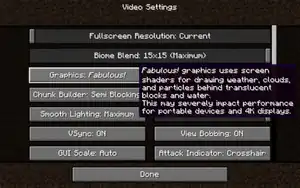
When certain buttons, text fields, and sliders are hovered over, or focused on when navigating with Tab ↹, they show a description in the form of a tooltip. The “Key Binds” options menu also has tooltips to provide details on conflicts between keys.
History
| Java Edition Beta | |||||||
|---|---|---|---|---|---|---|---|
| 1.0 | Added item tooltips. | ||||||
| 1.5 | Added statistics, which use tooltips in the "Blocks" and "Items" sections. | ||||||
| Java Edition | |||||||
| 1.0.0 | Beta 1.9 Prerelease 2 | Item tooltips now have an outline and rounded corners. | |||||
| Added potions, which display effect information on their tooltip. | |||||||
| Beta 1.9 Prerelease 3 | Added enchantments. Enchanted items show their enchantments on their tooltip, as well as some text reading “Enchanted!” | ||||||
| Beta 1.9 Prerelease 4 | The “Enchanted!” text has been removed from enchanted item tooltips. | ||||||
| 1.4.2 | 12w34a | F3 + H now shows advanced tooltips. | |||||
| 12w41a | Advanced tooltips now display tool and armor durability, and map zoom levels. | ||||||
| 1.4.6 | 12w50a | Added held item tooltips. | |||||
| 1.6.1 | 13w21a | Attributes now display on item tooltips. | |||||
| 1.11 | 16w39a | Added shulker boxes, which list their contents on their item tooltip. | |||||
| 1.13.1 | 18w33a | Tropical fish buckets now display the type of fish they are holding on their tooltip. | |||||
| 1.14 | 18w43c | Added crossbows, which show what projectile is loaded on their tooltip when in that state. | |||||
| ? | ? | Added option tooltips. | |||||
| 1.17 | 20w45a | Added bundles, which list their contents on their item tooltip. | |||||
| 20w46a | Changed how bundles display their contents on their tooltip. | ||||||
| 1.18 | 21w39a | Added effect tooltips, which appear when the compact style is used for displaying effects in the inventory. | |||||
| 1.19 | 22w17a | Added goat horns, which display the variant name on their tooltips. | |||||
| 1.19.1 | Pre-release 3 | Tooltips can no longer become offset.[1] | |||||
| 1.19.3 | 22w42a | Long tooltips no longer get cut off at the edge of the screen.[2] | |||||
| 22w44a | Monster spawner tooltips now display the name of the mob that it spawns. If the spawner’s mob spawn type has not been set, it instead shows information on how to do so. | ||||||
| Pre-release 2 | Tooltips now appear when navigating through menus with Tab ↹. | ||||||
| 1.19.4 | 23w03a | Added the “Notification Display Time” option, which affects how long held item tooltips appear onscreen. | |||||
| 23w05a | Adjusted the positioning of option tooltips to avoid covering the button being hovered over. | ||||||
| 23w06a | Option tooltips are now used in the key binds options menu to provide details on conflicts between keys. | ||||||
| Paintings now have special tooltips in the creative inventory. | |||||||
| Pre-release 2 | Hovering over the world name field on the world creation screen now displays a tooltip that shows the name of the folder in which the world is saved. | ||||||
| 1.19.4 Experiment | 23w04a | Tooltips for trimmed armor now show the trim material and variant name. | |||||
| Added smithing templates, which show their type, what items they can be used on, and what materials can be used with them on their tooltip. | |||||||
| 1.20 | 23w17a | Tooltips for decorated pots with pottery sherds now list the ingredients used to craft them. | |||||
| 1.20.2 | 23w31a | Updated the design of the tooltips in the statistics screen.[3] | |||||
| 1.20.5 | 24w10a | No longer appears when hovering outside the containing element. | |||||
| 1.21 | 24w18a | Enchanted items and potions now show more attributes on their tooltips. | |||||
| 1.21.2 Experiment | 24w33a | Bundle tooltips have been changed again; they now feature a fullness meter and the item slots no longer have backgrounds. | |||||
| It is now possible to scroll to select items in a bundle while the tooltip is displayed. | |||||||
| 1.21.2 | 24w33a | Smithing template tooltips have been changed; the variant’s name and “Smithing Template” have switched places. | |||||
| Banner patterns now specify which variant they are in their name instead of a subtitle. | |||||||
| 24w35a | Tooltips for bee nests and beehives now show the amount of bees and honey inside on their tooltips. | ||||||
| 24w36a | Data packs now support custom tooltip window designs. | ||||||
| 1.21.5 | 25w04a | Crossbows will now show all charged projectiles in their tooltip instead of just the first. | |||||
| 25w06a | Tooltips for fireworks and crossbows now show a compact form of multiple repeated stars or projectiles that are identical. | ||||||
| Pocket Edition Alpha | |||||||
| v0.5.0 | Added item tooltips. | ||||||
| Pocket Edition | |||||||
| 1.1.0 | alpha 1.1.0.0 | Added shulker boxes, which list their contents on their tooltip. | |||||
| Bedrock Edition | |||||||
| 1.16.0 | beta 1.16.0.63 | Held item tooltips now have a background. | |||||
| 1.20.10 | Preview 1.20.10.20 | Decorated pots crafted with at least one pottery sherd now list their crafting ingredients on their tooltip. | |||||
| 1.21.111 | Preview 1.21.110.22 | Added Armor and Armor Toughness values to vanilla armor tooltips, not working with add-on armors. | |||||
| Legacy Console Edition | |||||||
| Xbox 360 | Xbox One | PS3 | PS4 | PS Vita | Wii U | Switch | |
| TU1 | CU1 | 1.00 | 1.00 | 1.00 | Patch 1 | 1.0.1 | Added item tooltips. |
| TU3 | Changed the tooltip display setting to in-game tooltip display, so that tooltips always display in menus. | ||||||
| TU7 | Added potions, which display effect information on their tooltip. | ||||||
| Added enchantments. Enchanted items show their enchantments on their tooltip. | |||||||
| Added held item tooltips. | |||||||
| Added more descriptive tooltips for different types of tree-related blocks, silverfish blocks and stone bricks, a feature from Java Edition 1.3.1. | |||||||
| TU19 | CU7 | 1.12 | 1.12 | 1.12 | Attributes now display on item tooltips. | ||
| TU36 | CU25 | 1.28 | 1.28 | 1.28 | Patch 7 | Held item tooltips now show the rarity of the item and the first 3 rows of the item's lore. | |
| TU53 | CU43 | 1.49 | 1.50 | 1.49 | Patch 23 | 1.0.3 | Added shulker boxes, which list their contents on their tooltip. |
-
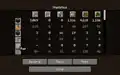 The old Java Edition item tooltip as seen in the statistics menu before 1.20.2.
Issues
Issues relating to "Tooltip" are maintained on the bug tracker. Issues should be reported and viewed there.
Gallery
Examples
-
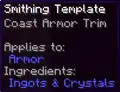 An example of a smithing template tooltip.
 -
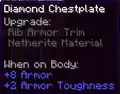 An example of a tooltip for a trimmed piece of armor.
 -
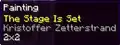 An example of a painting tooltip in the creative inventory in Java Edition.
 -
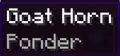 An example of a goat horn tooltip.
 -
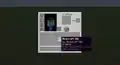 An example of a written book tooltip.
 -
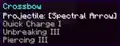 An example of a crossbow tooltip.
 -
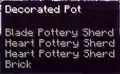 An example of a decorated pot tooltip.
 -
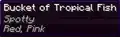 An example of a bucket of tropical fish tooltip in Java Edition.
 -
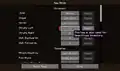 An example of a key bind conflict tooltip in Java Edition.
Notes
- ↑ Item name, bundle section, durability, item ID, number of components and usage warning are not visible there. Additionally, if item is dyed, "Dyed" will always be shown, even if advanced tooltips are enabled.
- ↑ Text in this field depends on the value of
slottag. - ↑ This section has been designed to be displayed only in Creative mode's item picker, meaning that it is not shown when item is located in player's hotbar, nor in Creative Inventory.
However, they are still visible in Saved Hotbars section, which may be more useful way to preview them than using/datacommand.
References
| General mechanics | |
|---|---|
| Technical mechanics | |
| Survival |
|
| Combat | |
| Environment |
More |
| Movement | |
| User interface | |
| Visuals | |
| Removed | |
| Unintended | |


.png)

.png)


.png)


.png)


