Bedrock Edition unused features

Since the beginning of Minecraft's development, there have been a number of features added to the game that have little to no actual use. Some of these features are leftovers from removed features, or simply placeholders for new features in future updates. Because Bedrock Edition supports backwards-compatibility for add-ons, many outdated features or old versions of changed features are still in the game, but unobtainable through normal gameplay. See Bedrock Edition removed features for features that have been completely removed from the game.
Blocks

Deprecated anvil
_BE2.png)
Named "Anvil" in-game, the deprecated anvil is an unused variant of anvils using the side texture on the top. It is obtainable using /give @s anvil 1 12.
Purpur blocks
There are unused variants of the purpur block that have the same texture with a different name. They can be obtained only by using /give or inventory editing. These are:

tile.deprecated_purpur_block_2.name, presumably intended to be named smooth purpur, has a rotated version of the normal block's texture.
Lava in cauldron
Cauldrons can be used to store lava, but always filled by 3⁄3 level. However, using /setblock or /fill command with different data values can obtain a cauldron with 1⁄5 through 4⁄5 level filled by lava, which normally cannot happen due to the fact that dyeing leather armor and filling glass bottles is not possible with lava.
info_update
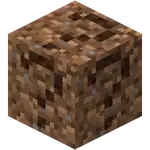
info_update and info_update2 are blocks that look like a dirt block with a "?" mark written on all sides. This is a placeholder for blocks with invalid IDs, such as blocks from newer versions than the world's version. The block can be obtained with inventory editing or glitches.
reserved6
reserved6 is a technical block used by the player's hotbar to refer to empty inventory slots. Its regular block/item form has never been obtainable without the use of glitches or inventory editing, but appears the same as info_update.
Unknown
Unknown is a normally unused block that generates in place where blocks have an invalid ID or invalid components in their behavior files. If the block has a unique model, it takes the shape of that model. It uses the same texture as info_update.
Chalkboard
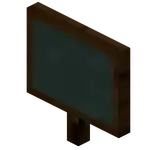
The chalkboard is a block used in Minecraft Education to display more text than a sign. Chalkboards have three variants: slate (1x1), poster (2x1), and board (3x2). Chalkboards are unobtainable in Bedrock Edition and use the unknown texture in both the inventory and as a block when obtained through glitches or inventory editing.
Nether Reactor Core

The functionality of the Nether Reactor was removed in Pocket Edition v0.12.1 alpha. However, the reactor core block still exists in-game and can be obtained through inventory editing or by retaining it from previous worlds before the update. It now drops its ingredients, and cannot be obtained through normal methods or with Silk Touch. Prior to v0.12.1, they were used to activate the nether reactor. Tapping on it would activate the reactor if built correctly. When the core is activated for the nether reactor structure, the cobblestone and the blocks of gold are both replaced with glowing obsidian and it makes an early Nether called nether spire.
Glowing obsidian
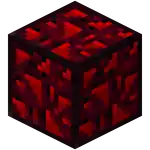
Glowing obsidian blocks were part of the now obsolete Nether reactor. It emits a soft red glow at light level 12, and drops a single obsidian when broken with a diamond pickaxe. It can be obtained only by using inventory editors or a Silk Touch enchanted pickaxe. As of 0.12.1, this block does not generate anymore. The block may still be obtained using inventory editors or by retaining it from previous worlds before the update.
Old stonecutter
_BE1.png)
Village & Pillage introduced the stonecutter with the model and texture similar to the Java Edition stonecutter, however, the new stonecutter does not replace the old stonecutter, as the old stonecutter was removed only from the creative inventory and commands. It is still available if the player already had it in a world prior to Village & Pillage or uses inventory editing.
Old wooden slab
Before normal wooden slabs were added, another type of wooden slab existed with stone characteristics. In current versions of Bedrock Edition, this slab can only be obtained via inventory editing, and its in-game name is simply "Wooden Slab".
Items
More explorer maps
Despite ocean explorer maps, woodland explorer, trial explorer, jungle explorer, swamp explorer, village, and buried treasure maps being the only explorer maps that can be obtained in game, other explorer maps actually exist in the game files, and can be obtained only via inventory editing. These maps being:
- Mineshaft explorer map: Shows the nearest mineshaft, for normal or badlands variant.
- Temple explorer map: Shows one of these structures if they are nearby:
- Desert pyramid
- Igloo
- Stronghold explorer map: Shows the nearest stronghold. This explorer map often leads the player to a village, because strongholds in Bedrock Edition have a high chance to generate underneath a village's well or meeting point. This can be an alternative way to find strongholds beside using an eye of ender.
- Ruins explorer map: Shows the nearest ocean ruins.
- Shipwreck explorer map: Shows the nearest shipwreck.
- Pillager outpost explorer map: Shows the nearest pillager outpost.
- Fortress explorer map: Shows the nearest Nether fortress. Unlike other explorer maps, this map uses the Nether map layout instead of the explorer map layout, which is a static gray color with a destination pointer that stays in one place but spinning wildly like the player pointer.
- End City Explorer Map: Shows the nearest end city. Unlike other explorer maps, this map uses the End map layout, instead of the explorer map layout.
These explorer maps, named "Unknown Map", have the same scale as the woodland and ocean explorer maps. However, when held, its name is changed to Map 0 and shows a green triangle (_BE1.png) ) to mark the destination structure.
These explorer maps have normal map textures but have the same layout as a woodland and ocean explorer maps, which are brown. They use stripes for bodies of water, and a sort of tan color for landmasses.
If the player obtains these unused explorer maps in an incorrect dimension, ex: obtaining a fortress explorer map in the Overworld causes the game to freeze and/or eventually crash.
) to mark the destination structure.
These explorer maps have normal map textures but have the same layout as a woodland and ocean explorer maps, which are brown. They use stripes for bodies of water, and a sort of tan color for landmasses.
If the player obtains these unused explorer maps in an incorrect dimension, ex: obtaining a fortress explorer map in the Overworld causes the game to freeze and/or eventually crash.
Tipped arrows
Besides the tipped arrows created from effect potions, there are six unobtainable tipped arrows from the base potions. These tipped arrows do not give any effects when shot at an entity.
- Arrow of Water
- Arrow of Splashing
- Arrow of Mundane
- Arrow of Long Mundane
- Arrow of Thick
- Arrow of Awkward
Entities
Armed zombie villager
Zombie villagers cannot spawn with armor equipped. However, armed zombie villagers are still spawnable via mob editing. If a zombie villager is wearing armor, only the boots are applied correctly. The helmet is struck through the head and the chestplate and leggings can be seen through holes in their clothes.
Paintings
In v0.5.0 alpha, with the addition of paintings to Pocket Edition, four unused 32×32 paintings were present in kz.png that remained unused - using IDA and the Android libminecraftpe.so file, it has been found that the paintings are referenced from the game code, particularly in the Motive::getAllMotivesAsList(void) method (get all paintings), but the Painting::setRandomMotive(int) method excludes them as possibilities for a random painting. In v0.8.0 alpha build 2, despite still being unused, the textures of these paintings were updated to be more detailed.
The paintings are named and designed according to the four classical elements - "Earth" features a brown square on a light brown background, "Water" is split into a lower light blue half and an upper blue half with a jagged line, "Fire" consists of three orange isosceles triangles on a yellow background, with the largest having a small red triangle inside it, and "Wind" features a beige hollow circle on a white background.
According to Helen Zbihlyj[1], these paintings were originally added "as part of a Pocket Edition promo map" (no footage found) which was planned to be a part of Pocket Edition promotion at MINECON 2012 or 2013 and have never been used in game. The artist of these paintings remains unknown, but is credited to Mojang on their debut to Java Edition.
-
_BE1.png) Original "Earth"
Original "Earth" -
_BE1.png) Original "Fire"
Original "Fire" -
_BE1.png) Original "Water"
Original "Water" -
_BE1.png) Original "Wind"
Original "Wind"
-
_JE1_BE2.png) Updated "Earth"
Updated "Earth" -
_JE1_BE2.png) Updated "Fire"
Updated "Fire" -
_JE1_BE2.png) Updated "Water"
Updated "Water" -
_JE1_BE2.png) Updated "Wind"
Updated "Wind"
Ravager jockeys
Some ravager jockeys do not spawn naturally and must be summoned using /summon:
- Vindicator riding ravager
/summon ravager ~ ~ ~ minecraft:spawn_with_vindicator_rider
- Pillager captain riding ravager
/summon ravager ~ ~ ~ minecraft:spawn_with_pillager_captain_rider
- Vindicator captain riding ravager
/summon ravager ~ ~ ~ minecraft:spawn_with_vindicator_captain_rider
Wither skeleton archer
If a wither skeleton is equipped with a bow, it uses it as a ranged weapon, and arrows shot are always set on fire regardless of what enchantment it has, or if it has an enchantment. However, wither skeleton archers cannot spawn naturally.
Wither skeleton spider jockey
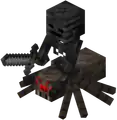
Spiders spawned in the Nether have a 1% chance of spawning while being ridden by a skeleton, which has an 80% of being a wither skeleton and a 20% of a normal skeleton. However, since spiders cannot naturally spawn in the Nether, this jockey is unused. Instead, it can be spawned using spider spawn eggs in Creative mode. Wither jockeys also have a cave spider variant. It can also be summoned with the following command in The Nether:
/summon cave_spider/spider ~ ~ ~ ~ ~ minecraft:entity_spawned_with_biome_specific_jockey
Zombie horse

Zombie horses can be spawned only by using its spawn egg or /summon, as it cannot spawn naturally. In Mounts of Mayhem,[upcoming] zombie horses can spawn naturally in savannas and plains, being ridden by adult zombies as zombie horsemen.
Zombie horse jockeys
These jockeys are unused since zombie horses cannot spawn naturally.
- Zombie horse jockey
- Baby zombie riding zombie horse
- Husk zombie horse jockey
- Baby husk riding zombie horse
- Zombie villager riding zombie horse jockey
- Baby zombie villager riding zombie horse
Camera
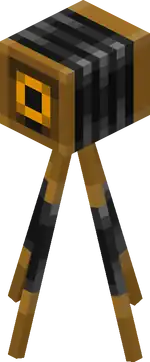
The camera is a mob used in Minecraft Education for capturing and storing images. It has also been added to Bedrock Edition, but it is only obtainable through add-ons or inventory editing, but can function normally.
The camera has been removed and re-added several times. It has also been obtainable with /give multiple times. The camera has also been available as a block for a while, and this camera block is now also unobtainable.
Old villager and old zombie villager
Old villagers and old zombie villagers, prior to the Village and Pillage update are still available in the game, but they are instantly converted into villager_v2 (new villagers) and zombie_villager_v2.
Their spawn egg can be obtained only via /give spawn_egg 1 15. However, trying to spawn them with that spawn egg spawns an old villager who is instantly transformed into a new villager and take its place.
Their trade tables were not removed, even though trading has changed between Village & Pillage and other updates.
Mechanics
Enchanting
Enchant anything
In Bedrock Edition, players cannot enchant a block or item; only tools, weapons, and armor can be enchanted, even if the player is in creative mode. However, it is possible to apply enchantments to non-enchantable items or blocks using an NBT editor. By using an NBT editor, it is possible to apply enchantments that cannot be applied in-game normally, such as Fire Aspect on flint and steel or Blast Protection on TNT. It is also possible to add multiple enchantments that are not compatible with each other such as Smite or Bane of Arthropods to a sword. Although the /enchant command in Bedrock Edition cannot enchant past the maximum level limit, it is possible to enchant items with a higher level than the max limit via the NBT editor.
Loot table
Mobs
In vanilla behavior packs, there is a loot table for the giant, a mob that cannot be spawned in Bedrock Edition.
Generated loot
Old village Village & Pillage introduced new village chest loot. However, old village chest loot has not been removed but has become unused. This old loot consists of:
| Stack size (6-8 stacks) |
Weight | Chance | |
|---|---|---|---|
 Potato Potato
|
5–8 | 10⁄46 | 21.7% |
 Carrot Carrot
|
4–8 | 10⁄46 | 21.7% |
 Wheat Wheat
|
8–12 | 15⁄46 | 32.6% |
 Wheat Seeds Wheat Seeds
|
2–4 | 5⁄46 | 10.8% |
 Beetroot Beetroot
|
5–8 | 5⁄46 | 10.8% |
 Wooden Hoe Wooden Hoe
|
1 | 1⁄46 | 2.1% |
| Stack size (3-8 stacks) |
Weight | Chance | |
|---|---|---|---|
 Diamond Diamond
|
1–3 | 3⁄94 | 3.1% |
 Iron Ingot Iron Ingot
|
1–10 | 10⁄94 | 10.6% |
 Gold Ingot Gold Ingot
|
1–3 | 5⁄94 | 5.3% |
 Bread Bread
|
1–3 | 15⁄94 | 15.9% |
 Apple Apple
|
1–3 | 15⁄94 | 15.9% |
 Iron Pickaxe Iron Pickaxe
|
1 | 5⁄94 | 5.3% |
 Iron Sword Iron Sword
|
1 | 5⁄94 | 5.3% |
 Iron Chestplate Iron Chestplate
|
1 | 5⁄94 | 5.3% |
 Iron Helmet Iron Helmet
|
1 | 5⁄94 | 5.3% |
 Iron Leggings Iron Leggings
|
1 | 5⁄94 | 5.3% |
 Iron Boots Iron Boots
|
1 | 5⁄94 | 5.3% |
 Obsidian Obsidian
|
3–7 | 5⁄94 | 5.3% |
 Oak Sapling Oak Sapling
|
3–7 | 5⁄94 | 5.3% |
 Saddle Saddle
|
1 | 3⁄94 | 3.1% |
 Iron Horse Armor Iron Horse Armor
|
1 | 1⁄94 | 1.0% |
 Golden Horse Armor Golden Horse Armor
|
1 | 1⁄94 | 1.0% |
 Diamond Horse Armor Diamond Horse Armor
|
1 | 1⁄94 | 1.0% |
- ↑ latest blacksmith loot chest after emerald and ink sac removed from loot
Old dungeon
There are unused loot tables that have similar loot, like dungeon chest loot before the Better Together Update. It is named monster_room.json (unknown structure)
| Stack size (1 stack[note 1]) |
Weight | Chance | |
|---|---|---|---|
| Iron ingot
|
1–5 | 10⁄93 | 10.7% |
 Redstone Dust Redstone Dust
|
1–4 | 10⁄93 | 10.7% |
| Bread
|
1 | 10⁄93 | 10.7% |
 Golden Apple Golden Apple
|
1 | 10⁄93 | 10.7% |
| Wheat
|
1–4 | 10⁄93 | 10.7% |
 Gunpowder Gunpowder
|
1–4 | 10⁄93 | 10.7% |
 String String
|
1–4 | 10⁄93 | 10.7% |
 Name Tag Name Tag
|
1 | 10⁄93 | 10.7% |
 Bucket Bucket
|
1 | 5⁄93 | 10.8% |
| Iron Horse Armor
|
1 | 5⁄93 | 5.3% |
| Golden Horse Armor
|
1 | 2⁄93 | 2.1% |
 Enchanted Book[note 2] Enchanted Book[note 2]
|
1 | 1⁄93 | 1.0% |
Other
There is also unknown equipment loot called low_item_tiers.json
| Chestplate | ||
|---|---|---|
| Equipment | Weight | Chance |
 Leather Tunic Leather Tunic
|
1⁄7 | 14.2% |
| Iron Chestplate
|
1⁄7 | 14.2% |
 Nothing[note 1] Nothing[note 1]
|
5⁄7 | 71.4% |
| Helmet | ||
 Leather Helmet Leather Helmet
|
1⁄7 | 14.2% |
| Iron Helmet
|
1⁄7 | 14.2% |
| Nothing[note 1]
|
5⁄7 | 71.4% |
Status effects
Health boost

Health Boost is an effect that increases the maximum health of an entity which can be regenerated. It can be obtained only with commands.
World generation
To support backwards-compatibility, the old world generator from before 1.18.0 still exists and can be obtained through add-ons. Because of this, all biomes and terrain features that have been removed from the generator in 1.18.0 still exist in the game's code.
Biomes
These biomes have been completely removed from the game or merged with other biomes in Java Edition. In Bedrock Edition, they still exist in the code, but do not generate normally. Biomes that existed in old worlds still exist, and the /locate biome command can be used to locate unused biomes. Most biomes were removed from the generator in Caves & Cliffs: Part II, because the terrain was the only difference with their regular biome variant.
| Biome name | Description | Screenshot |
|---|---|---|
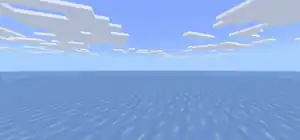
| Legacy frozen ocean | Similar to the frozen ocean biome, but without icebergs, it was completely flat. Because they were a frozen ocean variant, they could spawn polar bears and strays, but not dolphins. Unlike the regular frozen ocean, polar bears, drowned, squid, salmon, cod, rabbits, skeletons and strays were the only mobs that spawn here. Kelp also generated here.
This biome doesn't generate naturally from Pocket Edition Alpha 0.9.0 onward. When Bedrock Edition 1.4.0 introduced the new frozen ocean, this biome was not removed or replaced by the new frozen ocean, although the id name changed from |
 |
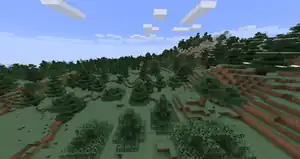
| Mountain edge | Similar to the sparse jungle biome, the mountain edge used to generate exclusively at the edge of windswept hills biomes in order to smooth the transition between biomes. This biome had lots of trees, similar to windswept forests. While the terrain was lower and gentler in nature, some areas might reach high enough to be covered by snow.
This biome doesn't generate naturally from Pocket Edition v0.9.0 alpha onward. |
 |
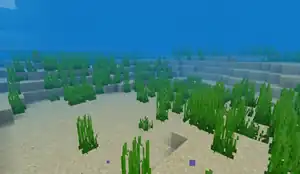
| Deep warm ocean | Similar to the warm ocean biome, but without coral reefs or sea pickles, and twice as deep. Because they were a deep ocean variant, they could generate ocean monuments.
The deep warm ocean did not naturally generate in any non-beta version. |
 |
| Desert lakes | In this biome, patches of water were more common, and the terrain was slightly more rough. Although desert wells could be found, desert pyramids, villages and outposts did not generate in this biome. | 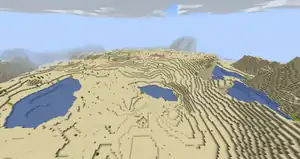 |
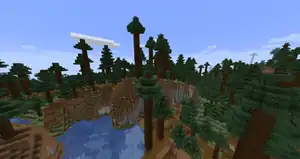
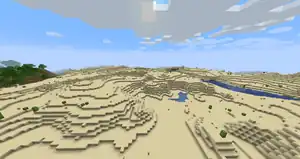
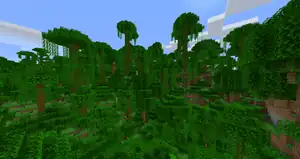
| Hills | Hills biomes were generated as small spots scattered throughout certain biomes. This included:
Most hills were gentle rolling slopes on which the usual biome terrain generated, with some sharper cliffs here and there. Snowy mountains had a lower chance of spawning passive mobs during world generation than other biomes (7% versus 10%). Swamp hills and dark forest hills generated as 'modified' biomes instead of hills biomes, making them slightly rarer but also bigger in size. Tall birch hills generated as 'modified hills' biomes, which made them even rarer than modified biomes. Tall birch hills had much more mountainuous terrain than most hills biomes. |
   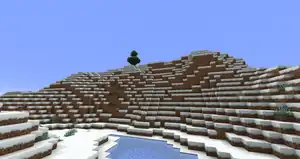 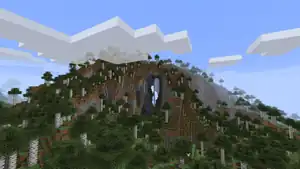 |
| Giant spruce taiga hills | Like all other hills biomes, this biome generated as a much hillier version of the giant spruce taigagiant spruce taiga, even more mountainuous than regular hills biomes. However, the giant spruce taiga hills used the same trees as the giant tree taiga hills (with leaves only at the top), making this biome very similar to the giant tree taiga hills. | 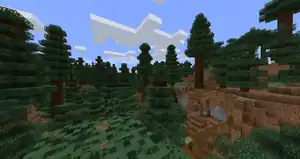 |
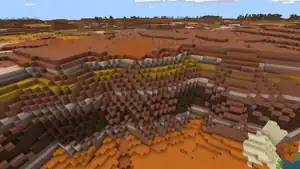
| Badlands plateau | Badlands plateaus generated as actual biomes in badlands biomes, and were flattened at the top, much like real-life plateaus. They came to rest at an elevation of about 20 to 30 blocks above sea level. One may discover the entrance to a mineshaft within the tall slopes of a badlands plateau.
With the new terrain generation in Caves & Cliffs: Part II, the regular badlands biome also featured these plateaus and this biome became redundant. |
 |
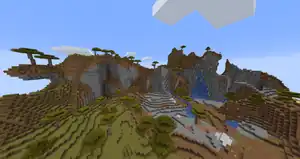
| Shattered savanna plateau | The terrain of the shattered savanna plateau biome was much less tame than its normal counterpart. It featured incredibly large and steep mountains that jut out of the terrain, similar to the shattered savannashattered savanna biome, albeit slightly smaller and gentler in comparison.
The grass and foliage color was lush green (the same color as in mushroom fields), making it easily distinctable from the regular shattered savanna. |
 |
| Modified wooded badlands plateau | This biome featured grass and oak trees on top of plateaus, much like its counterpart. However, the plateaus that generated here were generally smaller, allowing far less foliage to be generated. The terrain was more erratic, and could be compared to that of the similar modified badlands plateau biome, having an old and eroded appearance. Eroded badlands generated instead of desert alongside this biome. | 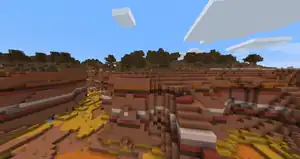 |
| Modified badlands plateau | Compared to the average badlands plateau, the modified badlands plateau featured more variable terrain and smaller plateaus, as if a larger plateau was weathered down over time. It was the second-rarest biome in the game, after the modified jungle edge. | 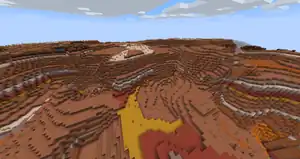 |
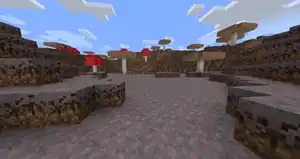
| Mushroom field shore | Mushroom field shores represented the transition between mushroom fields and the ocean, forming long strips between the biomes as a "beach", hence the name. However, it did not generate if the ocean biome was a deep ocean. This biome also generated when a river met a mushroom fields biome, similar to what frozen rivers did in snowy plains. The terrain of this biome was much more flat and shallow than the main mushroom fields biome, though it contained many of the same features, such as a mycelium surface layer, huge mushrooms and lack of hostile mobs, but shipwrecks and buried treasures could generate here.
Because the terrain was the only difference with the regular mushroom fields biome, this biome became redundant after Caves & Cliffs: Part II. |
 |
| Gravelly mountains+ | The gravelly mountains+ biome was a rare variation of the old mountainsmountains biome, which generated independently from the similar gravelly mountainsgravelly mountains biome. The only differency with the regular gravelly mountains was the presence of oak and spruce trees. Because almost no grass blocks were generated between the gravel, trees did rarely generate. | 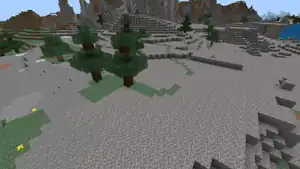 |
| Modified jungle | The modified jungle featured very mountainuous terrain, with many cliffs and overhangs. | 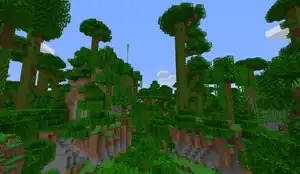 |
| Modified jungle edge | The very rare modified jungle edge only generated when a rare swamp hills biome bordered a jungle. Like the regular modified jungle, this biome had much more mountainuous terrain, but it was very small in size. | 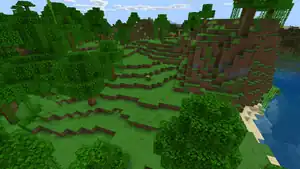 |
| Taiga mountains | Like the snowy taiga mountains, this biome featured very mountainuous terrain, sometimes passing snowfall hight. The taiga mountains were very similar to the windswept forest, but with a higher density of trees and slightly lower elevation. | 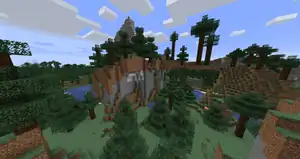 |
| Snowy taiga mountains | The very rare snowy taiga mountains featured even more mountainuous terrain than the snowy taiga hills, although not as much as the windswept hills. | 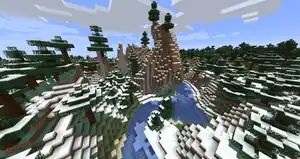 |


Fifth old growth taiga biome variant
The file biome_client.json contains a biome name that never existed in game.
"mega_taiga": {
      "water_surface_color": "#2d6d77",
      "water_fog_color": "#2d6d77"
    },
    "mega_spruce_taiga": {
      "water_surface_color": "#2d6d77",
      "water_fog_color": "#2d6d77"
    },
    "mega_taiga_mutated": {
      "water_surface_color": "#2d6d77",
      "water_fog_color": "#2d6d77"
    },
    "mega_spruce_taiga_mutated": {
      "water_surface_color": "#2d6d77",
      "water_fog_color": "#2d6d77"
    },
    "mega_taiga_hills": {
      "water_surface_color": "#286378",
      "water_fog_color": "#286378"
    },
Out of the five giant tree taiga biomes, only four can generate in the game while another one, mega_taiga_mutated, appears only in this code, as that biome is not defined in the vanilla behavior pack in the biomes folder. Whether the biome is a dropped feature or a copy of the old growth spruce taiga is unknown.
Water color and water fog color:
#2d6d77
Custom flat worlds
There is an NBT string in every level.dat file called "FlatWorldLayers", which when edited properly, can cause the respective world to generate custom layers. This is used when Custom Superflats created on Legacy Console Edition get converted over to Bedrock Edition.
Custom flat worlds can, nevertheless, still be created without cheats through custom world folders.
Single Biome world type
Similar to custom superflats, there is code in the game files for single biome worlds. It is fully functional but has many issues.
Other
World settings
level.dat contains several player abilities. Most of these are used in multiplayer, to determine who has what permissions. However, some are completely inaccessible without an NBT editor. With the exception of permissionsLevel, none of these settings can be altered in-game for the world itself, only for individual players. The flying changes in-game as players toggle flight mode, but cannot be altered manually without editing.
| Ability | Description |
|---|---|
instabuild
|
Whether the player can break blocks instantly. Normally true in Creative. |
invulnerable
|
Whether the player is immune to damage. Normally true in Creative. |
lightning
|
Depends if lightning appears in thunderstorms. |
flyspeed
|
The speed at which the player flies in Creative.[more information needed] |
walkspeed
|
The speed at which the player walks.[more information needed] |
Resources
There are no items, placeable blocks, or /summon mobs for these, as they appear only as textures, meaning they are currently without use in-game.
Blocks
_BE1.png) Old rose
Old rose
The exclusive blue rose was removed from the game since 0.9.0, but its texture still remains as flower_rose_blue.png
_JE1.png) Paeonia
Paeonia
The unimplemented paeonia flower's texture exists as flower_paeonia.png
Items
 Minecart with furnace
The minecart with furnace exists in Java Edition, while in Bedrock Edition it appears as an inventory icon texture.
 Quiver
The quiver was going to be used to hold arrows, but it was never implemented; Dinnerbone said that holding arrows in the offhand felt more natural.[2] Its texture still exists in 1.12.0.6.
 Ruby
Ruby
Rubies were supposed to be in the game, but since Dinnerbone was color-blind and could not tell the difference between it and redstone, it was scrapped, leaving only a texture. It was implemented in Minecraft Earth, with a completely different use and texture.
 Hoglin meat
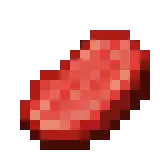
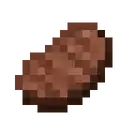
In 1.16.0, two textures named hoglin_meat_raw and hoglin_meat_cooked were added. They have the same texture as raw beef and cooked beef respectively and were likely intended as placeholders.
 Portfolio
The portfolio is an item in Minecraft Education that can save photos that were taken with the camera. Portfolios have been removed from Bedrock Edition but the texture still exists.
Unused potions
Bedrock Edition has unused potion textures for several effects, along with their splash variants. These effects are: Absorption, Blindness, Haste, Health Boost, Hunger, Mining Fatigue, Nausea, Resistance, Saturation, and Levitation, as well as the Luck potion textures also present in Java Edition. These unused textures were added along with the other potion textures in Pocket Edition v0.12.1 alpha, except for the potion of levitation, which was added in Pocket Edition 1.0.0. The textures were changed along with the other potion textures during the texture update in Bedrock Edition 1.10.0. Strangely, the potion of levitation texture is a duplicate of the splash potion of levitation texture.
-
 Potion of Absorption
 -
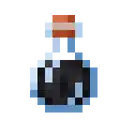 Potion of Blindness
 -
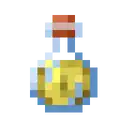 Potion of Haste
 -
 Potion of Health Boost
 -
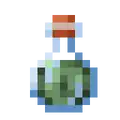 Potion of Hunger
 -
 Potion of Mining Fatigue
 -
 Potion of Nausea
 -
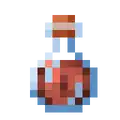 Potion of Resistance
 -
 Potion of Saturation
 -
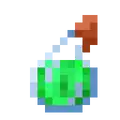 Potion of Levitation
 -
 Splash Potion of Absorption
 -
 Splash Potion of Blindness
 -
 Splash Potion of Haste
 -
 Splash Potion of Health Boost
 -
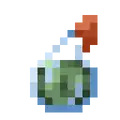 Splash Potion of Hunger
 -
 Splash Potion of Mining Fatigue
 -
 Splash Potion of Nausea
 -
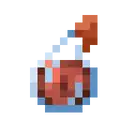 Splash Potion of Resistance
 -
 Splash Potion of Saturation
 -
Splash Potion of Levitation
_BE2.png) Target point map marker
Target point map marker
An unused marker for maps exist in the map markers texture file. This icon is named target_point in Java Edition and remains visible on item frames, though its usage is unknown.
Entities
Gray tabby cat
In the vanilla resource pack, a texture file for a tamed gray tabby cat exists. However, it is completely unused and cannot be spawned in-game.
-
 Unused gray tabby texture
 -
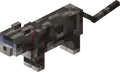 Gray tabby model
Tamed ocelot
In the vanilla resource pack, textures exist, along with the other cat textures, for an ocelot texture, as well as the texture for a tamed ocelot. Again, it is completely unused and cannot be spawned in-game.
Clownfish
In the vanilla resource pack, there is a texture for a generic clownfish, which is completely unused. Instead, clownfish are a variant of tropical fish.
-
.png) Unused texture of clownfish mob
Unused texture of clownfish mob -
.png) A possible look of the unused clownfish mob, created with Blockbench
A possible look of the unused clownfish mob, created with Blockbench
Particles
Soul lava
In an unknown build of Bedrock Edition 1.16.0,[more information needed] a "soul lava" particle was added to particles.png. It can be seen that this particle is to the "lava" particle texture what the soul flame particle is to the ordinary "flame" particle. It appears completely unused and cannot be summoned with /particle.
_BE1.png)
Unlike normal campfires, soul campfires do not emit any type of ember. This is due to there being no defined particle for a soul ember,[3] something which this texture would fill in. However, despite this, the texture is yet to make any appearance in Java Edition[3] and remains unused in Bedrock Edition.[4]
Copper lava
In Bedrock Edition Preview 1.21.110.23, a "copper lava" particle was added to particles.png. It can be seen that this particle is to the "lava" particle texture what the copper flame particle is to the ordinary "flame" particle. It appears completely unused and cannot be summoned with /particle.
_BE1.png)
Angry villager
In particles.png, an unused particle resembling an angry villager can be seen. This texture also exists in Java Edition. It appears completely unused and cannot be summoned with /particle.

Other
Old Pocket Edition panorama
As of Bedrock Edition 1.2.0, a new panorama background is used, but the old panorama before 1.2.0 was not removed. Despite many updates to the main panorama, the old and unused panorama textures still exist.
References
- ↑ https://reddit.com/r/Minecraft/comments/u8hpnx/thoughts_on_the_new_paintings/i5olue6/?context=3 (archived)
- ↑ "This is an example of how non-final the things I've been working on are: I'm removing quivers again. Arrows in off-hand feels more natural." – @Dinnerbone (Nathan Adams) on X (formerly Twitter), July 30, 2015
- ↑ a b MC-185482
- ↑ MCPE-121516
| Java Edition |
| ||
|---|---|---|---|
| Bedrock Edition |
| ||
| Minecraft Education |
| ||
| MinecraftEDU | |||
| Legacy Console Edition | |||
| New Nintendo 3DS Edition | |||


.png)


