Java Edition exclusive features
See also: Parity issue list
This article is about features only in the current Java Edition version. For the removed features, see Java Edition removed features. For the features exclusive to Bedrock Edition, see Bedrock Edition exclusive features.

This article needs cleanup to comply with the style guide.
[discuss]
Please help improve this page. The talk page may contain suggestions.
Reason: Fix capitalization, and also add all exclusive features, similar to the Bedrock Edition article.
Reason: Fix capitalization, and also add all exclusive features, similar to the Bedrock Edition article.
This is a list of Java Edition exclusive features. Some of these exclusive features may eventually be added to Bedrock Edition to bring parity.
General
- Supports loading custom skins for use in the game.
- Supports launching previous versions of Java Edition, including versions dating back to 2009.
- Not all versions of Java Edition are available in the Launcher. Additionally, all versions prior to Alpha v1.1.2_01 do not have working sound, as the sound assets for these versions have been removed from the Minecraft servers.
- Supports loading custom/modified versions of Minecraft, such as OptiFine, Forge, and Fabric.
- The types of particles and their technical names are displayed below. Particle names in italics are shown when using the "Minimal" particles setting.
| Particle name | Block/entity/event | Image |
|---|---|---|
| underwater | When underwater. | 
|
| sweep_attack | Perform a sweep attack with a sword. | 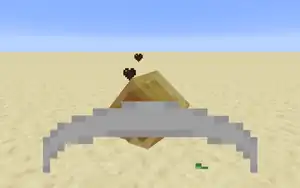
|
| damage_indicator | When an entity is damaged significantly. | 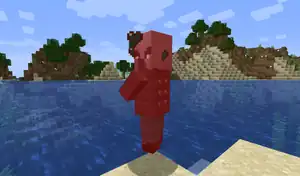
|
- To save space, some recipes in the recipe book are grouped together and can be selected by pressing the right button on the mouse.
- A game feature that allows players to track how many times they have completed certain tasks.
There are 72 items, and 34 more in the Operator Utilities tab, for a total of 106 Java Edition Creative inventory exclusives including operator utilities. The items are as follows:
- Luck effect
 tipped arrow,
  potion,
  splash potion, and
  lingering potion
 - Four no-effect tipped arrows:
 arrow of splashing, awkward tipped arrow, thick tipped arrow, and mundane tipped arrow
  Spectral arrow
 Minecart with furnace
 Sweeping Edge enchanted books, all three levels.
 Firework star, no color.
 Firework rocket, all three flight durations.
 Painting, 46 individual pre-defined paintings, plus four additional in operator utilities.
- All 34 items in the Operator Utilities tab if "Operator Items Tab" is enabled.
Gameplay
- Uses the advancement system instead of the achievement system.
- Can be used to gain experience.
- The range of breaking blocks is 5 blocks in Creative mode, and 4.5 blocks otherwise.
- The potion of Luck cannot be brewed, and can be obtained only by commands such as
/give @p minecraft:potion{Potion:"minecraft:luck"} 1, or through the creative inventory.
- Is uncensored by default, though a profanity filter exists for Realms.
- Default font uses much more updated version of Mojangles, with implementation of more characters and even certain emojis.
- There are also more and different font styles such as Illageralt and they are more up-to-date
- The "attack strength" combat mechanic.
- A meter shows up after switching items or attacking.
- Damage done depends on the fullness of the meter, with a quadratic reduction (attack does 20%–100% of normal damage as the meter fills).
- Fills at different rates depending on the new attack speed attribute (see table on the changes to gameplay section for a complete list).
- The
 Haste effect causes the meter to fill faster.
- The
- Can be displayed next to the hotbar (left or right based on the player's main hand), under the crosshair or turned off.
- Looks like the icon for the old
 Strength effect icon on the side of the hotbar, or like a dagger under the crosshair.
 - This is controlled in video settings.
- Looks like the icon for the old
- A cooldown animation is displayed of the tool slowly being lifted up, when either first switching to it or after attacking.
- A meter shows up after switching items or attacking.
- Sounds are played when attacked strongly and weakly, as well as sprint-knockback attacks, sweeping attacks, and critical hits.
- When the player is in third person while suffocating, the view automatically switches to first person.
- The player takes damage from falling into the void, even in Creative mode.
- Shows the chunk cache, the memory usage, various parameters, the player's map coordinates and a graph that measures the game's current frame rate.
- The player can enchant any item with any enchantment in Creative mode with enchanted books, allowing any applied effects to exhibit themselves.
- Sweeping Edge enchantment.
- Increases sweeping attack damage.
- For players, a "You Died!" screen (or "Game Over!" in Hardcore mode) instantly appears upon death. It also displays the player's score.
- Death messages are broadcast to everyone upon the death of a player, and to the pet's owner on the death of a pet (wolf, cat, or parrot).
- Death message: "<Player> fell from a high place", caused by a fall greater than 5 blocks.
- Creative inventory and survival inventory looks different from inventories in Bedrock Edition.
Spectator mode
- Can be entered by using F3 + N, or F3 + F4, if commands are enabled.
- Players in Spectator mode can teleport to other players using the hotbar.
- Players in Spectator mode can click other entities to spectate them, or spectate via /spectate.
- Summary of effects:
| ID | Name | Effect | |
|---|---|---|---|
| 24 | 
|
Glowing | Outlines entities (can be seen through blocks). Can be applied to any hostile mob that is in the village when a player or a villager rings the bell. |
| 26 | 
|
Luck | Increases chances of high-quality loot. Cannot be obtained without cheats or creative mode. |
| 27 | 
|
Bad Luck | Reduces chances of high-quality loot. Cannot be obtained without cheats. |
| 28 | 
|
Dolphin's Grace | Dolphin's Grace is a status effect that increases the player's swimming speed when a dolphin is nearby. |
- A feature that displays text for sounds in game.
- Has different trades than in Bedrock Edition.
- Trade inventory slots of a villager or wandering trader is different from Bedrock Edition.
Blocks
- Carpet can be used as a fuel in furnaces, smelting 0.335 items per carpet.
- Bonus chests always contain the same items.
- The top three rows for a large chest correspond to the western or northern half and the bottom three to the southern or eastern half.
- Holding ⇧ Shift and double-clicking while holding an item moves all items of the type clicked on in or out of the chest, to the extent that space is available for them.
- A chest can be "locked" by setting its Lock tag using the
/datacommand. If a chest's Lock tag is not blank, the chest cannot be opened except by players holding an item with the same name as the Lock tag's text. For example, to lock a chest at (0,64,0) so that only players holding an item named "Player's Key" can open the chest, use/data merge block 0 64 0 {Lock:"Player's Key"}.
- Paintings can be placed on their sides.
- Jumping vibrates the player, similar to jumping in a 2-block-high space.
- Primed TNT can pass through cobwebs without slowing down if shot through fast enough.
- Support quasi-connectivity.
- Transparency: Partial (blocks light)
- Mobs smaller than 0.512 cubic block cannot destroy farmland. This includes parrots, rabbits, chickens, bats, ocelots, wolves, cave spiders, endermites, silverfish, baby mobs, small slimes, and small magma cubes.
- The lit furnace block cannot be obtained, not even with commands.
- Fuel lasts differently, see Furnace/table.
- Doesn't drop itself when broken with a Silk Touch tool.
Piston and Sticky Piston
- Cannot push or pull certain blocks (those with block entities):
- Sticky pistons drop blocks when a single redstone tick pulse occurs, rather than retracting them.
- Redstone wire runs next to pistons instead of curving into them.
- Support quasi-connectivity.


- Can be used as fuel in furnaces, smelting 0.5 items per wool block.
Items
- Has a 5% chance of being dropped by any kind of fish.
- Can be used to change block states.
- Leather armor, leather horse armor, and wolf armor can be dyed by combining them with dyes in a crafting grid.
- A utility item that reveals crafting recipes to the player when used.
- What makes it a lingering potion as opposed to a splash potion is that their
Potiontag stores aminecraft:lingering_potionitem.
- The name for "Empty Locator Map" (requires compass) in Java Edition is called "Empty Map", which is different from the "Empty Map" that uses no compass in Bedrock Edition.
- Each spawn egg has a different ID.
Mobs
- The detection range of creepers is reduced to half of their normal range (8 blocks) when the player is wearing a creeper head.
- Drops 0-1
 cooked cod if killed by fire.
- Cannot normally be attacked with projectiles (including splash potions of Harming), as they always teleport away just before being hit.
- However, they do not teleport if positive potions are thrown at them, including splash potions of regeneration and strength, and do not teleport away from poison potions either.
- If all available blocks within teleport distance are removed or unable to be transported to, it is possible to hit endermen with a projectile, though arrows tend to bounce off dealing no damage on occasion.
- Even though rare, endermen can create iron and snow golems.
- However, they do not teleport if positive potions are thrown at them, including splash potions of regeneration and strength, and do not teleport away from poison potions either.
- A giant-sized zombie.
- Has no AI, does not fight back when hit.
- Can be summoned via commands only.
- An unused illager hostile mob.
- Attacks using a bow and casting spells, such as creating clones of itself.
- Can be summoned via commands only.
- A hostile version of rabbit, featuring horizontal red eyes and a nameplate reading "The Killer Bunny".
- Attacks players and wolves (both wild and tamed) unprovoked.
- Can be summoned via commands only.
- A reference to the "Rabbit of Caerbannog" from the movie "Monty Python and the Holy Grail".
- Do not scare phantoms.
- They use different AI, and strafe side to side when shooting arrows instead of standing still.
- Their bow is animated like the player's, with the arrow visibly being drawn back before shooting.
- Their detection range is reduced to half of their normal range (8 blocks) when the player is wearing a skeleton skull.
- Holding tipped arrows in their offhand causes them to shoot that type of arrow; these arrows are not consumed.
- Can drown in lava.
- Wandering traders spawned with a spawn egg via commands do not spawn with trader llamas.
- Automatically holds any item it comes across (except jack o'lanterns).
- Can spawn naturally with a carved pumpkin or a jack o'lantern on Halloween, or if the computer's calendar is set to October 31st.
- On Halloween, if a zombie wearing a carved pumpkin or jack o'lantern is killed using a weapon enchanted with Looting, there is a chance equivalent to the level of Looting used to drop the carved pumpkin or jack o'lantern, up to a maximum of a 3% chance of a drop.
- The detection range of zombies is reduced to half of their normal range (20 blocks) when the player is wearing a zombie head.
- Non-hostile zombified piglins do not prevent a nearby player from sleeping in a bed.
Non-mob entities
- Takes damage from all types of fire and lava.
- Can get visually stuck in players.
- Includes arrow of Luck.
- Includes spectral arrows, imbues the Glowing status effect for 10 seconds
- Exists.
- A self-propelling minecart that can be fueled using coal or charcoal. This can also be found in the Legacy Console Edition.
- Exists.
- A combination of minecart and monster spawner.
- Can be obtained only via commands.
- When summoned, it spawns pigs by default.
World generation
General
- Solid terrain, structures and biomes can generate all the way to 30 million blocks in a vanilla game, or 2,147 million blocks if the hardcoded 30-million-block limit is removed by modifying the game.
Single Biome world type
- Consists of only a single biome.
Large Biomes world type
- A world type that has its biome scale set to 6.
Debug mode world type
- Used to test block states, block models, and textures.
- Badlands and eroded badlands
- Red sandstone can generate in regular badlands and eroded badlands.
- If the player smelts a number of items in the igloo furnace, the light generated melts the igloo window, turning the ice into a water source block.
- If generates with a villager, it's always a villager without profession.
- They generate in rings with the strongholds evenly spaced around the circle until the total of 128 is reached.
- The 1st ring has 3 strongholds within 1408–2688 of the origin.
- The 2nd ring has 6 strongholds within 4480–5760 of the origin.
- The 3rd ring has 10 strongholds within 7552–8832 of the origin.
- The 4th ring has 15 strongholds within 10624–11904 of the origin.
- The 5th ring has 21 strongholds within 13696–14976 of the origin.
- The 6th ring has 28 strongholds within 16768–18048 of the origin.
- The 7th ring has 36 strongholds within 19840–21120 of the origin.
- The 8th ring has 9 strongholds within 22912–24192 of the origin
Superflat world type
- Also allows the player to access the End, which generates as in a normal world, by finding a stronghold or by creating an end portal in Creative mode.
- Structures such as villages can generate in superflat worlds.
- By default, a customizable world border appears to prevent players passing through.
Commands
- Gives, removes, or checks player advancements.
/ban
- Adds player to banlist.
- Adds IP address to banlist.
- Displays banlist.
/data
- Modifies the data tag of a block or entity.
- Starts or stops a debugging session.
- Sets the default game mode.
- The maximum experience that the player can earn from the
/experiencecommand is 2,147,483,647 levels.
- Removes entries from the banlist.
- Gives or takes player recipes.
/seed
- Displays the world seed.
- Sets the time before idle players are kicked.
/stop
- Stops a server.
- Sets a trigger to be activated.
- Manages server whitelist.
- Manages the world border.
Command format
- Data tags are used in commands to specify complex data for players, entities, and some blocks.
- Resource locations are namespaced and all have the
minecraft:prefix, except when they're modded, in which case they have amod_id:prefix.
- Most selector arguments were renamed and remade, and some behave differently. Others, like
distanceandlevel, support a range (1is exactly one,1..is one or more,..1is one or less, and1..10is between one and ten, inclusive).
| Versions | |||
|---|---|---|---|
| Development |
| ||
| Technical |
See here for more information | ||
| Game customization | |||