Spectator
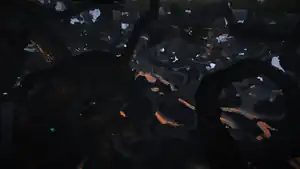
Spectator mode is a game mode that allows the player to fly around and observe the world without interacting with it in any way.
Usage
Spectators are invisible to other players and mobs, can fly, clip through blocks and entities, and view all entities, including other players, in Spectator mode. The HUD is completely invisible, except for subtitles and the chat. The inventory is accessible in Spectator mode; however, it cannot be interacted with in any way, and items cannot be crafted in the crafting grid.
Accessing
Spectator mode can be entered by using the /gamemode spectator command, dying in Hardcore mode, using F3 + N with cheats enabled, or through the F3 + F4 game mode selector.
In Bedrock Edition and Minecraft Education, Spectator mode can also be entered by changing the personal game mode to Spectator through settings, although players cannot spectate other entities.
Invisibility
Spectators are not noticed by mobs, and do not trigger mob spawning (including from monster spawners), nor do they prevent mob despawning, but they are noticed by commands and/or command blocks.
Spectators who are affected by the Glowing status effect can still be seen in Spectator mode by other players, although not by mobs.
Highlighting players

Spectators can also use the "Highlight Players (Spectator)" control if changed from the default (unassigned). This allows the spectator to see other players as if they have the Glowing effect when the button is pressed; the effect disappears when the button is released. The color of the outline reflects the player's team.
Intangibility
Spectators can move through blocks, entities and other players. When their head is inside a block, they can see through all blocks.
Spectators can see through lava and powder snow, and their underwater vision is set to maximum instantly instead of gradually like in other game modes.
Spectators cannot take damage, as all blows go through them. Lava, drowning, fire, and suffocation also do not affect them. However, they can still take damage from the void[Java Edition only] or the /kill command.
Commands (including player selectors) can still target spectators.
Flight
Spectators are always flying. They cannot stop flying by landing, as the player just clips through the blocks. The mouse scroll wheel and the sprint key affect the flying speed, but the slowness and swiftness effects do not.
The maximum speed that can be achieved while flying is 43.556 m/s (156.80 km/h) without sprinting and 87.111 m/s (313.59 km/h) if sprinting.
GUIs
If a player opens their inventory while in Spectator mode, they cannot interact with or use any of the items in it. Likewise, viewing GUIs is possible, but it is not possible to interact with them. If a container uses a loot table to generate its contents, but the loot has not yet been generated, a player in Spectator mode cannot open the container to view its contents. Items in the world also cannot be picked up. The player's head is slightly visible in the inventory, but in a translucent, darker color.
If a number key is pressed, the player can teleport to a specific player on that server by pressing 1, or the player can teleport to a team member by pressing 2 and clicking on the number of the player twice to be teleported or once to see their name.
Seeing invisible entities
Spectators can see other spectators and invisible mobs, as well as themselves using F5. Spectators appear as a translucent disembodied head, and any held or equipped items are invisible. Invisible mobs appear translucent, like when viewing an invisible ally with /team modify <team> seeFriendlyInvisibles set to true.
Mob view
A spectator can click on an entity with the attack button, to take its view. Their position is locked to that of the entity, and their POV moves in accordance with the entity. Viewing oneself while spectating from an entity's point-of-view using F5 shows the entity. Pressing the dismount key (⇧ Shift by default) returns the player to flying mode. In addition to spectating mobs, players can also spectate any other entity, such as an end crystal, primed TNT, or an armor stand. If the spectating mob takes any form of damage, the screen tilts a little as if the player was taking damage.
Certain mobs also apply a post-processing shader while looking from their point of view. This filters how the world is portrayed to the spectator. Similar to the Super Secret Settings, if one presses F4, it removes the filter without dismounting the mob. Below is a table of mobs that have a filter. Wardens, despite supposedly being blind and having no visible eyes, show a normal view when spectated.[1]
| Entity | Filter Description | Filter Image |
|---|---|---|
| Creeper | Pixelated and green tinted vision. | 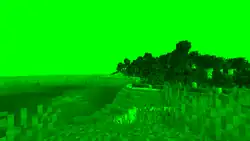
|
| Enderman | Inverted background. | 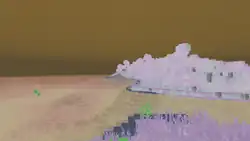
|
| Spider | Quintuple vision, slight blurring, high FOV. | 
|
| Cave Spider | Same as the spider, only slightly lower to the ground. | 
|
| Other mobs | The same as the player's. |
History
Development
| January 27, 2014 | Dinnerbone tweeted about trying out Spectator mode. | ||||||
|---|---|---|---|---|---|---|---|
Java Edition
| Java Edition | |||||||
|---|---|---|---|---|---|---|---|
| 1.8 | 14w05a | Spectator mode added. | |||||
| 14w06a | Added hot key for player outlines. | ||||||
| 14w18a | Spectator presence no longer prevents mob despawning. | ||||||
| 14w19a | The inventory hotbar is replaced with a commands window including the ability to teleport to other players or teams. | ||||||
| 14w20a | Adjusting fly speed of Spectator mode now works vertically. | ||||||
| 1.8.2 | pre1 | Hostile mobs no longer follow/attack spectators. | |||||
| 1.9 | 15w32a | F3 + N now toggles between Creative and Spectator. | |||||
| 15w37a | Players that die in Hardcore mode now have the choice to respawn in Spectator mode, rather than having to delete the world. | ||||||
Added game rule spectatorGenerateChunks. | |||||||
| 15w51a | A spectator is no longer able to open a chest where the loot has not been generated yet. | ||||||
| 1.16 | 20w20a | Added gamemode switcher accessible with F3 + F4. | |||||
| F3 + N now toggles between Spectator mode and the previous gamemode. | |||||||
| 1.17 | 21w11a | It is now possible to see while inside lava[2] and powder snow[3] in Spectator mode. | |||||
| 1.21.6 | 25w15a | Spectators will now teleport together with, but stop spectating, entities that move to other dimensions. | |||||
Bedrock Edition
| Bedrock Edition | |||||||
|---|---|---|---|---|---|---|---|
| ? | "Added" Spectator mode. | ||||||
| Spectator mode cannot be accessed without add-ons or editing, and players cannot spectate other entities. | |||||||
| Spectator mode used to be accessible through servers where a player's inventory would be filled with dandelions could not be replaced or placed.[verify] | |||||||
| 1.18.30 | Preview 1.18.30.21 | Spectator mode can now be accessed by using /gamemode 6; however, it is buggy and the player can still break blocks. | |||||
| 1.18.31 Experiment | Spectator mode is moved behind its own experimental toggle. | ||||||
Spectator mode can now be accessed by using /gamemode spectator. | |||||||
| 1.19.0 Experiment | Preview 1.19.0.21 | Spectator mode now functions properly. | |||||
| April 14, 2022 | Spectator mode is announced to not be fully included in 1.19.0. | ||||||
| 1.19.10 Experiment | Preview 1.19.10.20 | Many changes have been made, including:
| |||||
| 1.19.30 Experiment | Preview 1.19.30.20 | The Spectator game mode can no longer be accessed via /gamemode 6. | |||||
| Preview 1.19.30.22 | It is now possible to see while inside powder snow in Spectator mode. | ||||||
| 1.19.50 | Preview 1.19.50.20 | Spectator mode is now available without enabling experimental gameplay. | |||||
Minecraft Education
| Minecraft Education | |||||||
|---|---|---|---|---|---|---|---|
| 1.21.90 | Preview 1.21.90.1 | Added spectator mode. | |||||
Legacy Console Edition
| Legacy Console Edition | |||||||
|---|---|---|---|---|---|---|---|
| Xbox 360 | Xbox One | PS3 | PS4 | PS Vita | Wii U | Switch | |
| TU36 | CU25 | 1.28 | 1.28 | 1.28 | Patch 7 | 1.0.1 | A spectator mode has been added exclusively to the battle minigame. If the player dies, they will become a bat. |
| TU41 | CU30 | 1.33 | 1.33 | 1.33 | Patch 11 | The Tumble minigame also now has a spectator mode. | |
| September 24, 2016 | Spectator mode is seen in the Chinese Mythology mash-up-pack trailer. | ||||||
| TU58 | CU51 | 1.60 | 1.57 | 1.57 | Patch 28 | 1.0.8 | By using "Custom" in the Battle and Tumble minigames, the spectator mode type can now be changed to "Vex", "Head", "Bat", "Invisible" or "Parrot". In the Tumble minigame, it is possible to change the settings to break blocks in spectator mode. |
-
 First image of spectator mode
 -
 Second image of spectator mode
 -
 Third image of spectator mode
 -
 Fourth image of spectator mode
Issues
Issues relating to "Spectator" are maintained on the bug tracker. Issues should be reported and viewed there.
Trivia
- If the player wears a pumpkin on their head and enters Spectator mode, their vision is still filtered, even when spectating a mob.
- If an entity falls out of the world, any spectators die with it as they are still separate entities, and take void damage.
- All mobs' perspectives can be viewed with the exception of the ender dragon.
- Shaders persist if the player dies while spectating.
- If a player has an effect applied that changes their field of view, players spectating them are also affected. The FOV changes are not visible when spectating non-players.
- Nausea is not subject to this.
- If a player uses a spyglass, the effect also applies to the spectator, but without the overlay.
- If a player presses a number key to open up their hotbar, it is revealed that the textures used for the icons are the older textures used before Java Edition 1.14, even without the built-in Programmer Art texture pack enabled.
- If a player is in spectator mode, their name is italicized and grayed out on the multiplayer player list.
See also
References
| Game modes | |||
|---|---|---|---|
| Other game modes |
| ||
| Related world settings | |||
| Removed |
| ||


