Entity
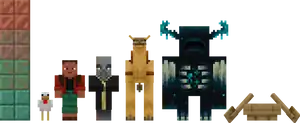
Entities include all dynamic, moving objects throughout the Minecraft world.
General behavior
Properties all or most entities have are:
- A position, rotation, and velocity
- A volume consisting of one or more non-rotating, three-dimensional boxes with a fixed height and width
- The ability to be on fire, displayed as flames on or around the entity
- The ability to have a status effect, such as from potions
- A view point, even if it has no eyes
Most entities can be pushed around by water currents, and some can have their trajectory altered by explosions if already traveling at speed. Some entities can be renamed by using a name tag on them.
Most entities have a health status, including mobs, players, armor stands, boats, boat with chests and minecarts. Moving blocks, items, shot or thrown projectiles, area effect clouds, and experience orbs do not have health.
Entities cannot pass through solid blocks, excluding vexes, ender dragons, and ender pearls. Most types of entities prevent blocks from being placed in the space they occupy, except for dropped items and experience orbs, which are automatically pushed out of the block to open air. If a solid block enters an entity's space, such as falling sand or a swinging door, then it is free to move out of the solid block but not back in. For example, if a door is closed on the player, player can jump up and stand on top of the bottom-half door block, if there is air above the door.
Entities are lit according to the light level of the block their position is in. For example, if a minecart runs over a non-straight track directly into a solid block, it turns black because solid blocks always have a light level of 0; arrows are also sometimes seen to turn black, especially if fired shallowly into the ceiling.
Immovable entities
Item frames, glow item frames, paintings, and leash knots, unlike most entities, align to the block grid, and are completely immobile.
Boats and minecarts
Boats, boats with chests and minecarts appear to recover health over time. For example, they can be broken by hitting them quickly, but cannot be destroyed by hits with unarmed hand with a pause after each hit. The amount of wobbling displayed by boats and minecarts when struck appears to indicate their current health. All minecart, boat and boat with chest variants have 6HP.png) .
.
Gravity-affected blocks
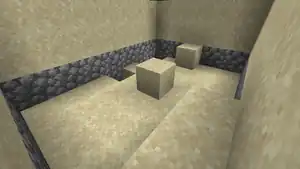
Gravity-affected blocks include sand, gravel, anvils, red sand, dragon eggs, concrete powder, scaffolding, and pointed dripstone, along with snow layers in Bedrock Edition.
A gravity-affected block normally exists as a block, but when its support is removed, it becomes a falling block entity and falls down until hitting the top surface of another block. If there is valid space, it places itself as a block at the nearest on-grid position, or drops as an item if that position is occupied by a block without a solid top surface, such as a torch or a bottom slab.
While a falling block ordinarily falls straight down, its trajectory can be affected by explosions, bubble columns, pistons, reeling it in, and moving slime blocks, and can slide down the side of honey blocks. It is also possible to modify the velocity and direction of a falling block by using commands such as /data[Java Edition only] or third-party programs. A falling block despawns and drops as an item if it does not land after existing for 600 ticks (30 seconds), or 100 ticks (5 seconds) if falling into the void[verify].
If a cave generates underneath sand, gravel, or red sand, the blocks remain stationary until they receive a block update. If a single block is updated and falls down, neighboring blocks are updated in a chain reaction that can cause the collapse of an entire region of gravity-affected blocks.
Interactions with "use" control
Entities with use interactions (such as boats, boat with chests, minecarts, cats, villagers, tamed parrots, and tamed wolves) do not stop the use action of a tool the player is holding. For example, using a water bucket on a tamed wolf causes the wolf to sit, but also empties the bucket near or onto the wolf.
Riding
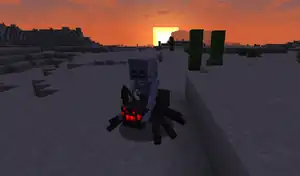
Entities can ride on, or be attached to, other entities. When this is the case, only the lower/"outer" entity's volume collides with other things, and only that entity can control movement.[Java Edition only] However, there are exceptions: players riding minecarts, boats, boats with chests, saddled horses, a happy ghast, a nautilus, a donkey, a mule, a camel, or baby zombies riding chickens, or skeletons riding horses or boats.
The only current legitimate combinations of riding entities are:
- A mob or player in a minecart, boat or boat with chests.
- A boat or boat with chest in a minecart[Java Edition only][1].
- A player on a saddled pig, horse, donkey, mule, skeleton horse, llama, strider, or camel.
- Any type of skeleton on a spider or cave spider[Bedrock Edition only]; also known as a spider jockey.
- Any type of baby zombie or zombified piglin[Java Edition only] on a chicken or other mobs[Bedrock Edition only]; also known as a chicken jockey.
- Skeletons riding skeleton horses.
- Pillager, vindicator, or evoker riding a ravager.
- Baby piglin, riding a baby hoglin.
- Baby piglin, riding a baby piglin on a baby hoglin.
- Baby piglin, riding a baby piglin, riding a baby piglin on a baby hoglin.
- A strider, riding another strider.
- Zombified piglin riding a strider.
A parrot perched on player's shoulder isn't considered as riding.
It is possible to have even more levels, such as a baby piglin on another baby piglin who is riding a hoglin in a minecart in a boat.
Entities can also be stacked on top of each other with the use of the /summon and /data commands in Java Edition. For example, using /summon spider ~ ~ ~ {Passengers:[{id:skeleton}]} summons a spider jockey, or using /ride in Bedrock Edition.
If an entity is riding another entity, the top entity cannot teleport because as soon as the teleport is made, the entity is teleported back to riding the other entity.[Java Edition only]
Starting from the Nether Update, entities that are riders or passengers of other entities cannot despawn.[verify][Java Edition only]
Types of entities
The table below lists types of entities that currently exist in Minecraft.
Entities listed as "solid" obstruct the passage of other entities.
| Type | Solid | Health | Living entity |
|---|---|---|---|
 Player[note 1] Player[note 1]
|
Yes | 20HP × 10 (Varies with attributes)
|
Yes |
 Mob Mob
|
Yes | Varies | Yes |
 Armor Stand[note 1] Armor Stand[note 1]
|
No | 20HP × 10
|
Yes |
 Mannequin[JE only] Mannequin[JE only]
|
No[verify] | 20HP × 10
|
Yes |
 Arrow Arrow
|
Yes (to boats and minecarts) | ∞ | No |
 Balloon[edu & BE only] Balloon[edu & BE only]
|
Yes | ∞ | No |
| Block display[JE only] | No | ∞ | No |
 Boat Boat
|
Yes | 6HP Recovers health quickly over time. |
No |
 Boat with Chest Boat with Chest
|
Yes | 6HP Recovers health quickly over time. |
No |
 Egg Egg
|
Yes | ∞ | No |
 End Crystal End Crystal
|
No | 5HP.png)
|
No |
 Ender Pearl Ender Pearl
|
Yes | ∞ | No |
 Evoker Fangs Evoker Fangs
|
No | ∞ | No |
 Eye of Ender Eye of Ender
|
No | ∞ | No |
 Experience Orb Experience Orb
|
No | 5HP
|
No |
 Falling Block Falling Block
|
No | ∞ | No |
 Fishing Bobber Fishing Bobber
|
Yes (to boats and minecarts) | ∞ | No |
 FireballSmall Fireball FireballSmall Fireball Wither skull Wither skull Dragon Fireball Dragon Fireball
|
Yes | ∞ | No |
 Firework Rocket Firework Rocket
|
No | ∞ | No |
 Ice Bomb[edu & BE only] Ice Bomb[edu & BE only]
|
Yes | ∞ | No |
| Interaction[JE only] | No | ∞ | No |
 Item Item
|
Yes (to boats and minecarts) | 5HP
|
No |
| Item display[JE only] | No | ∞ | No |
 Item frame[JE only] Item frame[JE only]
|
No | ∞ | No |
 Lightning Bolt Lightning Bolt
|
No | ∞ | No |
 Leash Knot Leash Knot
|
No | ∞ | No |
 Llama Spit Llama Spit
|
Yes | ∞ | No |
| Location Pointer Idle[BE only][note 2] | No | ∞ | No |
| Location Pointer Selected[BE only][note 2] | No | ∞ | No |
| Map Marker[BE only][note 2] | No | ∞ | No |
| Marker[JE only] | No | ∞ | No |
 Minecart |
Yes (to other entities) | 6HP Recovers health quickly over time. |
No |
 Minecart with chest |
Yes (to other entities) | 6HP Recovers health quickly over time. |
No |
 Minecart with command block |
Yes (to other entities) | 6HP Recovers health quickly over time. |
No |
 Minecart with furnace[JE only] |
Yes (to other entities) | 6HP Recovers health quickly over time. |
No |
 Minecart with hopper |
Yes (to other entities) | 6HP Recovers health quickly over time. |
No |
 Minecart with monster spawner[JE only] |
Yes (to other entities) | 6HP Recovers health quickly over time. |
No |
 Minecart with TNT |
Yes (to other entities) | 6HP Recovers health quickly over time. |
No |
 Painting Painting
|
No | ∞ | No |
| Ruler[BE only][note 2] | No | ∞ | No |
| Ruler Idle[BE only][note 2] | No | ∞ | No |
 Primed TNT Primed TNT
|
No | ∞ | No |
| Text display[JE only] | No | ∞ | No |
 Shulker Bullet Shulker Bullet
|
Yes | ∞ | No |
 Snowball Snowball
|
Yes | ∞ | No |
 Trident Trident
|
Yes | ∞ | No |
 Wind Charge Wind Charge
|
Yes | ∞ | No |
Motion
Gravity works differently in Minecraft than the real world, as not everything is subject to the same acceleration. Additionally, there is a drag force proportional to velocity, again dependent on the entity.
This is a GitHub repository with some in-depth explanation about the topic.
In general, entities perform 3 operations to calculate movement each tick:
- Apply acceleration: Add acceleration to the current velocity (for most entities, the only acceleration is gravity),
- Apply drag: Multiply the current velocity by a drag coefficient (which may be different for the horizontal and vertical components),
- Update position: Add the current velocity to the current position.
Different entities perform these operations in different orders within the tick, which changes their behavior. For example, a living entity in the air is described by the following code each tick:
// Update position
position.x += velocity.x;
position.y += velocity.y;
position.z += velocity.z;

// Update acceleration
velocity.y -= 0.08D;

// Update drag
velocity.x *= 0.91F;
velocity.y *= 0.98F;
velocity.z *= 0.91F;
Just substituting the correct values for acceleration and drag and ordering the three operations correctly is enough to exactly simulate any entity listed below. Note that different entities sometimes use different floating point precision for these values: either single precision (float) or double precision (double). Since rounding errors accumulate each tick, the precision can make a noticeable difference in their behavior (especially when they are moving fast).
| Kind | Ticking order | Gravity[note 3]
(m/tick/tick) |
Drag
(vertical) |
Drag
(horizontal) |
Terminal velocity
(m/tick)[note 4] |
Terminal velocity
(m/s) |
Maximum horizontal travel distance
(m/(m/s))[note 5] |
|---|---|---|---|---|---|---|---|
| Players and other living entities
|
Position, Acceleration, Drag | -0.08 (double) | 0.98 (float) | 0.91 (float)[note 6] | 3.92 | 78.4 | 11.111 |
Players/mobs with  Slow Falling Slow Falling
|
-0.01 (double)
|
0.49 | 9.80 | 11.111 | |||
  Falling blocks and TNT Falling blocks and TNT
|
Acceleration, Position, Drag | -0.04 (double) | 0.98 (double) | 1.96 | 39.2 | 50 | |
| Items
|
-0.04 (double) | 0.98 (double) | 0.98 (float) | 1.96 | 39.2 | 50 | |
| Experience orbs
|
-0.03 (double) | 0.98 (float) | 1.47 | 29.4 | 50 | ||
| Minecarts[note 7]
|
-0.04 (double) | 0.95 (double) | 0.76 | 15.2 | 20 | ||
| Thrown fishing bobbers
|
-0.03 (double) | 0.92 (double) | 0.345 | 6.90 | 12.5 | ||
  Boats and chest boats Boats and chest boats
|
Acceleration, Drag, Position | -0.04 (double) | N/A[note 8] | 0.90 (float)[JE only]/
N/A[BE only] |
∞ | ∞ | 9 |
| Thrown eggs, snowballs, and ender pearls
|
Acceleration, Drag, Position[note 9] | -0.03 (double) | 0.99 (float) | 0.99 (float) | 2.97 | 59.4 | 99 |
 Thrown potions Thrown potions
|
-0.05 (double)
|
4.95 | 99.0 | ||||
 Thrown bottles o' enchanting Thrown bottles o' enchanting
|
-0.07 (double)
|
6.93 | 138.6 | ||||
| Fireballs, small fireballs, wither skulls, and dragon fireballs
|
Acceleration, Drag, Position | 0.10 (double)[note 3] | 0.95 (float) | 1.90 | 38.0 | 19 | |
 Dangerous wither skulls Dangerous wither skulls
|
0.10 (double)[note 3] | 0.73 (float) | 0.2703703 | 5.407407 | 2.703703 | ||
| Wind charges
|
0.10 (double)[note 3] | N/A[note 8] | ∞ | ∞ | ∞ | ||
| Llama Spit
|
Position, Drag, Acceleration | -0.06 (double) | 0.99 (float) | 6.00 | 120.0 | 100 | |
| Fired arrows, and thrown tridents
|
-0.05 (double) | 0.99 (float) | 5.00 | 100.0 | 100 | ||
- ↑ a b In Bedrock Edition, these entities are under the mob category.
- ↑ a b c d e Only available in Bedrock Editor.
- ↑ a b c d Explosive projectiles and wind charges are not affected by gravity but instead get acceleration from getting damaged.
- ↑ Terminal velocity is given by if drag is before acceleration and otherwise.
- ↑ For axes with no acceleration, maximum travel distance is given by if position is before drag and otherwise. Table values are the number that, when multiplied by the initial velocity, gives the maximum travel distance.
- ↑ Players, mobs and armor stands whose OnGround property is set to 1 have a horizontal drag coefficient of . Friction is 0.6 by default, 0.8 for Slime Blocks, 0.98 for Ice, Packed Ice and Frosted Ice, and 0.989 for Blue Ice.
- ↑ Minecarts have a maximum horizontal velocity of 0.4. Any greater value is reset to that number before updating the position.
- ↑ a b For boats and wind charges, the order between acceleration and drag doesn't matter: Boats have no vertical drag, and wind charges have no drag at all.
- ↑ The order of throwable projectiles was changed in Java Edition 1.21.2, from "Position, Drag, Acceleration" to "Acceleration, Drag, Position".
Formulas
It can be useful to have a closed-form formula for and entity's position and velocity. These are not exact like a program would be, because the in-game movement is subject to floating-point rounding errors and mathematical formulas are not. A detailed explanation of how these formulas were derived can be found here.
Velocity
Applying an initial velocity on an entity, the entity's velocity after travelling for a number of ticks can be given by the formulas:
- Drag applied before acceleration:
- Drag applied after acceleration [note 1]:
Initial velocity and acceleration should be interpreted as vectors, and drag as a diagonal matrix. This means that the formulas work for each X, Y, and Z component separately if drag, initialVelocity, and acceleration are replaced with their corresponding X, Y, or Z components.
Position
Here is drag, is acceleration, is ticksPassed, and is initialVelocity. Then an entity starting at will end at a given by:
- Position, Drag, Acceleration:
- Position, Acceleration, Drag:
- Acceleration, Position, Drag:
- Drag, Acceleration, Position:
- Drag, Position, Acceleration[note 2]:
- Acceleration, Drag, Position:
Like before, initial position, initial velocity and acceleration should be treated as vectors and drag as a diagonal matrix.
- ↑ For entities where the acceleration is applied before drag, the effective acceleration is the acceleration scaled by the drag coefficient; this is why their terminal velocities aren't whole numbers while the others are.
- ↑ No entity has "Drag, Position, Acceleration" order but the formula is included for completeness.
Calculator
- ↑ a b Yaw and pitch follow the Minecraft's convention, thus zero yaw is directed at +Z (south) and looking upwards corresponds to negative values of pitch.
Data values
Java Edition
- [NBT Compound / JSON Object]: Root tag.
- Tags common to all entities see Template:Nbt inherit/entity/template
Bedrock Edition
Video
History

- early history
- when in Java Edition were entities given a dedicated folder in worlds?
Java Edition
| ? | Added entities. | ||||||
|---|---|---|---|---|---|---|---|
| Java Edition Infdev | |||||||
| 20100227-1414 | Removed entities. | ||||||
| 20100316 | Reimplemented entities. | ||||||
| Java Edition | |||||||
| 1.1 | ? | Players cannot interact with entities from far away in Creative mode. | |||||
| 1.4.2 | 12w34a | Entities can now use portals. | |||||
| 1.9 | 15w31a | Projectile motion has now been changed slightly.[2] | |||||
| 15w36a | Players can now be pushed by other entities (exceptions being items and experience orbs). | ||||||
| 15w45a | Entities bunched up in a 1×1 hole together no longer push away entities touching adjacent corners. | ||||||
| 15w49a | Projectiles now take the thrower's momentum into account when the player is falling, flying with elytra, or taking knockback; but not when the player is walking, riding an entity, or flying in Creative mode. | ||||||
| 1.11 | 16w32a | Entity IDs have now been changed to have underscores and no capital letters. They can also be used by typing minecraft: before the IDs, similar to block IDs.
| |||||
The ID for mobs (Mob), and monsters (Monster) have now been removed. | |||||||
| 1.21.2 | 24w39a | Thrown projectiles now tick in gravity-drag-position order. | |||||
| 1.21.6 | 25w19a | Projectiles now have a target tolerance margin that changes over time. | |||||
Bedrock Edition
| Pocket Edition Alpha | |||||||
|---|---|---|---|---|---|---|---|
| ? | The insides of mobs no longer render. | ||||||
| Bedrock Edition | |||||||
| ? | The insides of mobs now render again. | ||||||
| 1.21.90 | Preview 1.21.90.26 | Projectiles now have a target tolerance margin that changes over time. | |||||
Legacy Console Edition
| Legacy Console Edition | |||||||
|---|---|---|---|---|---|---|---|
| Xbox 360 | Xbox One | PS3 | PS4 | PS Vita | Wii U | Switch | |
| TU1 | CU1 | 1.00 | 1.00 | 1.00 | Patch 1 | 1.0.1 | Added entities. |
| TU19 | CU7 | 1.12 | 1.12 | 1.12 | Entities can now use portals. | ||
| TU46 | CU36 | 1.38 | 1.38 | 1.38 | Patch 15 | Projectiles now take the thrower's momentum into account. | |
| TU54 | CU44 | 1.52 | 1.52 | 1.52 | Patch 24 | 1.0.4 | Players can now be pushed by other entities (exceptions being items, experience orbs and other players). |
Trivia
- When a entity is moving away from its block radius, the solid block can be placed but it does not emit a place sound effect or the player's placing animation.[Java Edition only]
- in Bedrock Edition however, the block place sound effect can be played and emitted and the player's placing animation plays but it does not when using a controller or keyboard and mouse connection.
Issues
Issues relating to "Entity" are maintained on the bug tracker. Issues should be reported and viewed there.
See also
- Block entity – unlike the entities mentioned above, these are simply blocks that store additional data.
References


| Geography | |||||||||
|---|---|---|---|---|---|---|---|---|---|
| Sky and fog | |||||||||
| Weather |
| ||||||||
| Dimensions | |||||||||
| World types |
| ||||||||
| Player constructions |
| ||||||||
| Matter | |||||||||
| Sound | |||||||||
| Joke |
| ||||||||
| Bugs |
| ||||||||
| Removed |
| ||||||||


.png)


