Cloud

Clouds are graphical effects in the sky. While serving a solely aesthetic purpose, they can be used to determine directions because they always move westward.
Appearance

The appearance of clouds varies depending on the graphics settings used either on the specific clouds one[JE only] or the general graphics mode:
- Fast/Simple: Clouds are opaque instead of transparent. They do not change between day and night. Their color comes from the top of the fancy clouds. Their smallest horizontal dimensions are 8×8 blocks wide. In Java Edition, fast clouds are two-dimensional. Simple clouds in Bedrock Edition are also opaque, but remain 3D (three-dimensional), and are not affected by fog. Their appearance is similar to cirrus clouds.
- Fancy: Clouds are translucent, three-dimensional prisms, approximately four blocks tall and 12×12 blocks wide. The transparency can be affected by fog and the daylight cycle. They are similar in appearance to stratocumulus clouds.
- Fabulous! graphics in Java Edition also affect clouds, being the same as Fancy, but also being visible through transparent blocks and water. In Bedrock Edition, clouds are always visible through transparent blocks and water, even with Simple graphics.
- Vibrant Visuals[BE only] adds more layers of lighting to clouds, making them lighter on the edges and darker in the middle. The clouds also create shadows and when a cloud blocks the sunlight, the environment darkens. Because clouds use environment mapping, they are always reflected by water regardless of whether they are visible on the screen. In addition to weather and daylight tinting, clouds have unique tints based on the biome. Global light sources such as the sun also tint clouds with their color depending on how close the clouds are to the light source.
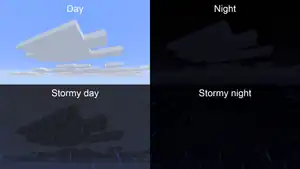
Clouds are tinted light gray during the day, which changes to gray or dark gray depending on the weather and the daylight cycle. During the night, fancy clouds are more transparent. Rainfall and thunderstorms darken clouds even in dry biomes, but snowfall does not have any additional effects. In Bedrock Edition, clouds gradually turn orange during sunset and sunrise at any graphics mode.
The shape, dimensions, and color of clouds can be changed by modifying the clouds.png file located within assets\minecraft\textures\environment within the version's JAR file. The file's dimensions can be changed to any size.
Clouds are made from individual square pieces. The game assembles clouds by placing cloud pieces one by one.
Behavior
Clouds always float westward between layer 192 and 196. They are not interactive, and simply float through blocks and entities. Unlike in real life, clouds themselves do not produce rain or snow, meaning rain or snow continues even above the clouds.
The maximum distance in which clouds are rendered depends on the cloud distance setting in Java Edition (max 128 chunks) or the render distance in Bedrock Edition. With Vibrant Visuals, the cloud distance is controlled by a separate "Clouds" slider, which has for different options at a maximum of 128 chunks.[more information needed] Clouds do not render with a render distance of 3 chunks or lower.
Since clouds are rendered client-side, the position of clouds is different for each player on a server.
Clouds retain their position even if the game is restarted. The position of clouds is persistent between worlds—if the player quits their current world and generates a new one, then travels to the same coordinates they were at in the previous world, the clouds appear in the same position as the previous world.
History

- 24w33a visual changes
- Dimension type configurability
Java Edition
| Java Edition Classic | |||||||
|---|---|---|---|---|---|---|---|
| May 23, 2009 | Notch says he accomplished adding "Clouds two tiles above the maximum build height". | ||||||
| 0.0.14a |  Added clouds, which float westward between layers 108 and 112. Added clouds, which float westward between layers 108 and 112. | ||||||
| Java Edition Indev | |||||||
| ? | The color and height of clouds can now be changed via world editing. | ||||||
| Java Edition Infdev | |||||||
| 20100227-1414 | With the removal of Indev world types and formatting, clouds can no longer be recolored or have their height changed. | ||||||
| 20100330 | Clouds no longer follow the player horizontally. However, they still follow the player vertically.[verify] | ||||||
| 20100611 |  Clouds are now 3D, have a top texture, and are translucent. Clouds are now 3D, have a top texture, and are translucent. | ||||||
| 20100615 | A Fast/Fancy graphics setting is added, which toggles clouds between two- and three-dimensional. | ||||||
| 20100624 |  Clouds no longer have a further texture applied. Clouds no longer have a further texture applied. | ||||||
| Java Edition Beta | |||||||
| 1.8 | Pre-release | Now clouds float between layers 128 and 132. | |||||
| Java Edition | |||||||
| 1.0.0 | Beta 1.9 Prerelease 5 | Clouds can now be disabled in the Video Options menu. | |||||
| ? | Clouds now completely occlude the rendering of blocks when seen from below. | ||||||
| 1.5 | 13w06a | Fixed blocks being unable to be seen through clouds from below. | |||||
| 13w10b | Undid the previous fix due to performance reasons. | ||||||
| 1.8.1 | pre4 | The shape of clouds on "Fast" and "Fancy" are now controlled with the same option that enables clouds, rather than with the standard Fast and Fancy graphics. | |||||
| 1.13 | 18w10d | Big optimizations to how clouds are rendered. | |||||
| 18w14a | The rendering of clouds has been optimized again. | ||||||
| 1.15 | 19w38b | Blocks can now be seen through clouds from below again.[1] | |||||
| 19w44a | Clouds no longer follow the player vertically.[2] | ||||||
| 1.17 | 21w06a | Now clouds float between layers 192 and 196. | |||||
| 21w13a | Reverted the above change. | ||||||
| 1.18 | experimental snapshot 2 | Clouds once again float between layers 192 and 196. | |||||
| 1.21.6 | 25w16a | Clouds now exist all the way to the horizon.[more information needed] | |||||
| The cloud texture no longer supports colored pixels.[more information needed] | |||||||
| 25w17a | Cloud rendering distance can now be configured independently of world/chunk render distance. | ||||||
| 25w21a | The texture file used for clouds has been changed.
| ||||||
| A creeper face pattern now appears in the clouds. | |||||||
| Upcoming Java Edition | |||||||
| 1.21.11 | 25w41a | Cloud movement and position is now tied to the world time, hence the same for all players on a server. | |||||
Bedrock Edition
| Pocket Edition Alpha | |||||||
|---|---|---|---|---|---|---|---|
| v0.6.0 | Added clouds. Clouds could be seen only in Fancy graphics, and if so, the clouds appeared opaque and two-dimensional, similar to the Fast clouds seen on Java Edition. | ||||||
| v0.7.0 | Clouds are now toggled with the Beautiful Skies option. | ||||||
| v0.7.4 | Clouds now have a darker color to match Java Edition. | ||||||
| v0.8.0 | build 1 | Clouds are always three-dimensional, and are opaque and transparent with Fast and Fancy graphics, respectively. | |||||
| v0.9.0 | build 1 | New culling of clouds. | |||||
| Clouds have been made translucent, as opposed to being completely opaque. | |||||||
| v0.10.0 | build 1 | New double-sided lighting on clouds that's more coherent with the terrain. | |||||
| build 6 | Better fog on clouds, starting farther away and following the sky color. | ||||||
| build 7 | The clouds and the terrain are now tinted red during sunset. | ||||||
| Bedrock Edition | |||||||
| 1.17.40 | beta 1.17.40.20 | Now clouds float between layers 192 and 196. | |||||
| 1.18.0 | ? | Clouds once again float between layers 128 and 132 in old worlds. | |||||
| 1.21.80 Experiment | Preview 1.21.80.25 | Added a unique pattern of clouds for when Vibrant Visuals is turned on. | |||||
| 1.21.90 | Preview 1.21.90.26 | The pattern of clouds has been changed. | |||||
| Removed the pattern of clouds unique to Vibrant Visuals. | |||||||
Legacy Console Edition
| Legacy Console Edition | |||||||
|---|---|---|---|---|---|---|---|
| Xbox 360 | Xbox One | PS3 | PS4 | PS Vita | Wii U | Switch | |
| TU1 | CU1 | 1.00 | 1.00 | 1.00 | Patch 1 | 1.0.1 | Added clouds. |
| TU5 | Cloud height raised to the top of the map, so clouds can no longer phase through blocks. | ||||||
| Cloud movement syncs with the game's time. | |||||||
-
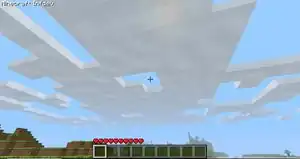 Textured infdev clouds.
 -
 Early Pocket Edition clouds.
 -
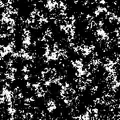 The cloud pattern prior to Java Edition 25w21a and Bedrock Edition Preview 1.21.90.26.
 -
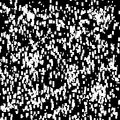 The cloud pattern from Bedrock Edition Preview 1.21.80.25 to Bedrock Edition Preview 1.21.90.26 with Vibrant Visuals turned on.
Issues
Issues relating to "Cloud" are maintained on the bug tracker. Issues should be reported and viewed there.
Trivia
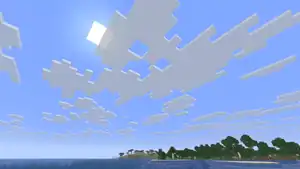
- The
cloud.pngimage includes a creeper face as gaps between clouds.
Gallery
Textures
-
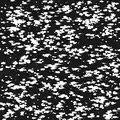 Clouds pattern. A black background was added for visibility.
 -
_JE3.png) The original texture file.
The original texture file.
Screenshots
-
 Old clouds.
 -
 Clouds can have different sizes and shapes.
 -
 Standing just above the cloud layer, looking down at the surface.
 -
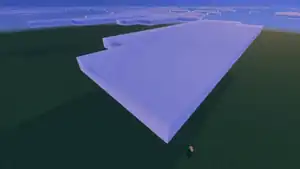 Clouds with Vibrant Visuals.
 -
 The cloud distance set to Low.
 -
 The cloud distance set to Medium.
 -
 The cloud distance set to High.
 -
 The cloud distance set to Ultra.
Development images
-
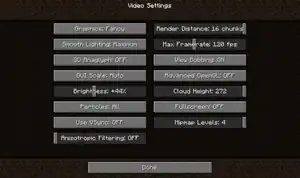 The unimplemented cloud height slider.
In other media
-
 Clouds artwork.
References
| Effects |
|
|---|---|
| Aspects | |


| Geography | |||||||||
|---|---|---|---|---|---|---|---|---|---|
| Sky and fog | |||||||||
| Weather |
| ||||||||
| Dimensions | |||||||||
| World types |
| ||||||||
| Player constructions |
| ||||||||
| Matter | |||||||||
| Sound | |||||||||
| Joke |
| ||||||||
| Bugs |
| ||||||||
| Removed |
| ||||||||


.png)


