Pocket Edition v0.7.0 alpha
For the development version of this release, see Pocket Edition v0.6.2 alpha.
v0.7.0 alpha

| Edition | ||||||
|---|---|---|---|---|---|---|
| Release date | ||||||
| Downloads | ||||||
| Protocol version |
11 | |||||
| ||||||
{
    "title": "v0.7.0 alpha",
    "images": [
        "Pocket Edition v0.7.0 alpha in game.jpg",
        "Pocket Edition v0.7.0 alpha.png"
    ],
    "rows": [
        {
            "field": "''(link to Pocket Edition article, displayed as Pocket Edition)''",
            "label": "(link to Edition article, displayed as Edition)"
        },
        {
            "field": "June 5, 2013<sup class=\" nowrap Inline-Template \" title=\"\">[<i>(link to Special:TalkPage/Pocket Edition v0.7.0 alpha article, displayed as <span title=\"prove for android  \" style=\"border-bottom: 1px dotted\">verify for Bedrock Edition</span>)</i>]</sup>(link to Category:Verify for Bedrock Edition article, displayed as Category:Verify for Bedrock Edition)",
            "label": "Release date"
        },
        {
            "field": "[https://archive.org/download/MCPEAlpha/PE-a0.7.0-armv7.apk Original]<br>\n[https://archive.org/download/MCPEAlpha/PE-a0.7.0-x86.apk x86]",
            "label": "Downloads"
        },
        {
            "field": "11",
            "label": "(link to Protocol version article, displayed as Protocol version)"
        }
    ],
    "invimages": [],
    "footer": "<table style=\"margin: auto; word-break: break-word;\">\n<tr style=\"background: inherit;\">\n<td style=\"padding: 0.4em\" >[[Pocket Edition  v0.6.0 alpha|<span style=\"margin-right:-0.35em\">◄</span>◄   v0.6.0 alpha]]</td>\n<td rowspan=\"2\" style=\"padding: 0.4em\">''' v0.7.0 alpha'''</td>\n<td style=\"padding: 0.4em\" >[[Pocket Edition  v0.8.0 alpha|  v0.8.0 alpha <span style=\"margin-right:-0.35em\">►</span>►]]</td>\n</tr>\n<tr style=\"background: inherit;\">\n<td style=\"padding: 0.4em\">\n[[Pocket Edition  v0.6.1 alpha|◄   v0.6.1 alpha]]\n</td>\n\n<td style=\"padding: 0.4em\">\n[[Pocket Edition  v0.7.1 alpha|  v0.7.1 alpha ►]]\n</td>\n</tr>\n</table>"
}
Other editions with a version "0.7.0":
 There is a guide for this update!
See Bedrock Edition guides/0.7 releases for a guide to all of the new features introduced in 0.7 releases.
v0.7.0 alpha is a major update to Minecraft: Pocket Edition that was released on June 5, 2013.[2] It adds notable features such as Pocket Edition Realms, buckets, cakes and spawn eggs, as well as other changes and fixes.
Additions


Blocks
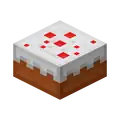
- A food block that can be eaten by the player.
- Can be crafted with three milk buckets, two sugar, one egg, and three wheat.
Items

- Can be crafted with iron ingots.
- Are used to carry water, lava, or milk.

- Places water.

- Places lava.

- Can be only obtained by using a bucket on a cow.
- Are used to craft cakes.
- Are used to spawn mobs directly.
- Cannot be obtained in Survival mode.
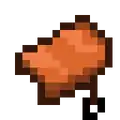
- Four type of spawn eggs, each spawning their respective mob:


- Currently serve no purpose.
- Are not yet obtainable.
General
- An official subscription-based server hosting service that allows players to create and manage their own private Minecraft servers.
- World creation enabled from June 10 onwards.[3]
- Not available on iOS devices.
- Players can press the
 button at the top-right of the screen to open the chat and talk with other players.
- Blends light levels across block faces and darkens corners using ambient occlusion to add semi-realistic shadows and glowing from light sources.
- Can be toggled off in the options.
- D-pad size
- Controls the size of the directional buttons as well as circle that appears when destroying blocks.
- Is a slider that is set all the way right by default.
- View distance
- Changes the render distance of the terrain.
- Is currently limited to a slider with two settings.
- The leftmost setting sets the render distance to two chunks, and the default rightmost setting sets it to four chunks.
- Beautiful skies
- Toggles clouds and sky color.
- Is on by default.
- Animated water
- Toggles water, lava, and fire animations.
- Is on by default.
- Smooth lighting
- Toggles smooth lighting.
- Is on by default.
- Hide GUI
- Makes the heads-up display invisible when toggled on.
- Is off by default.
Changes
Blocks
- Now lights flammable blocks around it on fire.
- Now has a flowing animation.
- Texture has been changed from
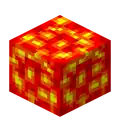 to
to 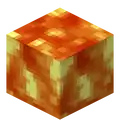 .
.
- Texture has been changed from
Items
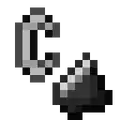
- Can now be used to set fires.

- Are now used to craft cakes.
- Throwing an egg has a chance of spawning an adult chicken.
Mobs
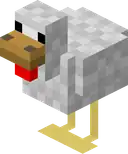
- Adult chickens now lay eggs and have a 1 in 8 chance to spawn a baby chicken and a 1 in 254 chance for an egg to hatch 4 chickens.
General

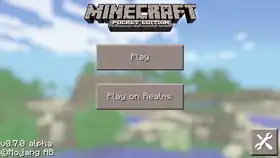
- The background is now a blurred image of a Minecraft world instead of a dirt background.
- The version number and Mojang copyright are both now in the bottom-left instead of the top and the bottom-right respectively.
- The Join Game button has been removed.
- The options button has been moved to the bottom-right.
- The Start Game button has been renamed to the Play button.
- Added the Play on Realms button in the middle.
- Xperia Play variant removed.
- Can be navigated with the D-pad on Xperia Play.
Select world menu
- Redesigned.
- Xperia Play variant removed.
- Cannot be navigated with the Xperia Play controller.
Create world menu
- Redesigned.
- Xperia Play variant removed.
- Can be partially navigated with the D-pad on Xperia Play.
- Server visibility, sound, and third person view are no longer directly controlled from it.
- An Options button has been added to it.
- Cannot be navigated with the Xperia Play controller.
- Replaced Android GUI with one rendered in game.
- Now uses options.txt to store settings.
- Removed the Lower graphics quality toggle.
- Is now split into four subsections, with some of them being split into further subsections:
- Game
- Name
- Difficulty
- Third person view
- Local server multiplayer
- Controls
- Sensitivity
- Invert Y-Axis
- Lefty
- Play with touch
- Split controls
- D-Pad size
- Feedback:
- Destroy block (vibrate)
- Graphics
- View Distance
- Fancy Graphics
- Beautiful skies
- Animated water
- Experimental:
- Smooth lighting
- Hide GUI
- Sound
- Sound Volume
- Game
- Not all options are available on all devices.
- Cannot be navigated with the Xperia Play controller.
- Connecting players inventory is now saved on server.
- Creative inventory
Fixes
From released versions before 0.7.0
- MCPE-131 – Dyes sometimes show up as the wrong color when holding in hand.
- MCPE-173 – no water animation (iOS).
- MCPE-381 – Bows aren't destroyed after taking maximum damage.
- MCPE-404 – Can't enter seed on T-mobile G2.
- MCPE-1212 – Torch placement is incorrect.
- MCPE-1296 – Breaking a door destroys or duplicates it.
- MCPE-1366 – Crash when TNT blows up Paintings.
- MCPE-1683 – Multiplayer: crash when player 1 breaks a sign as player 2 is writing on it.
- MCPE-1895 – Dashes go beyond world name if unnamed.
- MCPE-1896 – Cannot see what seed is being entered.
Other
- Fixed flowing lava depth not correctly updating in accordance with surrounding lava until receiving a random tick.
- Fixed lava being able to spread four blocks from its source instead of three in some cases.
References
- ↑ "Minecraft – Pocket Edition" (archived) – App Store.
- ↑ a b "Minecraft Pocket Edition 0.7.0 has been released! (We will start handing out severs next week) #mcpe" – @jbernhardsson (Johan Bernhardsson) on X (formerly Twitter), June 5, 2013
- ↑ "Minecraft PE has support for Realms but it's disabled until Monday. The client doesn't show that so it's very confusing, sorry..." – @danfrisk (Daniel Frisk) on X (formerly Twitter), June 5, 2013