Portfolio

This feature is exclusive to Minecraft Education.
Portfolio


| Rarity tier |
Common |
|---|---|
| Renewable |
No |
| Stackable |
Yes (64) |
{
    "title": "Portfolio",
    "rows": [
        {
            "field": "Common",
            "label": "(link to Rarity article, displayed as Rarity tier)"
        },
        {
            "field": "No",
            "label": "(link to Renewable resource article, displayed as Renewable)"
        },
        {
            "field": "Yes (64)",
            "label": "Stackable"
        }
    ],
    "invimages": [
        "Portfolio"
    ],
    "images": [
        "Portfolio.png"
    ]
}
A portfolio is an item that can save photos taken with a camera.[1]
Obtaining
Portfolios can be obtained in the creative inventory or through the /give command.
Usage
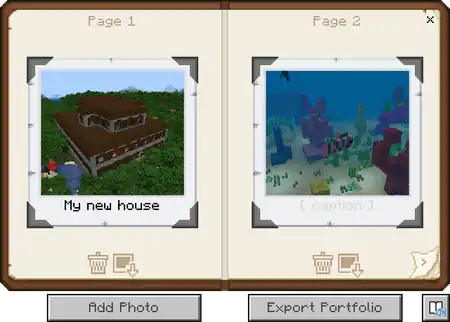
Once a photo has been taken using the camera, it appears in the portfolio. Once equipped, pressing the Use Item control brings up a two-page book of photos the player has taken, in chronological order. Captions can be added below each picture. Each picture can be deleted or saved as a photo item in the player's inventory. The "Add Photo" button allows the player to add pictures from photo items in their inventory, while the "Export Portfolio" button creates a PDF file in a specified folder containing all photos stored in the portfolio.
Data values
ID
| Name | Identifier | Numeric ID | Form | Translation key |
|---|---|---|---|---|
 Portfolio Portfolio | portfolio | 456 | Item | item |
History
| Pocket Edition Alpha | |||||||
|---|---|---|---|---|---|---|---|
| v0.16.0 | build 1 | Added portfolios. | |||||
| Their addition was likely accidental due to Pocket Edition sharing the same codebase as Education Edition. | |||||||
| build 2 | Removed portfolios. | ||||||
| Bedrock Edition | |||||||
| 1.16.100 | Added data-driven portfolios, allowing for add-ons to create custom portfolios. Normal Portfolios are still unobtainable. | ||||||
| Minecraft Education | |||||||
| 1.0 | Added portfolios. | ||||||
| ? | The "Export Portfolio" button now creates a PDF file instead of a .zip file containing all photos as JPGs. | ||||||
References


.png)
.png)


.png)


.png)


| |||||||||||||||||||
| |||||||||||||||||||


