Legacy Console Edition unused features


Since the beginning of development of the Legacy Console Edition there were features that went unused, and as time went on many other came along. These features may be debugging material, leftovers or scrapped concepts and ideas.
Mechanics
Unbreakable tools
All weapons, tools and armor can be made unbreakable via editing the item's NBT data.
Can break or place
Using NBT editors, items and blocks can be configured to be only placed on a specific block or only to destroy a specific block, however while the text for this mechanic works, the mechanic itself does not.
Blocks and items
Command blocks
In Java Edition, the command block cannot be obtained without using commands. In Legacy Console Edition however, they are completely unobtainable without inventory editing with an external editor. All three variants can be modded into the game, but none of them have any functionality. Oddly it has unused NBT data relating to executing commands and a tooltip stating "Used to execute commands." Also in terrain.png there are seemingly unused conditional mode textures for each variant of the command block. The game still calls on and applies the textures accordingly, which seems to imply command blocks were functional in debug/development builds of the game and used by 4J Studios. There are also several functions relating to opening and using command blocks and functions for running many different types of commands in the game data.
-
 Impulsive command block
 -
 Repeating command block
 -
 Chain command block
Barrier
_JE1_BE1.png)
The barrier can also only be obtained via external inventory editing. It's an invisible block used to make solid boundaries, however they are not fully functional as they cast shadows like other normal blocks, making them somewhat visible. It has a tooltip simply stating "An invisible but solid block." Interestingly barriers were used in the Aquatic Update tutorial mode[until TU73] and is also used in various Mini game maps, notably the glide track Shrunk.
debug_fourj_item
This mysterious item has the texture of a barrier, no display name and no tooltip hint. It can't be placed and has a secret use function that sets entities as persistent. The item texture ID is barrier but only applies to this item, as the actual barrier uses the block texture ID barrier.
Minecart with command block
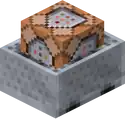
A minecart with a command block which also lacks any functionality. This only exists as an item, as placing it will result in a normal minecart being placed. The command block in the minecart cannot be modified via NBT editing and it has an unused tooltip stating "Used to execute commands on the move!"
Spectral arrow
_JE1.png)
Spectral arrows can be shot using a bow, however lack any functionality when hitting a player. It doesn't give the player the Glowing status effect which is also an unused feature of the Legacy Console Edition. The tooltip reads "Gives the victim a glowing outline that can be seen through blocks."
Bark wood
Wood is a block which has the log's side bark texture on all six sides and it can be chopped using an axe. It can be used as fuel in furnaces but is not flammable, as it is completely immune to fire. It cannot be used to craft planks though the tooltip states "Chopped using an axe, and can be crafted into planks or used as a fuel."
On PlayStation 4 Edition, all variants of wood were later added into the game, as obtainable blocks in both Creative and Survival, as the only version of Legacy Console to receive the Village & Pillage in the 1.90 update.
Petrified oak slab
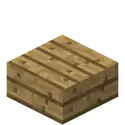
Before normal wooden slabs were added, there were other wooden slabs with stone properties, which means that they couldn't burn and needed to be broken with a pickaxe. These were however not removed.
Entities
Killer Bunny
The Killer Bunny is a white rabbit with horizontal red eyes, which is hostile towards players. It can only be summoned by changing a rabbit's RabbitType tag to 99 and upon being modded into the game, it will be given the name "entity.KillerBunny.name". Its attack strength changes depending on the difficulty: it will deal 5HP.png)
.png) points on Easy, 8HP points on Normal and 12HP × 6 points on Hard mode. Although not a neutral entity, it will not despawn when switching to Peaceful mode. The Killer bunny is retextured in most Texture and Mash-up packs despite not being offically used.
points on Easy, 8HP points on Normal and 12HP × 6 points on Hard mode. Although not a neutral entity, it will not despawn when switching to Peaceful mode. The Killer bunny is retextured in most Texture and Mash-up packs despite not being offically used.
Areas
Cavern testing area
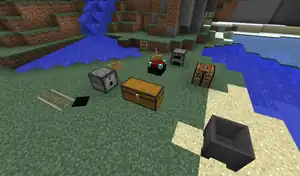
In the Battlemode map Large Cavern there is an out-of-bounds area that can't be accessed without hacking. It seems to be a testing area used to test various aspects of the game in Battlemode. It consists of a chest, a minecart with chest, a furnace and crafting table, an item frame, an enchanting table and a dispenser along with a cauldron. There is also a sign with text that reads "11111". The chest is empty, however the furnace has a stack of gold ingots inside.
Cavern unseen structures
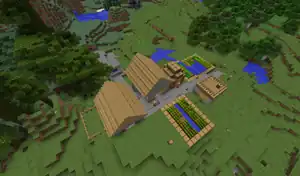
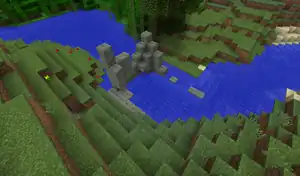
Also in the Large Cavern Battlemode map, there is an unseen village right beside the big opening of the cave and a obscure mossy stone brick structure which was likely going to be a part of the main battle arena.
Cove unseen caves


In the Large Cove map there is a lot of scenery that goes unused and unseen, the majority being caves. However, some can be seen without using mods, for example swimming out of the main arena through a one block gap at a waterfall.
Sounds
Corrupted cave sounds
There are two unused corrupted cave sounds, these being cave1.binka and cave8.binka. Oddly, the non-corrupted versions that are used are called cave1_fixed.binka and cave8_fixed.binka.
Warning: Loud!
| Sound | Name | File name | Path | |
|---|---|---|---|---|
| cave1 | cave1.binka | Minecraft.msscmp/ambient/cave/ | ||
| cave8 | cave8.binka | Minecraft.msscmp/ambient/cave/ | ||
Sound loops[X360 only]
The four audio loops from C418's early Java Edition sound tests existed in the Xbox 360 Edition files until TU57 when the game's audio format was changed to match that of the other editions. Despite other sound effects from alpha and beta versions of Java Edition existing still in the files to this day, these were removed.
| Sound | Name | Container | |
|---|---|---|---|
|
Warning: Loud![note 1] |
loops_waterfall.wav | resident.xwb | |
| loops_ocean.wav | resident.xwb | ||
| loops_cave chimes.wav | resident.xwb | ||
| loops_birds screaming loop.wav | resident.xwb | ||
Old explosion
The old explosion sound file still exists in the game files.
Warning: Loud!
| Sound | Name | Path |
|---|---|---|
| old_explosion.binka | Minecraft.msscmp/random/ |
Duplicate crafting sound
A duplicate of the crafting failed sound.
| Sound | Name | Path |
|---|---|---|
| btn_Back.binka | Minecraft.msscmp/note/ |
Resources
Blocks and items
Structure block textures

In terrain.png there are seemingly unused textures which were going to be used for the structure block. These texture resources are actually called on and used by the game for the structure block which implies that Structure Blocks were actually used in debug/development builds of the game. There are also several functions relating to opening and using structure blocks in the game data.
Structure void texture

Like the structure block textures, there is also a seemingly unused texture for the structure void in items.png. Structure voids are actually in the game and function identically to their Java Edition counterparts if loaded in a Structure file.
Shulker Box Break Particle Layer
There is an unused tile in Terrain.png directly to the right of the Shulker Box tile. This was intended to be a non tinted overlay when structure blocks are broken for texture packs, as seen in the Norse Mythology Mash-Up Pack's terrain.png file, but it seems 4J Studios forgot to actually implement it as the game does not attempt to call for it.
Particles
There are several unused Java Edition and Bedrock Edition particles in the particle sheet for Legacy Console Edition.
Other
Old tutorial screenshot
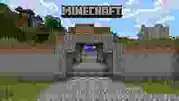
In numerous media files throughout the game and its many DLC packs, there is a low-quality version of the popup image from the tutorial mode in the Xbox 360 Edition TU19 tutorial world.
Aquatic Update graphic

This is a formerly used graphic featuring the artwork for the Aquatic Update. It was used to access the store page for Bedrock Edition for Xbox One Edition and Nintendo Switch Edition when discontinued. It's located in MCBREUpSell720.fui[note 2].
Altimeter icons
-
 Altimeter icon
 -
 Button to toggle altimeter
There was once a toggle-able altimeter planned for the glide mini game, however this idea was scrapped. Leftover are these graphics.
Team alliance icon
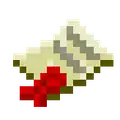
There was once a feature planned to allow alliances and teams in mini games, however this idea was scrapped. Leftover is this graphic along with some unused text regarding teams.
Minecraft icons

Inside almost every .fui[note 3] file from the Legacy Console Edition there is a 64×64 Minecraft icon whose purpose is unknown. Such an icon is only sometimes seen as world icons. These icons are identical to the MinecraftIcon.png file and are also present in Mash-Up packs.
PS3 layout table
.png)
Found on the PlayStation 3 Edition is this graphic located in DebugUIMarketingGuide720.fui, and which seems to be some sort of layout table.
Status effects
Glowing
To obtain the Glowing effect, the player's NBT data has to be edited using an editor. In other editions of the game this effect is obtained when hit by a spectral arrow, however that is not the case here as spectral arrows are non-functional in this edition, and so is the status effect itself.
Saturation
Saturation is non-functional in this edition and will not regenerate a player's hunger points. It can not last longer than a few ticks, even when the duration of the effect was made longer using a NBT editor.
Blindness
This unused effect impairs the players vision by surrounding them with a thick black fog, with only a few blocks being visible. It also prevents the player from sprinting and doing critical hits to mobs or players.
Health Boost
A non-functional status effect, which was intended to be used to increase a player's maximum health. It uses the absorption effect icon texture instead of its own.
Bad Luck
The direct opposite to the Luck status effect. It subtracts the effect level from the attribute generic.luck.[more information needed]
Other
In the Legacy Console Edition there is a debug menu that was probably used by the developers during development. It can currently only be accessed in Xbox 360 Edition TU4 and below.[1]
Old tutorial world
In the game files there is a leftover world file of the TU46 tutorial world. It's located in \Tutorial\Tutorial.mcs.
DLC
There is some DLC which used to be purchasable but now can't be obtained without modding anymore, most of which are located in \CU\DLC\.
History
_JE1_BE1.png)
| Legacy Console Edition | |||||||
|---|---|---|---|---|---|---|---|
| Xbox 360 | Xbox One | PS3 | PS4 | PS Vita | Wii U | Switch | |
| TU0 | Added debug options. | ||||||
| TU5 | CU1 | 1.00 | 1.00 | 1.00 | Patch 1 | 1.0.1 | Removed debug options. |
| TU14 | 1.04 | _JE5_BE1.png) _JE5_BE1.png) _JE5_BE1.png) _JE5_BE1.png) Added oak, spruce, birch and jungle bark wood. Added oak, spruce, birch and jungle bark wood. | |||||
| TU19 | CU7 | 1.12 | 1.12 | 1.12 | 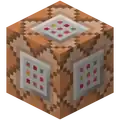 Added command blocks. Added command blocks. | ||
| TU25 | CU14 | 1.17 | 1.17 | 1.17 | _JE6_BE1.png) _JE6_BE1.png) Added acacia and dark oak bark wood. Added acacia and dark oak bark wood. | ||
| TU31 | CU19 | 1.22 | 1.22 | 1.22 | Patch 3 | Added barriers. | |
 Added the Killer Bunny. Added the Killer Bunny. | |||||||
| TU36 | CU25 | 1.28 | 1.28 | 1.28 | Patch 7 | Added Battlemode, including the maps Cavern, Cove and Crucible. | |
| TU43 | CU33 | 1.36 | 1.36 | 1.36 | Patch 13 | Added unused structure block textures to terrain.png. | |
| Added unused structure void textures in terrain.png. | |||||||
| Added the Chinese Mythology Mash-up pack. | |||||||
| TU46 | CU36 | 1.38 | 1.38 | 1.38 | Patch 15 | Added spectral arrows. | |
 Added the Glowing status effect. Added the Glowing status effect. | |||||||
| TU69 | 1.76 | 1.76 | 1.76 | Patch 38 | The tutorial world was updated for the Aquatic Update, leaving the old one leftover. | ||
_JE1_BE1.png) _JE1.png) _JE1_BE1.png) _JE1_BE1.png) _JE1_BE1.png) _JE1.png) Added stripped oak, spruce, birch, jungle, acacia and dark oak bark wood. Added stripped oak, spruce, birch, jungle, acacia and dark oak bark wood. | |||||||
Gallery
-
 The debug_fourj_item in the inventory
 -
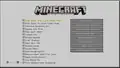 Debug options
 -
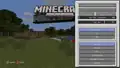 Debug menu
Notes
References
- ↑ "Debug unlocked" - AssemblerGames, September 13, 2018
| Java Edition |
| ||
|---|---|---|---|
| Bedrock Edition |
| ||
| Minecraft Education |
| ||
| MinecraftEDU | |||
| Legacy Console Edition | |||
| New Nintendo 3DS Edition | |||


.png)


