Ore UI


| Developer(s) |
Paulo Ragonha, Fernando Vía Canel, Marlon Huber-Smith, Anna Päärni, Danila Dergachev, Omar ElGaml, James Nicholls |
|---|---|
| Publisher(s) | |
| Platform(s) |
Same as in Bedrock Edition |
| Engine | |
| Written in |
TypeScript and JavaScript |
| Latest version |
React Facet: v18.3.0 |
| Release date |
First commit on October 11, 2021[1] |
| Size |
1.52MB |
| License | |
| Source available |
Yes |
| Links |
|
{
    "title": "Ore UI",
    "rows": [
        {
            "field": "Paulo Ragonha, Fernando Vía Canel, Marlon Huber-Smith, Anna Päärni, Danila Dergachev, Omar ElGaml, James Nicholls",
            "label": "Developer(s)"
        },
        {
            "field": "(link to Mojang Studios article, displayed as Mojang Studios)",
            "label": "Publisher(s)"
        },
        {
            "field": "Same as in ''(link to Bedrock Edition article, displayed as Bedrock Edition)''",
            "label": "Platform(s)"
        },
        {
            "field": "[https://coherent-labs.com/products/coherent-gameface/ Coherent Gameface]",
            "label": "Engine"
        },
        {
            "field": "(link to wikipedia:TypeScript article, displayed as TypeScript) and (link to wikipedia:JavaScript article, displayed as JavaScript)",
            "label": "Written in"
        },
        {
            "field": "React Facet: [https://github.com/Mojang/ore-ui/releases/tag/v18.3.0 v18.3.0]",
            "label": "Latest version"
        },
        {
            "field": "First commit on October 11, 2021",
            "label": "Release date"
        },
        {
            "field": "1.52MB",
            "label": "Size"
        },
        {
            "field": "(link to wikipedia:MIT License article, displayed as MIT License)",
            "label": "License"
        },
        {
            "field": "Yes",
            "label": "<span style=\"white-space:normal\">Source available</span>"
        },
        {
            "field": "\n* [https://github.com/Mojang/ore-ui Website]",
            "label": "Links"
        }
    ],
    "invimages": [],
    "images": [
        "Ore UI.png"
    ]
}
Ore UI is a collection of open source packages designed for building interactive video game user interfaces using web technology. Built on React and TypeScript, it provides reusable building blocks for video game development and general-purpose web applications.[2] Ore UI is currently used in games such as Minecraft: Bedrock Edition, Bedrock Editor, Minecraft Education, and Minecraft Legends.
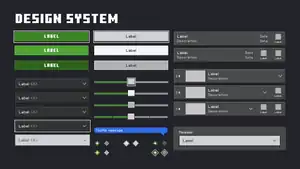

In Bedrock Edition, a new UI design system is being developed using the Gameface engine (formerly Hummingbird[5]) by Coherent Labs,[6][7][8] which made it possible to run modern web technology such as JavaScript, HTML and CSS.[9]
Unlike JSON UI, Ore UI is hard-coded and cannot be modified by resource packs.[10][11][12] Ore UI also does not support color codes[13][14][15] or emoji.[16][17]
Development
Bedrock Edition's UI redesign tech preview
On November 9, 2018, Tobias Ahlin, the lead experience designer at Mojang Studios, announced a UI overhaul coming to Bedrock Edition built on Hummingbird engine, which runs a subset of HTML and CSS, and a design system built with React.[7] A tech preview for Bedrock Edition title screen redesign featuring a user-friendly input for touch, controller, and keyboard, was shown at the dotJS 2018 developer conference.

The new title screen from the tech preview features two pages. The top page shows the player's last played world, with the background UI that changes to match the world's thumbnail. The bottom page shows five interactable buttons and their actions possibly:
- "Play" which lets the player navigate to the Select World screen.
- "Store" which lets the player navigate to the store (similar to the modern Marketplace).
- "Skins" which lets the player change their skin (similar to the modern Character Creator).
- "Achievements" and "Settings" which let the player view their achievements and settings.
There is also a profile button (with the player's profile picture) on the top right corner, which likely lets the player navigate to their profile screen.
The website for Minecraft JavaScript API documentation was once available through a link which can be seen near the end of the talk, the documentation provides the page to the tech preview where you can freely interact with the UI redesign.[7] The original link for the documentation now redirects to a completely different website, making the documentation completely inaccessible, and is now considered lost media.
On July 31, 2020, the very first look at the new achievements screen was revealed in Bedrock Edition beta 1.16.100.50, rolled out gradually for 5% players.[18] For the next 9 weeks, the number of players who can access the new achievements increases slowly from 5% to 75%.[19]
React Facet
On October 18, 2021, React Facet source code was published on Ore UI GitHub repository under MIT License.[20]
On October 25, 2021,[21] Paulo Ragonha, a tech lead at Mojang Studios, introduced React Facet, an observable-based state management for video game user interface built in React.[6] This was announced at the React Advanced 2021 developer conference. In the talk, Ragonha showcases how React Facet bridges game data by introducing a system that connects the backend C++ game engine (where the game's states reside) with the frontend JavaScript UI. This connection relies on a concept called facets, which are lightweight observable objects representing slices of the game's state. These facets allow the UI to subscribe to specific pieces of data from the game engine, such as player health, inventory, or environmental changes, and receive real-time updates as the state changes in the game.
Design system
The Ore UI design system can be found inside the Ore UI Developer Page section in the Minecraft Bedrock Developer Mode.
-
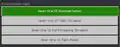 Ore UI Developer Pages section.
 -
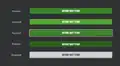 Hero button states.
 -
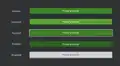 Primary button states.
 -
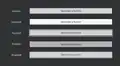 Secondary button states.
 -
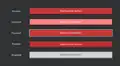 Destructive button states.
 -
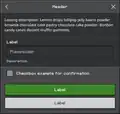 Modal with placeholder content.
 -
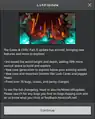 A dummy modal.
 -
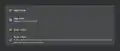 Checkboxes in action.
 -
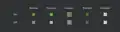 Checkbox states.
 -
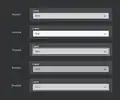 Dropdown button states.
 -
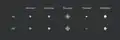 Radio button states.
 -
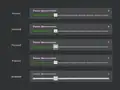 Slider states.
 -
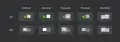 Switch states.
 -
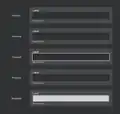 Text field states.
 -
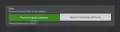 Toggle button states.
 -
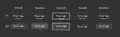 Tab button states.
 -
 All tag variants.
History
Bedrock Edition
| Bedrock Edition | |||||||
|---|---|---|---|---|---|---|---|
| 1.16.100 | beta 1.16.100.50 | .png) Achievement screen has been updated to match Ore UI, available in beta only, rolled out gradually for 5% players[18]. Achievement screen has been updated to match Ore UI, available in beta only, rolled out gradually for 5% players[18]. | |||||
| Release | Achievement screen is released to the public and no longer in beta only. | ||||||
| 1.18.30 | beta 1.18.20.21 | .png) Create New World screen has been updated to match Ore UI, available in beta only. Create New World screen has been updated to match Ore UI, available in beta only. | |||||
| 1.19.20 | Create New World screen is released to the public and no longer in preview only. | ||||||
| 1.19.40 | Preview 1.19.40.20 | .png) Control mode screen has been added to match Ore UI, available in preview only. Control mode screen has been added to match Ore UI, available in preview only. | |||||
| Preview 1.19.40.22 | .png) Report button screen in Profile (Other Player) screen has been updated to match Ore UI, available in preview only. Report button screen in Profile (Other Player) screen has been updated to match Ore UI, available in preview only. | ||||||
| Preview 1.19.40.23 | .png) Notification screen has been updated to match Ore UI, available in preview only. Notification screen has been updated to match Ore UI, available in preview only. | ||||||
| Release | Notification screen is released to the public and no longer in preview only. | ||||||
| 1.19.50 | Control mode screen is released to the public and no longer in preview only. | ||||||
| Report button screen in Profile (Other Player) screen is released to the public and no longer in preview only. | |||||||
| 1.19.80 | Preview 1.19.80.20 | .png) You Died screen (Experimental) toggle in Death screen has been updated to match Ore UI, available in preview only. You Died screen (Experimental) toggle in Death screen has been updated to match Ore UI, available in preview only. | |||||
| Editor screen has been added to match Ore UI, available in preview only. | |||||||
| Preview 1.19.80.21 | .png) .png) .png) .png) Sign in screen has been updated to match Ore UI, available in preview only. Sign in screen has been updated to match Ore UI, available in preview only. | ||||||
| Release | Sign in screen is released to the public and no longer in preview only. | ||||||
| 1.20.30 | Preview 1.20.30.22 | .png) "Worlds" tab in Play screen has been updated to match Ore UI, available in preview only. "Worlds" tab in Play screen has been updated to match Ore UI, available in preview only. | |||||
| Release | .png) You Died screen (Experimental) toggle in Death screen is released to the public and no longer in preview only. You Died screen (Experimental) toggle in Death screen is released to the public and no longer in preview only. | ||||||
| 1.20.60 | Preview 1.20.60.21 | .png) "Friends" tab in Play screen has been updated to match Ore UI, available in preview only. "Friends" tab in Play screen has been updated to match Ore UI, available in preview only. | |||||
| Preview 1.20.60.23 | .png) Edit World screen has been updated to match Ore UI, available in preview only[22]. Edit World screen has been updated to match Ore UI, available in preview only[22].
| ||||||
.png) Inbox screen has been added to match Ore UI, available in preview only[23]. Inbox screen has been added to match Ore UI, available in preview only[23]. | |||||||
| Realms Stories screen has been added to match Ore UI, available in preview only. | |||||||
| Preview 1.20.60.25 | .png) .png) Get Started button on Quick World Creation in Game Mode screen and Survival Difficulty screen has been added to match Ore UI, available in preview only. Get Started button on Quick World Creation in Game Mode screen and Survival Difficulty screen has been added to match Ore UI, available in preview only. | ||||||
| Release | Inbox screen is released to the public and no longer in preview only. | ||||||
| Get Started button on Quick World Creation in Game Mode screen and Survival Difficulty screen is released to the public and no longer in preview only. | |||||||
| 1.20.80 | Preview 1.20.80.21 | .png) "Servers" tab in Play screen has been updated to match Ore UI, available in preview only. "Servers" tab in Play screen has been updated to match Ore UI, available in preview only. | |||||
| Preview 1.20.80.23 | .png) Search for players screen has been updated to match Ore UI, available in preview only. Search for players screen has been updated to match Ore UI, available in preview only. | ||||||
| Death screen is released to the public and no longer in You Died screen (Experimental) toggle. | |||||||
| Release | Search for players screen is released to the public and no longer in preview only. | ||||||
| Realms Stories screen is released to the public and no longer in preview only. | |||||||
| 1.21.0 | Preview 1.21.0.20 | .png) Profile screen has been updated to match Ore UI, available in preview only. Profile screen has been updated to match Ore UI, available in preview only. | |||||
| Preview 1.21.0.25 | _(Bedrock_Preview_1.21.0.25).png) "Servers" tab (MOTD) in Play screen has been updated to match Ore UI, available in preview only. "Servers" tab (MOTD) in Play screen has been updated to match Ore UI, available in preview only. | ||||||
| Release | Profile screen is released to the public and no longer in preview only. | ||||||
| 1.21.20 | Preview 1.21.10.21 | .png) The texture of Control mode screen has been changed to match Ore UI. The texture of Control mode screen has been changed to match Ore UI. | |||||
| Preview 1.21.20.21 | .png) Bed screen (Experimental) toggle in Sleep screen has been updated to match Ore UI, available in preview only. Bed screen (Experimental) toggle in Sleep screen has been updated to match Ore UI, available in preview only. | ||||||
| Release | Achievement button in title screen and pause menu has been replaced with the profile button, along with the new profile screen, showing the player's statistics, achievements, and screenshots.[verify] | ||||||
| 1.21.30 | Preview 1.21.30.22 | .png) Screenshot Gallery screen in Profile screen has been added to match Ore UI, available in preview only. Screenshot Gallery screen in Profile screen has been added to match Ore UI, available in preview only. | |||||
| Preview 1.21.30.24 | .png) "Worlds" Tab in Play screen on Create From Template button screen has been updated to match Ore UI, available in preview only. "Worlds" Tab in Play screen on Create From Template button screen has been updated to match Ore UI, available in preview only. | ||||||
| Release | Screenshot Gallery screen in Profile screen is released to the public and no longer in preview only. | ||||||
| 1.21.40 | Preview 1.21.40.22 | .png) "Realms" tab in Play screen has been updated to match Ore UI, available in preview only. "Realms" tab in Play screen has been updated to match Ore UI, available in preview only. | |||||
| 1.21.50 | Preview 1.21.50.24 | Sleep screen is released to the public and no longer in Bed screen (Experimental) toggle. | |||||
| Release | Sleep screen is released to the public and no longer in preview only. | ||||||
| Editor screen is released to the public and no longer in preview only. | |||||||
| December 28, 2024 | Edit World screen is released to the public and no longer in preview only. | ||||||
| 1.21.60 | Play screen is released to the public and no longer in preview only. | ||||||
| 1.21.70 | Preview 1.21.70.22 | .png) Player Permissions screen in Pause menu screen has been updated to match Ore UI, available in preview only. Player Permissions screen in Pause menu screen has been updated to match Ore UI, available in preview only. | |||||
| Preview 1.21.70.23 | .png) The Report Bad Behavior screen in Profile (Other Player) screen has been changed to match Ore UI. The Report Bad Behavior screen in Profile (Other Player) screen has been changed to match Ore UI.
| ||||||
| "Report" screen has been renamed to "Report Bad Behavior" screen. | |||||||
| Release | Player Permissions screen in Pause menu screen is released to the public and no longer in preview only. | ||||||
.png) The "Friends" drawer is now accessible from the main menu and the pause screen. The "Friends" drawer is now accessible from the main menu and the pause screen. | |||||||
| 1.21.80 | Preview 1.21.80.25 | .png) Multiplayer and Server list in Disconnected screen or Kick screen has been updated to match Ore UI, available in preview only. Multiplayer and Server list in Disconnected screen or Kick screen has been updated to match Ore UI, available in preview only. | |||||
| 1.21.90 | Preview 1.21.90.25 | .png) .png) Quick World Creation in Select Character screen and Ready To Play screen has been added to match Ore UI, available in preview only. Quick World Creation in Select Character screen and Ready To Play screen has been added to match Ore UI, available in preview only. | |||||
| Release | Quick World Creation in Select Character screen and Ready To Play screen is released to the public and no longer in preview only. | ||||||
| 1.21.100 | Preview 1.21.100.20 | .png) Audio Settings screen has been updated to match Ore UI, available in preview only. Audio Settings screen has been updated to match Ore UI, available in preview only. | |||||
| Preview 1.21.100.22 | .png) .png) The Multiplayer and Server list in Disconnected screen or Kick screen in added Show Details button on added Error Details screen has been changed to match Ore UI, available in preview only. The Multiplayer and Server list in Disconnected screen or Kick screen in added Show Details button on added Error Details screen has been changed to match Ore UI, available in preview only. | ||||||
| Release | Multiplayer and Server list in Disconnected screen or Kick screen is released to the public and no longer in preview only. | ||||||
| 1.21.111 | Preview 1.21.110.20 | .png) The Edit World screen for Minecraft Realms has been updated to match Ore UI, available in preview only. The Edit World screen for Minecraft Realms has been updated to match Ore UI, available in preview only. | |||||
| Preview 1.21.110.25 | .png) "Social" tab button on people screen in Pause menu screen has been updated to match Ore UI, available in preview only. "Social" tab button on people screen in Pause menu screen has been updated to match Ore UI, available in preview only. | ||||||
| "Friends" tab has been renamed to "Social" tab, available in preview only. | |||||||
| Release | .png) Achievement screen has been changed to match Ore UI. Achievement screen has been changed to match Ore UI. | ||||||
| 1.21.120 | Preview 1.21.120.22 | .png) .png) Accessibility and Language Settings screen has been updated to match Ore UI, available in preview only. Accessibility and Language Settings screen has been updated to match Ore UI, available in preview only. | |||||
| Preview 1.21.120.23 | .png) The Multiplayer and Server list in Disconnected screen or Kick screen in added Learn More button has been changed to match Ore UI. The Multiplayer and Server list in Disconnected screen or Kick screen in added Learn More button has been changed to match Ore UI. | ||||||
| Preview 1.21.120.24 | .png) General Settings screen has been updated to match Ore UI, available in preview only. General Settings screen has been updated to match Ore UI, available in preview only. | ||||||
| Release | "Social" tab screen in Pause menu screen is released to the public and no longer in preview only. | ||||||
| "Friends" tab has been renamed to "Social" tab, is released to the public and no longer in preview only. | |||||||
| Upcoming Bedrock Edition | |||||||
| 1.21.130 | Preview 1.21.130.24 | .png) Video Settings screen has been updated to match Ore UI, available in preview only. Video Settings screen has been updated to match Ore UI, available in preview only. | |||||
Minecraft Education
| Minecraft Education | |||||||
|---|---|---|---|---|---|---|---|
| 1.21.90 | Preview 1.21.90.1 | Added Ore UI for new world screen. | |||||
.png) .png) Create New World and Edit World screen has been updated to match Ore UI. Create New World and Edit World screen has been updated to match Ore UI. | |||||||
Ore UI Versions
| 0.1.2 | Stabilize automated performance tests. | ||||||
|---|---|---|---|---|---|---|---|
| Add ESLint checks. | |||||||
| Fix Style updates not properly cleaning previous subscriptions. | |||||||
| 0.1.3 | Fix unmount cleanup of Facets. | ||||||
| 0.1.4 | Separate setWithCallback support from set in facet. | ||||||
| 0.2.0 | Add support for null values on some built-in equality checks. | ||||||
Add support for multiple facets in useFacetCallback and useFacetEffect. | |||||||
| 0.2.1 | Add "contribute" file with publishing documentation. | ||||||
Fix useFacetCallback return type. | |||||||
| 0.2.2 | Add login instructions to CONTRIBUTING.md. | ||||||
useFacetState setter memoized. | |||||||
| 0.2.3 | Add index to Map tests. | ||||||
| Add a condition property to the Mount component. | |||||||
Rename useFacetEffect to useFacetLayoutEffect and add a new useFacetEffect. | |||||||
| Add With component to refine mounted components Facet type. | |||||||
Deferred Mount feature: DeferredMountWithCallback. | |||||||
| 0.3.0 | Add support for id attribute. | ||||||
| Fix missing public APIs from published npm package. | |||||||
Rename RemoteFacet to SharedFacet. | |||||||
| Rename shared to shared-facet. | |||||||
Update README.md. | |||||||
| Make the types defined in the hooks more dynamic. | |||||||
| Add tscompiler paths for our packages. | |||||||
| Adding pr as a trigger of actions. | |||||||
| 0.3.2 | Introduce multiObserve and hasDefinedValue helpers. | ||||||
| 0.3.3 | Update the types of the useFacetCallback function. | ||||||
| Fix circular dependency. | |||||||
| 0.3.4 | Fix line endings settings for prettier. | ||||||
| Allow null as return value of the mount components. | |||||||
| 0.3.5 | Added a deferred mount config provider. | ||||||
| 0.3.6 | Support onMouseMove handler. | ||||||
| 0.3.7 | Fix memory leak caused by not removing child from parent. | ||||||
| 0.3.8 | Fix createFacet equalityCheck to not fire for undefined or null. | ||||||
| 0.3.9 | Added createFacetContext. | ||||||
| 0.3.10 | Added defaultEqualityCheck to createFacet, and introduced createStaticFacet. | ||||||
| 0.3.11 | Support data- properties related to narration. | ||||||
| 0.3.12 | Upgrade TypeScript version + tie VSCode TS version to workspace. | ||||||
| 0.4.0 | Convert some key null coalescing operators into explicit ternaries. | ||||||
Move responsibility of cleaning up effects from facets to useEffect() / useFacetEffect(). | |||||||
| 0.4.1 | Upgrade Yarn to 3.2.4. | ||||||
| Turn off static access logs in test environment. | |||||||
| Added improved logging to static facet context. | |||||||
| 0.4.2 | Make it possible to supply an initial value for useFacetRef. | ||||||
Support defaultReturnValue in useFacetCallback. | |||||||
| 0.4.3 | New linting rule to detect import issues. | ||||||
| 0.4.4 | Lock nodejs version. | ||||||
Fix useFacetCallback having outdated values. | |||||||
Fix useFacetCallback mismatch subscriptions. | |||||||
| Only accept numerical characters if the input type is number. | |||||||
| 0.4.5 | Update the list of maintainers in the README.md file. | ||||||
Keep useFacetCallback instance same even if facets instances change. | |||||||
| 0.5.0 | Tweak hasDefinedValue typing. | ||||||
| Adds support for custom equality checks on unwrap. | |||||||
| Batching support. | |||||||
| 0.5.1 | Add support for Gameface's cohinline attribute in dom-fiber. | ||||||
Update the list of maintainers in the README.md file. | |||||||
Force strict comparison eqeqeq eslint rule. | |||||||
Revert to using void as cleanup type for useFacetEffect. | |||||||
| 0.5.2 | Adding bigint to Value type. | ||||||
| 0.5.3 | Fix children being called with null and undefined. | ||||||
| 0.5.4 | Added support for foreignObject in our custom renderer. | ||||||
| 0.6.0 | Added property count to Map to make length of provided array available. | ||||||
Cached maps useFacetMemo can return values before any subscription. | |||||||
| 0.6.1 | Fix useFacetUnwrap support for custom equality check. | ||||||
| 0.6.2 | Updated puppeteer to the latest version. | ||||||
Update the useSharedFacet typing. | |||||||
| 0.6.4 | Correctly export fireEvent from renderer.ts. | ||||||
| 18.0.0 | Update to React 18. | ||||||
| 18.1.0 | Support for React 18's useTransition and startTransition. | ||||||
| 18.2.0 | Move documentation from separate branch to main branch. | ||||||
Added comment for code smell using useFacetCallback. | |||||||
Fix issue with incorrect typing for StrictReactNode. | |||||||
| New Unwrap and Times helper components. | |||||||
| 18.3.0 | Documentation improvements & spring cleaning. | ||||||
Fix support for updating equality checks of useFacetWrapMemo. | |||||||
Issues
Issues relating to "Ore UI", "OreUI", "New UI", "NewUI", or "New design" are maintained on the bug tracker. Issues should be reported and viewed there.
Gallery
Screenshots
-
.png)
-
.png)
-
.png)
-
.png)
-
.png)
-
.png)
-
.png) Ore UI refresh of create new world screen.
Ore UI refresh of create new world screen. -
.png) Ore UI refresh of edit world screen.
Ore UI refresh of edit world screen. -
.png)
-
.png)
-
.png)
-
.png) Ore UI refresh of inbox screen.
Ore UI refresh of inbox screen. -
.png) Ore UI refresh of search for players screen.
Ore UI refresh of search for players screen. -
.png) Ore UI refresh of profile screen (not signed in).
Ore UI refresh of profile screen (not signed in). -
.png) Ore UI refresh of profile screen.
Ore UI refresh of profile screen. -
.png) Ore UI refresh of report bad behavior screen.
Ore UI refresh of report bad behavior screen. -
.png) Ore UI refresh of profile in screenshot gallery screen.
Ore UI refresh of profile in screenshot gallery screen. -
.png) Ore UI refresh of the achievements screen.
Ore UI refresh of the achievements screen. -
.png)
-
.png) Ore UI refresh of Pause menu in player permissions screen.
Ore UI refresh of Pause menu in player permissions screen.
Development screenshots
-
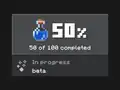 A sneak peek of the achievements screen
 -
 A sneak peek of the create new world screen, showing active resource packs section.
 -
 A sneak peek of the create new world screen, likely showing a part of the "Create" button
 -
 Another sneak peek of the create new world screen, likely showing the world's difficulty selector
 -
![An early look of the hotbar[24]](./_assets_/5af80496508534f4cdd561aac15bbc50/Ore_UI_development_hotbar.jpg)
-
![An early look of the inventory screen[25]](./_assets_/5af80496508534f4cdd561aac15bbc50/Ore_UI_development_inventory.jpg)
-
![An early look of the crafting table screen[26]](./_assets_/5af80496508534f4cdd561aac15bbc50/Ore_UI_development_crafting_table.jpg) An early look of the crafting table screen[26]
An early look of the crafting table screen[26] -
![An early look of the crafting recipe screen[27]](./_assets_/5af80496508534f4cdd561aac15bbc50/Ore_UI_development_crafting_recipe.jpg) An early look of the crafting recipe screen[27]
An early look of the crafting recipe screen[27] -
![An early look of the crafting recipe locked screen[27]](./_assets_/5af80496508534f4cdd561aac15bbc50/Ore_UI_development_crafting_recipe_locked.jpg) An early look of the crafting recipe locked screen[27]
An early look of the crafting recipe locked screen[27] -
![An early look of the furnace screen[28]](./_assets_/5af80496508534f4cdd561aac15bbc50/Ore_UI_development_furnace.jpg)
-
![An early look of the anvil screen[26]](./_assets_/5af80496508534f4cdd561aac15bbc50/Ore_UI_development_anvil.jpg)
-
![An early look of the dropper and dispenser screen[25]](./_assets_/5af80496508534f4cdd561aac15bbc50/Ore_UI_development_dropper_and_dispenser.jpg)
-
![An early look of the hopper screen[25]](./_assets_/5af80496508534f4cdd561aac15bbc50/Ore_UI_development_hopper.jpg)
-
![An early look of the trading screen[29]](./_assets_/5af80496508534f4cdd561aac15bbc50/Ore_UI_development_trading.jpg)
-
![An early look of the chest container screen[30]](./_assets_/5af80496508534f4cdd561aac15bbc50/Ore_UI_development_chest_container.jpg)
-
![An early look of the ender chest container screen[30]](./_assets_/5af80496508534f4cdd561aac15bbc50/Ore_UI_development_ender_chest_container.jpg) An early look of the ender chest container screen[30]
An early look of the ender chest container screen[30] -
![An early look of the barrel container screen[30]](./_assets_/5af80496508534f4cdd561aac15bbc50/Ore_UI_development_barrel_container.jpg)
-
![An early look of the shulker box container screen[30]](./_assets_/5af80496508534f4cdd561aac15bbc50/Ore_UI_development_shulker_box_container.jpg) An early look of the shulker box container screen[30]
An early look of the shulker box container screen[30] -
![An early look of the pocket ui profile of shulker box container screen[31]](./_assets_/5af80496508534f4cdd561aac15bbc50/Ore_UI_development_shulker_box_container_-_pocket_UI_profile.jpg) An early look of the pocket ui profile of shulker box container screen[31]
An early look of the pocket ui profile of shulker box container screen[31] -
![An early look of the classic ui profile of shulker box container screen[31]](./_assets_/5af80496508534f4cdd561aac15bbc50/Ore_UI_development_shulker_box_container_-_classic_UI_profile.jpg) An early look of the classic ui profile of shulker box container screen[31]
An early look of the classic ui profile of shulker box container screen[31] -
![An early look of the pocket ui profile of anvil screen[31]](./_assets_/5af80496508534f4cdd561aac15bbc50/Ore_UI_development_anvil_-_pocket_UI_profile.jpg)
-
![An early look of the classic ui profile of anvil screen[31]](./_assets_/5af80496508534f4cdd561aac15bbc50/Ore_UI_development_anvil_-_classic_UI_profile.jpg)
-
![An early look of the Player Permissions screen[32]](./_assets_/5af80496508534f4cdd561aac15bbc50/Ore_UI_development_player_permissions.jpg) An early look of the Player Permissions screen[32]
An early look of the Player Permissions screen[32] -
![An early look of the Player Permissions screen[32] (kick players confirmation dialog)](./_assets_/5af80496508534f4cdd561aac15bbc50/Ore_UI_development_player_permissions_(Kick_Other_Player).jpg) An early look of the Player Permissions screen[32] (kick players confirmation dialog)
An early look of the Player Permissions screen[32] (kick players confirmation dialog) -
![An early look of the party screen[33]](./_assets_/5af80496508534f4cdd561aac15bbc50/Ore_UI_development_create_party.jpg) An early look of the party screen[33]
An early look of the party screen[33] -
![An early look of the disconnection screen[34]](./_assets_/5af80496508534f4cdd561aac15bbc50/Ore_UI_development_disconnected.jpg) An early look of the disconnection screen[34]
An early look of the disconnection screen[34] -
![A sneak peek of the quick world creation in select character screen[35]](./_assets_/5af80496508534f4cdd561aac15bbc50/Ore_UI_development_quick_world_creation_-_select_character_screen.jpg) A sneak peek of the quick world creation in select character screen[35]
A sneak peek of the quick world creation in select character screen[35] -
![A sneak peek of the Realms Stories in "Timeline" tab opt in to timeline message.[36]](./_assets_/5af80496508534f4cdd561aac15bbc50/Ore_UI_development_realms_stories_in_%22timeline%22_tab_-_opt_in_to_timeline_message.jpg) A sneak peek of the Realms Stories in "Timeline" tab opt in to timeline message.[36]
A sneak peek of the Realms Stories in "Timeline" tab opt in to timeline message.[36] -
![A sneak peek of the Play Screen in "Realms" tab - "Add Members" button.[37]](./_assets_/5af80496508534f4cdd561aac15bbc50/Ore_UI_development_play_screen_in_%22realms%22_tab_-_%22Add_Members%22_button.jpg) A sneak peek of the Play Screen in "Realms" tab - "Add Members" button.[37]
A sneak peek of the Play Screen in "Realms" tab - "Add Members" button.[37]
dotJS 2018
-
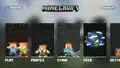 Early prototype of Bedrock Edition's title screen UI redesign
 -
Tech preview of Bedrock Edition's title screen UI redesign
-
![An improved version of the tech preview with the panorama updated to match Update Aquatic from 2020[38]](./_assets_/5af80496508534f4cdd561aac15bbc50/DotJS_2018_Bedrock's_UI_redesign_tech_preview%252C_improved_2020.jpg) An improved version of the tech preview with the panorama updated to match Update Aquatic from 2020[38]
An improved version of the tech preview with the panorama updated to match Update Aquatic from 2020[38] -
![Bedrock Edition's achievement UI redesign[39]](./_assets_/5af80496508534f4cdd561aac15bbc50/DotJS_2018_Bedrock's_UI_redesign_achievement.jpg) Bedrock Edition's achievement UI redesign[39]
Bedrock Edition's achievement UI redesign[39]
Ore UI-styled screenshots
These UIs take design inspiration from Bedrock Edition's UI redesign, and are not really implemented through Ore UI framework, instead they may use resource pack or different implementation based on JSON UI.
-
 Quests screen in the Minecraft Movie Live Event
 -
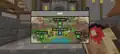 Map screen in the Minecraft Movie Live Event
 -
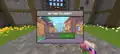 Return to Lobby confirmation dialog in the Minecraft Movie Live Event
 -
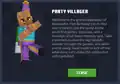 NPC conversation screen in the 15 Year Journey
 -
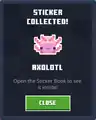 Sticker collected screen in the 15 Year Journey
 -
 Return to Hub confirmation dialog in the 15 Year Journey
Video
- Developer for Ore UI
See also
Release
- Quick World Creation
- Play
- Create New World
- Edit World
- Social, the Pause menu
- Sign In
- Realms Stories
- Inbox
- Player Permissions
- Search For Players
- Profile
- Report Bad Behavior
- Screenshot
- Achievement
- Death
- Sleep
- Controls
- Bedrock Editor
Preview
References
- ↑ "first commit · Mojang/ore-ui@a899c6a" – GitHub.
- ↑ "Mojang/ore-ui: 💎 Building blocks to construct game UIs using web tech." – GitHub.
- ↑ "Thanks for everyone that attended my talk live at @ReactAdvanced. For anyone that couldn't attend, I'll post a link here once it is available for everyone. It was a developer conference, but if you were waiting for a sneak peek on the new UI components... here it is ☺️" – @pirelenito on X (formerly Twitter), October 26, 2021
- ↑ "Mojang 2022 - Now" – Senior UX/UI Designer.
- ↑ "GameTest Q&A 2021/08/06" – Bedrock Wiki.
- ↑ a b "Using React to Build Performant Game UIs in Minecraft - Paulo Ragonha, React Advanced 2021" – December 27, 2021 on YouTube
- ↑ a b c "dotJS 2018 - Tobias Ahlin - Adding JavaScript to Minecraft" – March 4, 2019 on YouTube
- ↑ "Powered by Coherent Labs" – Coherent Labs.
- ↑ "Coherent Gameface" – Coherent Labs.
- ↑ "No. Allowing directly changing screens is what made improving the UI design of Minecraft impossible: any change breaks existing mods. It's the same reason why there is a graveyard of abandoned mods for Java Minecraft – not every modder has time to make updates for every release." – @Volgar on X (formerly Twitter), December 9, 2024
- ↑ "Intro to JSON UI" – Bedrock Wiki, April 1, 2024.
- ↑ MCPE-180757 — HBUI texture files are not in the "resource_packs" folder — resolved as "Works As Intended".
- ↑ "It probably won't be supported in the new screens, but it certainly shouldn't look like this, just plain text. Thanks, I'll pass it to the team." – @Volgar on X (formerly Twitter), December 12, 2024
- ↑ MCPE-174371 — The new "Play screen" UI doesn't support colored characters — resolved as "Works As Intended".
- ↑ MCPE-152246 — New Create New World UI doesn't support text formatting codes — resolved as "Works As Intended".
- ↑ "Emojis & Symbols" – Bedrock Wiki, April 1, 2024.
- ↑ MCPE-185774 — New server UI does not show some characters — resolved as "Won't Fix".
- ↑ a b "Uh-oh! I think I pressed something, and now 5% of #Minecraft beta users will see the new achievements screen. Well, might as well ask for feedback here: https://aka.ms/mcAchievementBeta." – @Volgar on X (formerly Twitter), July 31, 2020
- ↑ "I'll provide more context later, but... jam. It gets everywhere. Hence a whopping 75% of #Minecraft players have a chance to see the new achievements screen both in the latest release and the latest beta. Stay tuned! Ta-tah!" – @Volgar on X (formerly Twitter), December 10, 2020
- ↑ "Importing codebase from internal repository (#1) · Mojang/ore-ui@96c107c" – GitHub.
- ↑ "Schedule" – React Advanced.
- ↑ "Well, actually, that's not all, my dears. In today's preview the new Edit World screen is rolling out too! Check it out, and use the feedback button on the screen to tell us what you think." – @Volgar on X (formerly Twitter), December 13, 2023
- ↑ "Howdy, my dears! In case you missed it, there is now new Inbox screen built with Ore UI available in #Minecraft preview builds. It's a work in progress, but hopefully it'd be a hub for release notes, invitations etc" – @Volgar on X (formerly Twitter), December 13, 2023
- ↑ "So far the HUD only has the hotbar." – @xKingDarkYT on X (formerly Twitter), December 28, 2024
- ↑ a b c "New inventory, dropper/dispenser and hopper OreUI screens." – @nipitare_ on X (formerly Twitter), September 4, 2025
- ↑ a b "Anvil and the Crafting Table screens in OreUI" – @SmokeyStack_ on X (formerly Twitter), August 12, 2025
- ↑ a b "New OreUI crafting recipe screen in #Minecraft
First image is unlocked recipes, second one locked ones
Note: Amount of rows might be inaccurate and don't worry about bread." – @nipitare_ on X (formerly Twitter), September 9, 2025 - ↑ "Looks still early wip but could be soon... maybe as soon as next year?" – @xKingDarkYT on X (formerly Twitter), November 20, 2024
- ↑ "Some part of new trading screen in OreUI. Code wise trade offers seem to be implemented but cannot get them to work." – @nipitare_ on X (formerly Twitter), September 23, 2025
- ↑ a b c d "OreUI versions of the container screens" – @xKingDarkYT on X (formerly Twitter), December 28, 2024
- ↑ a b c d "Apparently OreUI screens are side by side if you use pocket ui profile. This applies to all OreUI container screens, shulker box and anvil are just examples." – @nipitare_ on X (formerly Twitter), September 18, 2025
- ↑ a b "An OreUI version of the player permissions screen was added in today's Preview (1.21.60.25)" – @xKingDarkYT on X (formerly Twitter), January 8, 2025
- ↑ "Seems like Mojang is working on a party system?" – @xKingDarkYT on X (formerly Twitter), February 28, 2025
- ↑ "New disconnection screen." – @xKingDarkYT on X (formerly Twitter), February 28, 2025
- ↑ "New Character Selector screen in #Minecraft Bedrock" – @inotflying on X (formerly Twitter), May 8, 2025
- ↑ "Realms upcoming feature sneak peek 👀
Bedrock Realm owners will have the option to require that players opt-in to the Realm's Timeline if they want to play on the Realm." – @CornerHardMC on X (formerly Twitter), May 16, 2025 - ↑ "Small Realms improvement coming in 1.21.90: there's a new "Add Members" button that takes you directly to the screen that allows you to add members to your Realm" – @CornerHardMC on X (formerly Twitter), May 24, 2025
- ↑ "A look at early abandoned designs of the Start Screen (Main Menu)
Left image is from 2019
Right image is from 2020" – @xKingDarkYT on X (formerly Twitter), April 24, 2023 - ↑ https://twitter.com/xKingDarkTV/status/1650372641637687296
External links
- Ore UI on GitHub
| Editions |
| ||||||
|---|---|---|---|---|---|---|---|
| Development |
| ||||||
| Technical |
| ||||||
| Multiplayer | |||||||
| Exclusive features |
| ||||||
| Removed | |||||||









.png)


.png)