Panorama

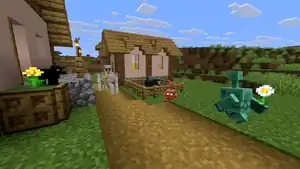
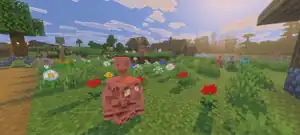
The panorama (also known as the cubemap[1]) is a slowly panning wide-angle view of a Minecraft world displayed on the title screen and most other menu screens. It is themed after the latest named update and can be customized with a resource pack.
Description
The panorama is shown as a background in all menu screens that do not cover the entire background. This includes all menu screens in Java Edition and in Bedrock Edition the main menu, loading world screen (except Realms), pop-up windows, all Ore UI menus, and the Dressing Room. Non-Ore UI error screens display a static background instead.
A separate panorma is shown when Vibrant Visuals is enabled. The brightness of this panorama is affected by the "Adjust Gamma" setting. Exclusive panoramas are also shown for Minecraft Preview with Vibrant Visuals disabled and Minecraft Education.
In the options, the panorama scrolling can be adjusted with the "Panorama Scroll Speed" accessibility setting in Java Edition and the "Screen Animations" video setting in Bedrock Edition. A blur overlay can be adjusted in the options in Java Edition.
The panorama files in Java Edition are found in the indexes directory as multiple square images (panorama_<0-5>.png) and are extracted in the same way as sound files, as denoted in Tutorial:Sound directory. In Bedrock Edition, the regular panorama is stored in the regular vanilla resource pack in 
textures/ui. Each Vibrant Visuals panorama (including discontinued) is stored in the internal resource pack of the respective version as .hdr files.
With resource packs, the vanilla panorama may be overwritten with custom images. Six square (1080x1080) images named panorama_<0-5>.png (or panorama_<0-5>.hdr for Vibrant Visuals) need to be placed in the assets/<namespace>/textures/gui[JE only][verify]/ textures/ui[BE only] directory. The first four panoramas are used horizontally from left to right, panorama_4 is rendered above panorama_0 and panorama_5 is rendered below the first panorama. Custom panoramas reverse the animation in Bedrock Edition by default (moving left instead of right). Several Marketplace add-ons and Minecraft Education events contain custom panoramas.
Current panoramas
The Copper Age
| Java Edition / Bedrock Edition | Bedrock Edition (Vibrant Visuals) | ||||
|---|---|---|---|---|---|
     
|
     
| ||||
|
|
In Java Edition, this panorama was introduced in 25w34a, currently used in 25w31a through 1.21.10, and formerly used in 25w41a through 25w44a.
In Bedrock Edition, this panorama was introduced in Preview 1.21.110.25. A different panorama shows when Vibrant Visuals is enabled.
The standard panorama was taken in Java Edition,[note 1] whereas the Vibrant Visuals panorama was taken in Bedrock Edition. Both panoramas were taken in worlds using the seed 7904846446833094596 at coordinates X=119 / Y=65 / Z=-6271. The world spawn of this seed is in an old growth birch forest at X=16 / Y=67 / Z=-32 and the coordinates X=119 / Y=65 / Z=-6271 are located in a plains biome 6240 blocks to the south.
Mounts of Mayhem
| Java Edition / Bedrock Edition | Bedrock Edition (Vibrant Visuals) | ||||
|---|---|---|---|---|---|
     
|
File:1.21.130 panorama HDR 4.png File:1.21.130 panorama HDR 0.pngFile:1.21.130 panorama HDR 1.pngFile:1.21.130 panorama HDR 2.pngFile:1.21.130 panorama HDR 3.png File:1.21.130 panorama HDR 5.png | ||||
|
|
In Java Edition, this panorama was introduced in 25w45a, currently used in 25w41a onward. In Bedrock Edition, an exclusive panorama for Vibrant Visuals was introduced in Bedrock Edition Preview 1.21.130.26.
The regular panorama was taken in Java Edition and the Vibrant Visuals panorama was taken in Bedrock Edition, both on the same unknown seed.
Chase the Clouds
| Minecraft Education | ||
|---|---|---|
     
| ||
|
In Minecraft Education, this panorama was introduced in 1.21.90.
Minecraft Preview
| Bedrock Edition / Minecraft Education | ||
|---|---|---|
     
| ||
|
This panorama is exclusively available on Bedrock Edition and Minecraft Education Previews after Preview 1.18.20.22 and Preview 1.21.40.1, and betas after Bedrock Edition beta 1.21.80.21. It is the only panorama the player could see in Previews and betas when Vibrant Visuals are turned off.
This panorama was taken on the seed 2510333169515186510 at coordinates X=979 / Y=71 / Z=-11.
Although this panorama is exclusive to Bedrock Edition and Minecraft Education, it was actually taken in Java Edition 1.17.1, which can be inferred from the color of water, the way in how clouds fade at high distances, and the side texture of the dirt path.
Historical panoramas
History
Java Edition
| Java Edition Beta | |||||||
|---|---|---|---|---|---|---|---|
| 1.8 | preview |       Replaced background in the main menu with panorama. Added panorama<0-5>.png. Replaced background in the main menu with panorama. Added panorama<0-5>.png. | |||||
| Java Edition | |||||||
| 1.0.0 | Beta 1.9 Prerelease 3 |  Changed panorama0.png. Changed panorama0.png. | |||||
| RC2 | Brightened the panorama overlay. | ||||||
| 1.6.1 | 13w24a | Renamed panorama<0-5>.png to panorama_<0-5>.png. | |||||
| 1.7.2 | 13w36a | The panorama was flipped horizontally. | |||||
| 13w38a | The change to the panorama mentioned above for 13w36a has now been reverted. | ||||||
| 1.13 | pre1 |       Changed panorama to reflect Update Aquatic.[2] Changed panorama to reflect Update Aquatic.[2] | |||||
| pre2 | Compressed panorama textures. | ||||||
| 1.14 | November 28, 2018 |       Changed panorama in all released 1.14 snapshots to reflect Village & Pillage. Changed panorama in all released 1.14 snapshots to reflect Village & Pillage. | |||||
| 1.15 | 19w41a |       Changed panorama in all released 1.15 snapshots to reflect Buzzy Bees. Changed panorama in all released 1.15 snapshots to reflect Buzzy Bees. | |||||
| 1.16 | 20w14a |       Changed panorama in all released 1.16 snapshots to reflect the Nether Update. Changed panorama in all released 1.16 snapshots to reflect the Nether Update. | |||||
| 1.17 | 21w15a |       Changed panorama in all released 1.17 snapshots to reflect Caves & Cliffs: Part I. Changed panorama in all released 1.17 snapshots to reflect Caves & Cliffs: Part I. | |||||
| 21w18a |    Changed panorama_0.png, panorama_1.png and panorama_5.png to eliminate torches. Changed panorama_0.png, panorama_1.png and panorama_5.png to eliminate torches. | ||||||
| 1.18 | 21w41a |       Changed panorama in all released 1.18 snapshots to reflect Caves & Cliffs: Part II. Changed panorama in all released 1.18 snapshots to reflect Caves & Cliffs: Part II. | |||||
| 1.19 | 22w15a |       Changed panorama in all released 1.19 snapshots to reflect The Wild Update. Changed panorama in all released 1.19 snapshots to reflect The Wild Update. | |||||
| 1.19.3 | 22w42a | The panorama scroll speed can now be customized in the accessibility settings. | |||||
| 1.20 | 23w14a |       Changed panorama in all released 1.20 snapshots to reflect Trails & Tales. Changed panorama in all released 1.20 snapshots to reflect Trails & Tales. | |||||
| 1.20.5 | 24w09a | The panorama is now visible in more in-game menus such as the world selection and creation menus as well as the options menu if accessed from the main menu, with a blur overlay in such cases. | |||||
| 1.21 | 24w18a |       Changed panorama in all released 1.21 snapshots to reflect Tricky Trials. Changed panorama in all released 1.21 snapshots to reflect Tricky Trials. | |||||
| 1.21.4 | 24w44a |       Changed panorama in all released 1.21.4 snapshots to reflect The Garden Awakens. Changed panorama in all released 1.21.4 snapshots to reflect The Garden Awakens. | |||||
| 1.21.5 | 25w10a |       Changed panorama in all released 1.21.5 snapshots to reflect Spring to Life. Changed panorama in all released 1.21.5 snapshots to reflect Spring to Life. | |||||
| 1.21.6 | 25w19a | Panorama textures must all be the same size and square. | |||||
| 25w20a |       Changed panorama in all released 1.21.6 snapshots to reflect Chase the Skies. Changed panorama in all released 1.21.6 snapshots to reflect Chase the Skies. | ||||||
| 1.21.9 | 25w34a | Changed panorama in all released 1.21.9 snapshots to reflect The Copper Age. | |||||
| 1.21.11 | 25w45a | Changed panorama in all released 1.21.11 snapshots to reflect Mounts of Mayhem. | |||||
Bedrock Edition
| Pocket Edition Alpha | |||||||
|---|---|---|---|---|---|---|---|
| v0.7.3 |       Replaced background with panorama. Added panorama<0-5>.png. Replaced background with panorama. Added panorama<0-5>.png. | ||||||
| Bedrock Edition | |||||||
| 1.2.0 | beta 1.2.0.2 |       Changed panorama. Changed panorama. | |||||
| December 2017 |       Changed panorama to reflect the 2017 holiday season. Changed panorama to reflect the 2017 holiday season. | ||||||
| ? | Reverted to the previous panorama after the holiday season. | ||||||
| 1.5.0 | beta 1.5.0.4 |       Changed panorama to reflect Update Aquatic. Changed panorama to reflect Update Aquatic. | |||||
| 1.8.0 | December 20, 2018 |       Changed panorama to show off cats and pandas. Changed panorama to show off cats and pandas. | |||||
| 1.11.3 |       Changed panorama to reflect Village & Pillage. Changed panorama to reflect Village & Pillage. | ||||||
| 1.14.0 | beta 1.14.0.1 |       Changed panorama to reflect Buzzy Bees. Changed panorama to reflect Buzzy Bees. | |||||
| beta 1.14.0.2 |      Changed panorama again to match Java Edition. Exclusively changed clouds on panorama_<0-4>.png. Only panorama_5.png identical to Java Edition. Changed panorama again to match Java Edition. Exclusively changed clouds on panorama_<0-4>.png. Only panorama_5.png identical to Java Edition. | ||||||
| October 18, 2019 |       Added panorama for beta versions. Added panorama for beta versions. | ||||||
| 1.16.0 | beta 1.16.0.57 | Changed panorama to reflect the Nether Update. | |||||
| 1.17.0 | beta 1.17.0.54 | Changed panorama to reflect Caves & Cliffs: Part I. | |||||
| October 1, 2021 |       Changed panorama in all released 1.16 and 1.17 versions to reflect 2021 Halloween season. Changed panorama in all released 1.16 and 1.17 versions to reflect 2021 Halloween season. | ||||||
| November 1, 2021 | Reverted to the previous panorama after the Halloween season. | ||||||
| 1.18.0 | beta 1.18.0.21 | Changed panorama to reflect Caves & Cliffs: Part II. | |||||
| 1.18.30 | Preview 1.18.20.22 | Added panorama for Preview versions. | |||||
| 1.19.0 | Preview 1.19.0.25 | Changed panorama to reflect The Wild Update. | |||||
| October 4, 2022 |       Changed panorama in non-beta versions from 1.19.0 and beta versions from beta 1.19.10.20 to reflect 2022 Halloween season. Changed panorama in non-beta versions from 1.19.0 and beta versions from beta 1.19.10.20 to reflect 2022 Halloween season. | ||||||
| November 1, 2022 | Reverted to the previous panorama after the Halloween season. | ||||||
| 1.20.0 | Preview 1.20.0.23 | Changed panorama to reflect Trails & Tales.
| |||||
| Changed the panorama rotation from counterclockwise to clockwise. | |||||||
| 1.21.0 | Preview 1.21.0.24 | Changed panorama to reflect Tricky Trials. | |||||
| 1.21.50 | Preview 1.21.50.26 |       Changed panorama to reflect The Garden Awakens. Changed panorama to reflect The Garden Awakens. | |||||
| 1.21.70 | Preview 1.21.70.26 | Changed panorama to reflect Spring to Life. | |||||
| 1.21.80 | Preview 1.21.80.21 | Changed panorama from Minecraft beta to reflect the Preview versions. | |||||
| 1.21.90 | Preview 1.21.90.25 |       Changed panorama to reflect Chase the Skies. Changed panorama to reflect Chase the Skies. | |||||
| Preview 1.21.90.26 |       Added a new panorama that is used when the Vibrant Visuals setting is turned on. Added a new panorama that is used when the Vibrant Visuals setting is turned on.
| ||||||
      Changed main panorama again to match the Vibrant Visuals panorama. Changed main panorama again to match the Vibrant Visuals panorama. | |||||||
| Preview 1.21.90.28 | Changed main panorama again to match Java Edition. | ||||||
| 1.21.111 | Preview 1.21.110.25 | Changed panoramas to reflect The Copper Age. | |||||
| Upcoming Bedrock Edition | |||||||
| 1.21.130 | Preview 1.21.130.26 | File:1.21.130 panorama HDR 0.pngFile:1.21.130 panorama HDR 1.pngFile:1.21.130 panorama HDR 2.pngFile:1.21.130 panorama HDR 3.pngFile:1.21.130 panorama HDR 4.pngFile:1.21.130 panorama HDR 5.png Changed panoramas to reflect Mounts of Mayhem. | |||||
Minecraft Education
| Minecraft Education | |||||||
|---|---|---|---|---|---|---|---|
| 1.0.0 | v0.14.2 | Added panorama. | |||||
| 1.0.21 | Changed panorama. | ||||||
| 1.7.0 | Changed panorama to reflect Update Aquatic. | ||||||
| 1.9.0 | 1.8.0 | Changed panorama to show off cats and pandas. | |||||
| 1.12.0 |       Changed panorama. Changed panorama. | ||||||
| 1.14.31 | 1.14.30 |       Added panorama for demo. Added panorama for demo.
| |||||
| Changed panorama to reflect Buzzy Bees. | |||||||
| release |       Changed panorama. Changed panorama. | ||||||
| 1.14.50 | 1.14.40 |       Changed panorama. Changed format of textures from PNG to JPG. Changed panorama. Changed format of textures from PNG to JPG. | |||||
| 1.17.30 | 1.17.30.2 | Changed panorama to reflect the GOAT Update. Changed format of textures from JPG to PNG. | |||||
| release |       Slightly changed the panorama to include some Education Edition features. Slightly changed the panorama to include some Education Edition features. | ||||||
| 1.18.32 | 1.18.10.04 | Changed panorama to reflect Mobile, Multiplayer & More. | |||||
| release |       Changed panorama to include some Education Edition features with new seed. Changed panorama to include some Education Edition features with new seed. | ||||||
| 1.19.52 | 1.19.50.0 | Changed panorama to reflect The Wild Update. | |||||
| release |       Changed panorama to include some Minecraft Education features. Changed panorama to include some Minecraft Education features. | ||||||
| 1.20.12 | 1.20.10.0 | Changed panorama to reflect Trails & Tales. | |||||
| release |       Changed panorama to include some Minecraft Education features. Changed panorama to include some Minecraft Education features. | ||||||
| 1.21.03 | Preview 1.20.70.0 |       Changed panorama to reflect the new cloud world backup functionality. Changed panorama to reflect the new cloud world backup functionality. | |||||
| 1.21.90 | release | Changed panorama to reflect Chase the Clouds. | |||||
New Nintendo 3DS Edition
| New Nintendo 3DS Edition | |||||||
|---|---|---|---|---|---|---|---|
| 0.1.0 | Added the classic panorama to the top screen.
| ||||||
      A second panorama representing the Nether is shown on the bottom screen. A second panorama representing the Nether is shown on the bottom screen. | |||||||
Legacy Console Edition
| Legacy Console Edition | |||||||
|---|---|---|---|---|---|---|---|
| Xbox 360 | Xbox One | PS3 | PS4 | PS Vita | Wii U | Switch | |
| 1.66.0016.0 |  Added panorama to the menu screen. At the time, it scrolled from left to right, but was changed later to loop endlessly. Added panorama to the menu screen. At the time, it scrolled from left to right, but was changed later to loop endlessly. | ||||||
| 0.66.0054.0 |  Added night version of panorama background. Added night version of panorama background.
| ||||||
 Changed panorama to the tutorial world. Changed panorama to the tutorial world. | |||||||
| TU5 |   Changed panoramas to reflect the new tutorial world. Changed panoramas to reflect the new tutorial world. | ||||||
| TU7 |   Changed panoramas to reflect the new tutorial world. Changed panoramas to reflect the new tutorial world. | ||||||
| TU12 | CU1 | 1.00 | 1.00 | 1.00 |   Changed panoramas to reflect the new tutorial world. Changed panoramas to reflect the new tutorial world. | ||
| TU20 | CU8 | 1.13 | 1.13 | 1.13 | Patch 1 |   Changed panoramas to reflect the new tutorial world. Changed panoramas to reflect the new tutorial world. | |
| TU31 | CU19 | 1.22 | 1.22 | 1.22 | Patch 3 |   Changed panoramas to reflect the new tutorial world. Changed panoramas to reflect the new tutorial world. | |
| TU46 | CU36 | 1.38 | 1.38 | 1.38 | Patch 15 | 1.0.1 |   Changed panoramas to reflect the new tutorial world. Changed panoramas to reflect the new tutorial world. |
| TU57 | Changed panorama speed. (Xbox 360 Edition only) | ||||||
| TU69 | 1.76 | 1.76 | 1.76 | Patch 38 |   Changed panoramas to reflect the new tutorial world. Changed panoramas to reflect the new tutorial world. | ||
Trivia
- In the Legacy Console Edition 0.66.0054.0 panorama, a second castle can be seen in the far distance.
Issues
Issues relating to "Panorama" are maintained on the bug tracker. Issues should be reported and viewed there.
See also
Notes
- ↑ Two villages can be seen in the standard panorama, one that generates only in Java Edition visible in panorama_3.png, and one that generates only in Bedrock Edition at the location that the panorama was taken. Only the village that generates in Bedrock Edition is present in the Vibrant Visuals panorama.
References
- ↑ "Minecraft Snapshot 21w41a" – Minecraft.net, October 13, 2021.
- ↑ MC-129542
| |||||||||||||||||||||||
| |||||||||||||||||||||||