Java Edition Infdev 20100327

This version does not have an official title.
This version is referred to only as "Minecraft Infdev" in-game. The current title of this version is unofficial and has not been used by Mojang.
Please update the name if confirmed by reliable sources, such as in the launcher.
Please update the name if confirmed by reliable sources, such as in the launcher.
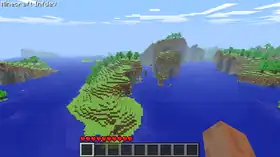
Minecraft Infdev
| Edition | ||||||
|---|---|---|---|---|---|---|
| Release date |
March 27, 2010 | |||||
| Downloads | ||||||
| Minimum Java version | ||||||
| al_version |
1.118 | |||||
| ||||||
{
    "title": "Minecraft Infdev",
    "images": [
        "Infdev 20100327.png"
    ],
    "rows": [
        {
            "field": "''(link to Java Edition article, displayed as Java Edition)''",
            "label": "(link to Edition article, displayed as Edition)"
        },
        {
            "field": "March 27, 2010",
            "label": "Release date"
        },
        {
            "field": "[https://vault.omniarchive.uk/archive/java/client-infdev/inf-20100327.jar Client] ([https://meta.omniarchive.uk/versions/v1/inf-20100327.json .json])",
            "label": "(link to Tutorial:Installing a snapshot#Manual version installation article, displayed as Downloads)"
        },
        {
            "field": "<span class=\"plainlinks\">[https://en.wikipedia.org/wiki/Java_version_history#Java_SE_5 Java SE 5]</span>",
            "label": "<span style=\"white-space: normal;\">Minimum Java version</span>"
        },
        {
            "field": "1.118",
            "label": "(link to al_version article, displayed as al_version)"
        }
    ],
    "invimages": [],
    "footer": "<table style=\"margin: auto; word-break: break-word;\">\n<tr style=\"background: inherit;\">\n<td style=\"padding: 0\" ></td>\n<td rowspan=\"2\" style=\"padding: 0.4em\">''' Infdev 20100327'''</td>\n<td style=\"padding: 0\" ></td>\n</tr>\n<tr style=\"background: inherit;\">\n<td style=\"padding: 0.4em\">\n[[Java Edition  Infdev 20100325-1640|◄   Infdev 20100325-1640]]\n</td>\n\n<td style=\"padding: 0.4em\">\n[[Java Edition  Infdev 20100330-1203|  Infdev 20100330-1203 ►]]\n</td>\n</tr>\n</table>"
}
A version of Minecraft Infdev was released on March 27, 2010.[1]
With its introduction of the Alpha level format and the reintroduction of level saving, this is the first version where worlds created in it can be opened in any subsequent version (except for snapshots 21w06a through 21w14a of Java Edition 1.17, and 21w37a through 21w38a of Java Edition 1.18, which was due to a lack of a system to convert worlds rather than being fundamentally incompatible) without the need for external editors.
Additions
World generation
General
- The world generation is now responsible of new noise generators that replace the Classic world noise generator. These are: "Low Noise", "High Noise", and "Selector Noise". The first two are responsible of generating the Far Lands.
General
General
- The game now automatically saves while playing.
Changes
Blocks
_JE1.png)
_JE1.png)
- The smelting time of furnaces has been reduced from 8 seconds to 4 seconds.
Non-mob entities

- The player dying causes the contents of their inventory to drop, and respawns the player at the world spawn, rather than forcing the player to reload the last save.
- Now not start with items in new worlds.
- The player always spawns at 0,64,0, then gets shot up to the nearest available space.
General
- The level format has been updated from the Indev level format to the Alpha level format.
- The world saving interface has been revamped.
- The "Generate new level..." button has been replaced with a "Single player" button which opens the Select world screen, in which worlds can be loaded, created, and deleted. The "Load level.." button has been replaced with a "Multi player" button, although it is always grayed out.
- The Select world screen displays the file size of the world, based on the [Long] SizeOnDisk value in level.dat. This value is calculated inaccurately, usually underestimating the world size by a large margin.
Technical
Performance
- Performance improvements.
Removals
World generation
General
- The Classic world noise terrain generator has been removed of the game's code, revamping the terrain generation.
- Caves and flowers no longer generate, as they are not yet implemented in the new terrain generator.

- Brick pyramids removed.
General
General
- The defunct map theme, map shape, and map type buttons have been removed from the interface.
- Debug tools are removed from the player's inventory.
Fixes
1 bug fixed
- The game's performance no longer drastically degrades progressively.
Bugs
14 bugs reported
- The Far Lands are not an addition itself. Instead, they are the overflow of the new Low and High noise generators, that overflow at 12,550,824 blocks away on the X and Z axes, where the Far Lands generate.
- Naturally-generated places that do not have direct exposure to the sky (e.g. cliff overhangs) are completely dark until given a sky light update.
- Note that block updates on their own have no effect.
- The world above the height limit is always fully lit and can cause blocks near the height limit to be lit up at nighttime with block light if a block update happens. This can temporarily hang the game while it processes the insane amounts of lighting updates, and may crash on older computers.
- After dying, the player's body remains lying where they died.
- The body can be pushed around and still has the idle animation, as if it were still alive.
- Standing on the body causes it to disappear. When the player moves away, it reappears.
- Jumping onto the body can cause the player to slide on it briefly. This works best when the body is in a tight space, such as a 1-block-deep, 3-block-long hole.
- When blocks are placed on the body, completely covering it, the body becomes black — but this isn't visible until one of the blocks is removed. Once all blocks are removed, the body returns to its normal red color.
- After loading an existing world, ores and trees regenerate if the conditions are correct (e.g. the place where ore would generate is filled with stone).
- Ore regenerates if it is replaced with stone.
- Trees regenerate if the block underneath is dirt or grass, and the tree has enough space to grow
- Interestingly, this phenomenon occurs even under unnatural conditions: creating a large, flat, dirt platform in the sky will cause trees to generate on it.
- Wheat crops, fire, farmland, torches and saplings preserve their data values in the occupied space, resulting in newly-placed blocks to take on the data value of the block previously occupying that space allowing for any block from this version to obtain a damage value between 0-15 (Though the item form has to be obtained with silk touch in a later version.).
- Containers (i.e. chests and furnaces) do not save if the chunk is not updated since.
- They require a chunk update in their chunk to update.
- When generating a new world, the game may stop responding on some laptops.
- Slabs have broken lighting.
- Pressing the respawn button multiple times creates clones of the player, and when the player touches/attacks any clone, the player's hand goes crazy. (this is the only known way to spawn the Mob in this era of the game without modding).
- After reloging onto a world the player is raised by 1 block up.
- Opening a furnace that has no item in its fuel slot while its smelting crashes the game.
- Furnace smelting time can sometimes be cut in half, or doubled, after saving and exiting.[more information needed]
- On very rare occasions taking items out of a furnace output slot crashes the game.[more information needed]
Gallery
-
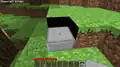 A lighting glitch with slabs.
 -
 The Far Lands in Infdev 20100327.
 -
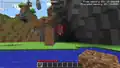 Player's body remaining there after dying.
 -
.png) A player’s body, partially uncovered to reveal the black coloration.
A player’s body, partially uncovered to reveal the black coloration. -
.png) The new 'Select World' screen.
The new 'Select World' screen. -
 An image posted by Notch accompanying this version's release.
 -
 An image posted on Notch's blog teasing the new worldgen.
 -
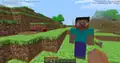 Spamming "Respawn" after dying creates Steve mobs at the spawnpoint.
 -
.png) Lighting glitch at the height limit.
Lighting glitch at the height limit. -
 Mountaintop
References
- ↑ "Infdev's been updated with saving and new terrain" – The Word of Notch, March 27, 2010


.png)


.png)


.png)


