Death
Death is a game mechanic related to health, which occurs when the health of an entity reaches 0HP.png) .
.

Occurrence
Death occurs usually as the result of taking enough damage.
Setting the maximum health of an entity to 0HP makes it immediately die.
Executing /kill causes entities to die immediately, including non-mob entities.
In Java Edition, a parrot dies immediately when it is fed a cookie.
Upon the death of a player, a death message describing the cause of death is shown in chat to everyone in that world if the showDeathMessages game rule is set to true. The death of a player's pet also creates a death message if the same game rule is set to true: In Java Edition, this is shown only to its owner; in Bedrock Edition, this is shown to every present player in the world. In Java Edition, the death of a player, villager, or renamed mob is recorded in the game's logs.
When killed, mobs can drop their items and experience at their location.
- In Java Edition, players and mobs drop their experience immediately.
- In Bedrock Edition, players and mobs first play out their animation (see below), then they turn to dust and drop their experience.
Animation
When an entity dies, it performs a death animation, if it has one:
- Players and most mobs fall on their left side to the ground.
- Squid do not have death animations.
- Spiders, endermites, and silverfish flip upside-down.
- The ender dragon flies to the highest dragon-immune block in the (0,0) column, which is typically the top of the exit portal, and then ascends and explodes.
For players and mobs, the death animation lasts 20 game ticks (1 second). After the death animation has completed, the mob or player's body immediately disappears and creates white smoke particles.
In Java Edition, mobs still count toward the mob cap during their death animation.[1]
In Bedrock Edition, armor stands have a brief death animation when killed with a harming, wither, or poison potion. In Java Edition, summoning an armor stand with no health causes the death animation.[2]
In Minecraft Education, tripod cameras have a death animation when killed by a potion effect.
Player effects

.png)
.png)
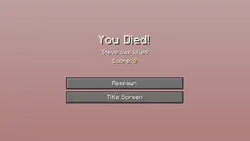
For players, a "You Died!" screen (or "Game Over!" in Hardcore mode) appears, displaying a death message; in Java Edition, the player's score is also displayed. In Java Edition, the view of the world is tinted red, render distance is reduced to default, the camera-view slowly tilts as if falling over, shudders, and zooms in slightly. In Bedrock Edition, the screen is slightly darkened, a maroon vignette appears and closes around the screen, render distance is set to default, camera switches to third-person view and zooms out for the purpose of allowing the player to see their cause of death. The following options appear on the screen:
- Respawn, either in the last bed the player slept in, at their default spawn point (their first spawn point in the game), their respawn anchor, or at the spawn point set by commands. In Hardcore mode, the player can respawn only in Spectator mode, and cannot continue because cheats are disabled.
- Return to the title screen.
The death screen is not shown upon death if:
- The player holds a totem of undying in the main hand or off-hand and died without falling into the void, in which case the player resurrects upon death. Resurrection does not happen if the player fell into the void.
- The game rule
doImmediateRespawnis set totrue, in which case the player instantly respawns upon death without the death screen appearing, but still shows death message.
Any items or blocks that were in the player's inventory (except items enchanted with Curse of Vanishing) are dropped from their head, and scattered around the spot where the player died (unless the game rule keepInventory is set to true). Like any dropped item, these drops decay after five minutes while that chunk is loaded.
The player also loses any experience accumulated, reverting the level back to 0 (unless the game rule keepInventory is set to true) and drops experience orbs with a precise total value of player last level × 7 experience points (with a maximum of 100). After reaching level 15, the player always drops only 100 experience points regardless of level.
The player also loses all effects upon respawning, even when the game rule keepInventory is set to true.[3]
Despite the fact that dead players disappear like all other mobs, it is still possible for the player to see their own hand while in the first-person mode.[4]
Achievements
| Icon | Achievement | In-game description | Actual requirements (if different) | Gamerscore earned | Trophy type (PS) | ||
|---|---|---|---|---|---|---|---|
| PS4 | Other | ||||||
 |  | Cheating Death | Use the Totem of Undying to cheat death | Have the totem of undying in your hand when you die. | 30 | Silver | |
Advancements
| Icon | Advancement | In-game description | Actual requirements (if different) |
|---|---|---|---|
  | Adventure | Adventure, exploration and combat | Kill any mob, or be killed by any living entity. |
  | Postmortal | Use a Totem of Undying to cheat death | Activate a totem of undying by taking fatal damage. |
History
| Java Edition Classic | |||||||
|---|---|---|---|---|---|---|---|
| 0.24_SURVIVAL_TEST | Added health and Survival mode, and therefore death. | ||||||
| Enemies now fall over when killed. | |||||||
| Java Edition Indev | |||||||
| ? | Dead mobs would fall on their left side instead of other random directions. | ||||||
| Java Edition Infdev | |||||||
| 20100327 | The player now drops their inventory and respawns upon death, rather than having to reload the last save. | ||||||
| 20100413-1949 | The player is now removed from the world a few seconds after dying. | ||||||
| Java Edition | |||||||
| 1.2.1 | 12w05b | Death screen has a slight delay before buttons become active, to avoid accidentally clicking buttons when killed. | |||||
| 1.11 | 16w39a | Added the totem of undying, which can save the player from death. | |||||
| 1.16.2 | 20w30a | Capitalized the first "d" in the "You died!" text on the death screen. | |||||
| Pocket Edition Alpha | |||||||
| v0.2.0 | Added health and Survival mode, and therefore death. | ||||||
| Bedrock Edition | |||||||
| 1.19.10 | Preview 1.19.10.21 | Death messages are now displayed on the death screen. | |||||
| 1.19.80 | Preview 1.19.80.20 | .png) You Died screen (Experimental) toggle in Death screen has been updated to match Ore UI, available in preview only. You Died screen (Experimental) toggle in Death screen has been updated to match Ore UI, available in preview only. | |||||
| 1.20.30 | .png) You Died screen (Experimental) toggle in Death screen is released to the public and no longer in preview only. You Died screen (Experimental) toggle in Death screen is released to the public and no longer in preview only. | ||||||
| 1.20.80 | Preview 1.20.80.23 | Death screen is released to the public and no longer in You Died screen (Experimental) toggle. | |||||
| 1.21.100 | Preview 1.21.100.22 | Enabled engine changes to mob death behavior. | |||||
| Legacy Console Edition | |||||||
| Xbox 360 | Xbox One | PS3 | PS4 | PS Vita | Wii U | Switch | |
| TU1 | CU1 | 1.00 | 1.00 | 1.00 | Patch 1 | 1.0.1 | Added the health bar, and therefore death. |
| TU36 | CU25 | 1.28 | 1.28 | 1.28 | Patch 7 | The player's hand now disappears on the death screen in first person view after 1 second when the player is not rendered anymore.[5] | |
| TU54 | CU44 | 1.52 | 1.52 | 1.52 | Patch 24 | 1.0.4 | Added the totem of undying, which can save a player from death. |
| TU56 | CU48 | 1.55 | 1.55 | 1.55 | Patch 26 | 1.0.6 | Death screen has a slight delay before buttons become active, to avoid accidentally clicking buttons when killed. |
Issues
Issues relating to "Death" are maintained on the bug tracker. Issues should be reported and viewed there.
Gallery
Screenshots
-
A preview example of the revised in Bedrock Edition death screen, depicting Efe dying from a creeper explosion.
-
-
 A generic death screen used on minecraft.net.
See also
- Health, the system used to tell the user when they will die.
- Ore UI, the Bedrock Edition UI refresh.
References
| General mechanics | |
|---|---|
| Technical mechanics | |
| Survival |
|
| Combat | |
| Environment |
More |
| Movement | |
| User interface | |
| Visuals | |
| Removed | |
| Unintended | |


.png)


.png)


.png)


