Tutorial:Managing slimes in superflat mode
On superflat maps, slimes spawn in enormous numbers, and dealing with them can become extremely tedious. Dealing with them can involve building walls or fences, slime pits or moats, or one can use a clock with a command block. These methods are described below.
If no slimes at all are desired, then in Java Edition the world can simply be generated with a surface y level above 40, which stops the slime spawns. For details, see how to create custom world generation presets.
Slime pit
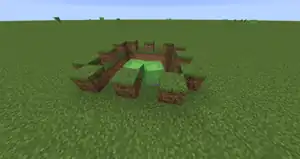
This slime pit is 5×5×3, and has been dug down to bedrock and given a one-block 'lip'. The lip ensures slimes already in the pit don't sometimes push new arrivals away before they can fall in. Recommended size is about 7×7. 4×4 is about the minimum practical size because otherwise larger slimes arriving at an angle won't fall in. Rather than making one enormous pit, it's usually better to make several medium-sized pits in different areas.
Slime cage
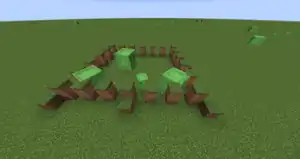
This simple slime cage made of dirt blocks traps small and large slimes but not any other mob type. The one-block 'steps' that allow slimes to climb into the cage, but not back out again. Their only escape is to be destroyed or to despawn. If you want to use a slime cage to help keep an area slime-free, put the steps on the inside, then any slime that does appear inside can find its way out, but not back in again.
The key idea behind both trap types is to ensure the slimes are trapped rather than killed; once enough slimes are trapped, the mob spawn rate in that area is greatly reduced and new mobs — slime or not — largely stop spawning. When you want to do some mob farming, simply move 128+ meters away from the slime pit, at which point all the slimes in it despawn and mobs of all types then start reappearing elsewhere as they normally would. A good tip is to do this either shortly before nightfall or shortly before dawn to maximize the number of farmable non-slime mobs that appear. By this method you can roughly control the numbers of mobs appearing in an area by luring more or fewer slimes into your slime pits.
One minor tip is to ensure your slime pits are dug out of earshot of the areas you spend the most time in, otherwise the sound of dozens of constantly-jumping slimes can also become wearing.
Given the large area covered by a typical NPC village, if you enclose an entire village inside a single wall, it's highly probable for at least one slime-spawning chunk to be inside the village. You may wish to place blocks allowing slimes to exit certain areas and not re-enter them in order to keep their numbers manageable.
Using snowballs, the player can push a slime away from the village or other area, though this is most practical in creative mode. Slimes may also be pushed into lava pits.
Moat
A moat uses the same principle as a slime pit, but it takes advantage of the fact that slimes cannot swim. For simply stopping slimes, a one-block deep moat freezes them in their tracks, but it drowns only the smallest (harmless but annoying) ones. To kill all kinds of slimes, make it three blocks wide and three blocks deep. A water moat has the advantage that it forms a complete barrier against slimes, but is completely harmless to the player and other mobs. Dry moats capture other mobs without killing the slimes. Moats are also easy to build and look nice. In 1.13 it is possible to use magma blocks to pull slimes and all other mobs down using bubble columns. If there are a lot of nearby villages, the player might be able to fill the moat with lava to kill mobs of all kinds although the only downside is that it destroys the items they drop and experience orbs unless they use hoppers.
Command block auto-killer (Creative with cheats only)
This simple trick can be achieved by using a repeating command block with the setting always active on. In the command block, use this simple command: /kill @e[type=minecraft:slime] or /tp @e[type=minecraft:slime] ~ -70 ~ (The second command stops slimeball drops by teleporting the slimes into the void)
The player can also type the following commands directly into the chatbox: /gamerule doMobSpawning false (This method prevents all mobs including slimes from spawning in the world)
Turning on Peaceful mode
One alternative method is to turn monsters on 'peaceful' mode. This, however, prevents all hostile mobs from spawning, as well as other various in-game effects (such as starvation).
Java: Visit the game menu and change the Difficulty box near the top-right corner by clicking on it. Note: this works only if the difficulty is not locked.
Bedrock: Pause, go to options, and then find the 'game' tab. You should be able to change it from there.
On both, though, you can do /difficulty peaceful
Using the MobSpawning game rule
The best option if you want to keep peaceful off, but still keep the mobs away, is to use '/gamerule doMobSpawning false'. Though this does have a downside, even peaceful mobs won't spawn, they also won't despawn. Meaning any mobs already in the world are unaffected. Spawners are immune to this gamerule, meaning they can be used to continue having mobs spawn, without the ones you don't want.
This can either be set at the beginning of a java world, in the newer 'gamerules' window when creating a world, or can be changed midgame if your cheats are turned on.
To turn this on, either open your chat, or hit the slash key, dependent on what your keybinds are set to. Then type in; '/gamerule doMobSpawning false' and hit enter.
In bedrock, it's a world setting. Simply open your world settings, scroll to the box that says 'Mob Spawning' and turn it off.
Spawn-proofing slime chunks
One way to completely prevent slimes from spawning in certain areas is to spawn-proof those areas. This can be done in several ways: Converting the blocks to path blocks, covering the chunk in water, or digging a perimeter.
Identifying slime chunks
There are two main ways to do this, you can either use chunkbase.com's slime chunk map along with the seed to easily locate which chunks are slime chunks (through the use of coordinates) or manually identifying the chunks through by building walls separating the chunks and seeing which chunks spawn slimes. To find the seed for chunkbase, you can use the command /seed in Java edition or look through your world settings in Bedrock edition. To manually identify slime chunks, you can place blocks to make 2-block high walls along chunk borders (use f3+g in Java edition or just doing the math in bedrock edition to find the borders, see this page for more information). To identify the slime chunks, afk in the area for a short amount of time and then see which of the sections have slimes in them.
Covering the chunk with non-spawnable blocks
The most popular way to do this is by using a shovel on the dirt blocks on the ground to convert them into dirt path blocks, which are less than a full block and so mobs cannot spawn on them. You will need several wooden shovels, three stone shovels, or two iron shovels to spawn-proof a single chunk (with the stone and iron shovels the last one will have mostly full durability). Alternative methods to this are to cover the chunk in other blocks that do not have a full top (such as bottom slabs or stairs) or are transparent (such as glass or leaves). This method is fairly cheap and easy (especially if you have an iron farm set up) and does not take particularly long to spawn-proof a single chunk. The main downside is that the tan squares aren't the most aesthetic.
Covering the chunk with water
This one is easy, and does not need to be done just in slime chunks. All you will need is two buckets of water. The way to do this is to place the two buckets of water so that their corners touch, creating a 2x2 infinite water source. From here, just continue to scoop up water from the side and then placing it along a straight diagonal. This will cause the water to spread out and create infinite water sources in a large square around the diagonal line that you placed. If you have done this right, no slimes should be able to spawn inside this area. This method can be scaled infinitely, and does not take that long to do so. The only cons are that some people may not like how the water looks, and it can make transport slightly more annoying (although faster that land travel if you have a boat).
Digging a perimeter.
Digging a perimeter is something that many late-game hardcore players make at one point or another for super-fast farms, but it is not nearly as difficult on superflat. All that it takes is digging down to bedrock (3 blocks of dirt on a standard superflat) over the whole chunk. You will need at least 7 iron shovels for each chunk, making this method expensive but helpful for producing a large amount of dirt for terraforming.


.png)


.png)


