Debug renderer

Debug renderers are a set of graphical tools used for technical analysis of Minecraft.
Renderers
3d_crosshair

By default, this renderer is set to only appear if the debug overlay is enabled, replacing the normal crosshair. It can be configured like all other debug renderers.
This replaces the crosshair with three edges of a cube, culminating at one vertex. The constituent lines point in the three positive directions, such that it appears "concave" to the all-positives direction, and "convex" to the all-negatives direction. The X-axis is represented by a red line, the Y-axis by a green line, and the Z-axis by a blue line.
chunk_borders
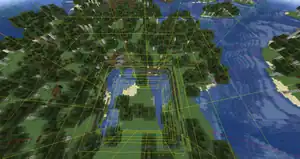

chunk_section_octree
chunk_section_paths
chunk_section_visibility
entity_hitboxes
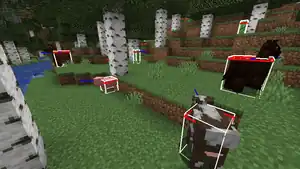
Hitboxes are shown on visible entities.
- White bounding box
- A long blue tint for direction facing
- Red outlines for the eye height (if any)
- Yellow outlines for the passenger attachment point (if any)
Note that the shown hitbox is just a visual box relative to the visual model, rather than the actual hitbox, which means that the shown hitbox and the actual hitbox could be desynchronized.
visualize_block_light_levels
visualize_chunks_on_server
Displays information about each chunk's load level and status. Renders the chunk colormap in the debug screen.
visualize_collision_boxes
Displays collision boxes of nearby blocks.
visualize_entity_supporting_block
Marks the blocks that entities are considered standing on (red for the player, green for everything else, light blue for blocks under thin blocks, like carpet).
visualize_heightmap
Displays the values of heightmaps:[more information needed]
- Dark Teal:
MOTION_BLOCKING - Green:
WORLD_SURFACE - Blue:
OCEAN_FLOOR - Cyan:
MOTION_BLOCKING_NO_LEAVES
visualize_sky_light_levels
Displays the light engine status for each chunk section. A 2 means an empty section with no lighting data, a 1 means a section with only lighting data, and a 0 means a section with lighting data and block shape data.
visualize_sky_light_sections
Displays information about sky light for every chunk section. No coloring means an empty section with no lighting data, brown means a section with only lighting data, and yellow means a section with lighting data and block shape data.
visualize_solid_faces
Highlights all solid, sturdy block faces (that a button can be placed on) in red.
visualize_water_levels
Indicates the fluid level of the water from an integer number ranging from eight (water source) to one (the farthest point that flowing water can flow before stopping).
History
| Java Edition | |||||||
|---|---|---|---|---|---|---|---|
| 1.4.4 | 1.4.3 | Added the entity_hitboxes debug renderer, toggled via F3 + B.
| |||||
| At this point, hitboxea are displayed as solid white, opaque cuboids. | |||||||
| 1.7.2 | 1.7.1 | entity_hitboxes has been visually overhauled; instead of a solid cuboid, it now renders as a thin white outline. | |||||
| 1.8 | 14w04a | 3d_crosshair now exists and is active when the debug screen is open.
| |||||
This displays 3 short colored lines to indicate the direction of each axis:
| |||||||
| 14w25b | entity_hitboxes now shows which direction entities are looking using a blue line. | ||||||
| 1.9 | 15w43a | 3d_crosshair's constituent lines now change size relative to the GUI scale. | |||||
| 1.10 | 16w20a | Added the chunk_borders debug renderer, toggled via F3 + G.
| |||||
3d_crosshair now has a small black outline around its lines when looking at an area with bad contrast. | |||||||
| ? | chunk_section_octree now exists, but is inaccessible without game modifications.[check the code] | ||||||
| ? | chunk_section_paths now exists, but is inaccessible without game modifications.[check the code] | ||||||
| ? | chunk_section_visibility now exists, but is inaccessible without game modifications.[check the code] | ||||||
| ? | visualize_block_light_levels now exists, but is inaccessible without game modifications.[check the code] | ||||||
| ? | visualize_chunks_on_server now exists, but is inaccessible without game modifications.[check the code] | ||||||
| ? | visualize_collision_boxes now exists, but is inaccessible without game modifications.[check the code] | ||||||
| ? | visualize_entity_supporting_block now exists, but is inaccessible without game modifications.[check the code] | ||||||
| ? | visualize_heightmap now exists, but is inaccessible without game modifications.[check the code] | ||||||
| ? | visualize_sky_light_levels now exists, but is inaccessible without game modifications.[check the code] | ||||||
| ? | visualize_sky_light_sections now exists, but is inaccessible without game modifications.[check the code] | ||||||
| ? | visualize_solid_faces now exists, but is inaccessible without game modifications.[check the code] | ||||||
| ? | visualize_water_levels now exists, but is inaccessible without game modifications.[check the code] | ||||||
| 1.20.2 | 23w31a | entity_hitboxes now shows the passenger's attachment point on the entity it is riding. | |||||
| 1.21.9 | 25w31a | Three more debug renderers are now available in-game through the newly-implemented Debug Options menu:
| |||||
The 3d_crosshair, chunk_borders and entity_hitboxes renderers can now be toggled from within the debug options menu, rather than only through keyboard controls (for the latter two) or only (and always) appearing in the debug menu (for the first). | |||||||
| 25w37a | With the addition of debug property settings, eight more debug renderers can be enabled without game modifications:
| ||||||
| Upcoming Java Edition | |||||||
| 1.21.11 | 25w41a | The WATER, HEIGHTMAP, COLLISION, SUPPORT_BLOCKS, LIGHT, SKY_LIGHT_SECTIONS, SOLID_FACE and CHUNKS debug property settings have been removed, and the associated debug renderers made actually toggleable from within the debug settings menu.
| |||||
visualize_block_light_levels, which does not appear to have been tied to any such property setting, is now also available in the debug settings menu.
| |||||||
entity_hitboxes's blue facing direction line is now a large arrow, with four lines added to the end forming the apex of a square pyramid. | |||||||
| |||||||||||||||||||||||||||||||||
| |||||||||||||||||||||||||||||||||
| |||||||||||||||||||||||||||||||||





.png)


