Note Block

| Renewable |
Yes |
|---|---|
| Stackable |
Yes (64) |
| Tool |
|
| Blast resistance |
0.8 |
| Hardness |
0.8 |
| Luminous |
No |
| Transparent |
No |
| Flammable |
No |
| Catches fire from lava |
Yes |
| Map color (JE) |
|
{
    "title": "Note Block",
    "rows": [
        {
            "field": "Yes",
            "label": "(link to Renewable resource article, displayed as Renewable)"
        },
        {
            "field": "Yes (64)",
            "label": "Stackable"
        },
        {
            "field": "<span class=\"sprite-file\" style=\"height:32px;width:32px;--vertical-align:middle\">(link to File:SlotSprite Axe Required.png article, displayed as 32x32px|link=Axe|alt=|class=pixel-image|This block can be broken with any tool, but an axe is the quickest)</span>",
            "label": "Tool"
        },
        {
            "field": "0.8",
            "label": "(link to Explosion#Blast resistance article, displayed as Blast resistance)"
        },
        {
            "field": "0.8",
            "label": "(link to Breaking#Blocks by hardness article, displayed as Hardness)"
        },
        {
            "field": "No",
            "label": "(link to Light article, displayed as Luminous)"
        },
        {
            "field": "No",
            "label": "(link to Opacity article, displayed as Transparent)"
        },
        {
            "field": "No",
            "label": "(link to Flammable article, displayed as Flammable)"
        },
        {
            "field": "Yes",
            "label": "Catches fire<br>from (link to lava article, displayed as lava)"
        },
        {
            "field": "<span style=\"display: inline-block; white-space: nowrap;\"><span style=\"display: inline-block; background-color: rgb(143, 119, 72); border: 1px solid #888; border-radius: 0.3em; color: transparent; width: 1em; height: 1em; vertical-align: -0.36em; margin-right: -0.1em\"><br></span> 13 WOOD</span>",
            "label": "(link to Map color article, displayed as Map color) <small>((link to Java Edition article, displayed as ''JE''))</small>"
        }
    ],
    "invimages": [
        "Note Block"
    ],
    "images": [
        "Note Block.png"
    ]
}
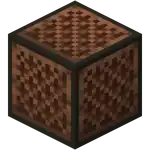
A note block is a block that emits sounds when attacked, used, or powered. The sound produced can be altered in various ways by using it or putting certain blocks directly above or below it. A note block's sound played repeatedly can be used to direct allays to stay nearby and drop collected items near it.
Obtaining
Breaking
Note blocks are most quickly broken with an axe.
| Block |  Note Block Note Block
| |
|---|---|---|
| Hardness | 0.8 | |
| Tool | 
| |
| Breaking time (sec)[A] | ||
| Default | 1.2 | |
 Wooden Wooden
|
0.6 | |
 Stone Stone
|
0.3 | |
 Copper Copper
|
0.25 | |
 Iron Iron
|
0.2 | |
 Diamond Diamond
|
0.15 | |
 Netherite Netherite
|
0.15 | |
 Golden Golden
|
0.1 | |
- incorrect tool, drops nothing
- correct tool, drops nothing or something other than the block itself
- correct tool, drops the block itself
- italicized can be instant mined
- ↑ These durations ignore other influential factors (e.g., Mining Fatigue) and are measured in seconds. For more information, see Breaking § Speed.
Natural generation
Note blocks can generate in ancient cities.
Crafting
| Ingredients | Crafting recipe |
|---|---|
| Any Planks + Redstone Dust |
             |
Usage
Playing music
Notes
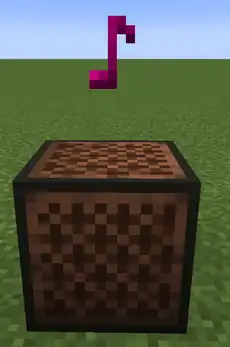
A note block will produce a sound and spawn a colored musical note particle whenever any of the following conditions are met:
- It is attacked by a player in Survival mode
- It receives a redstone signal
- It is used by a player. Using a note block also changes its pitch.
A note block must have either air or a mob head in the space directly above it to play a sound, though using a silenced note block will still change its pitch. Note block sounds can be heard from up to 48 blocks away, and can be independently controlled by the Jukebox/Note Blocks slider in the audio settings.
Each time a note block plays a sound, a note particle will appear from the top. The color of the particle depends on the pitch of the note block. Note particles do not appear for silenced note blocks or mob head instruments.
Excluding mob heads, there are 16 different instruments and 25 different pitches per instrument (a total of 400 notes with different sounds). Using a note block increases the instrument's pitch up a semitone, with a total of two full octaves (24 semitones in total) being available for each instrument. The standard range (for harp and pling instruments) of notes span from F♯3 to F♯5. After reaching the highest note (24 presses of the use button), pressing use again (25th press of the use button) resets the pitch back to F♯3, as does breaking the block. The note block's pitch is ignored for player heads and the six mob heads.
The string bass and didgeridoo are two octaves (24 semitones) lower than the standard range, the guitar is one octave (12 semitones) lower than the standard range, the flute is one octave above the standard range, and the bell, chime, and xylophone are 2 octaves above the standard range. This gives six octaves (72 semitones) of effective range to combine instruments for greater pitch coverage.
The exact pitch can be found from its use-count by using the following formula: 2 ^ ((use count - 12) / 12).
The exact pitch to use-count assignment is shown below,[1][2] along with the note's color, which is rendered with shading using the particle's texture.
|
|
Alternatively, there is a graphical version available:
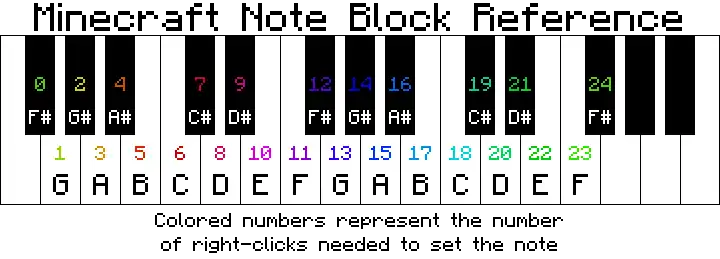
The current pitch of a note block can be roughly estimated by attacking it and looking at the color of the note particle.

In Java Edition, the tuning can also be checked by looking at the debug screen (accessed by pressing F3). It is denoted as "note:" followed by a number from 0 to 24.
Instruments
The instrument played depends on the block placed directly underneath the note block. Mob heads must instead be placed on top of the note block.
Mob head instruments take priority over block instruments, and play the corresponding mob's ambient sound, except for creeper heads, which instead trigger the primed sound. Mob head sounds are not affected by the note block's pitch.
The table given below is only applicable for Minecraft BE /MCPE and JE before 1.20
| Block | Instrument | Range | Sound event names (Java) | Sound event names (Bedrock) |
|---|---|---|---|---|
 Material: wood Material: wood
|
Bass (String bass) | F♯1–F♯3 | block.note_block.bass
|
note.bass
|
 Material: sand, gravel, concrete powder, heavy core Material: sand, gravel, concrete powder, heavy core
|
Snare Drum | — | block.note_block.snare
|
note.snare
|
 Material: glass, sea lantern, beacon Material: glass, sea lantern, beacon
|
Hat (Hi-hat click) | — | block.note_block.hat
|
note.hat
|
 Material: stone, blackstone, netherrack, nylium, obsidian, quartz, sandstone, ores, bricks, resin bricks, corals, respawn anchor, bedrock, concrete, stonecutter, furnace, observer, terracotta, prismarine, prismarine bricks, dark prismarine, purpur block, purpur pillar Material: stone, blackstone, netherrack, nylium, obsidian, quartz, sandstone, ores, bricks, resin bricks, corals, respawn anchor, bedrock, concrete, stonecutter, furnace, observer, terracotta, prismarine, prismarine bricks, dark prismarine, purpur block, purpur pillar
|
Bass Drum | — | block.note_block.basedrum
|
note.bd
|
 Block of gold Block of gold
|
Bell (Glockenspiel) | F♯5–F♯7 | block.note_block.bell
|
note.bell
|
 Clay, Clay,  honeycomb block[BE only] [3], honeycomb block[BE only] [3],  infested block[BE only], infested block[BE only],  block of resin[BE only] block of resin[BE only]
|
Flute | F♯4–F♯6 | block.note_block.flute
|
note.flute
|
 Packed ice Packed ice
|
Chime | F♯5–F♯7 | block.note_block.chime
|
note.chime
|
 Wool Wool
|
Guitar | F♯2–F♯4 | block.note_block.guitar
|
note.guitar
|
 Bone block Bone block
|
Xylophone | F♯5–F♯7 | block.note_block.xylophone
|
note.xylophone
|
 Block of iron Block of iron
|
Iron Xylophone (Vibraphone) | F♯3–F♯5 | block.note_block.iron_xylophone
|
note.iron_xylophone
|
 Soul sand Soul sand
|
Cow Bell | F♯4–F♯6 | block.note_block.cow_bell
|
note.cow_bell
|
 Pumpkin Pumpkin
|
Didgeridoo | F♯1–F♯3 | block.note_block.didgeridoo
|
note.didgeridoo
|
 Block of emerald Block of emerald
|
Bit (Synthesizer) | F♯3–F♯5 | block.note_block.bit
|
note.bit
|
 Hay bale Hay bale
|
Banjo | F♯3–F♯5 | block.note_block.banjo
|
note.banjo
|
 Glowstone Glowstone
|
Pling (Electric piano) | F♯3–F♯5 | block.note_block.pling
|
note.pling
|
 Skeleton skull Skeleton skull
|
Sound effect: Skeleton rattle | — | block.note_block.imitate.skeleton
|
note.skeleton
|
 Wither skeleton skull Wither skeleton skull
|
Sound effect: Wither skeleton rattle | — | block.note_block.imitate.wither_skeleton
|
note.witherskeleton
|
 Player head Player head
|
Sound effect set in [String] note_block_sound, silent by default | — | Dependent | Dependent |
 Zombie head Zombie head
|
Sound effect: Zombie moan | — | block.note_block.imitate.zombie
|
note.zombie
|
 Creeper head Creeper head
|
Sound effect: Creeper hiss | — | block.note_block.imitate.creeper
|
note.creeper
|
 Piglin head Piglin head
|
Sound effect: Piglin snort | — | block.note_block.imitate.piglin
|
note.piglin
|
 Dragon head Dragon head
|
Sound effect: Ender dragon roar | — | block.note_block.imitate.ender_dragon
|
note.enderdragon
|
 Any other blocks Any other blocks
|
Harp | F♯3–F♯5 | block.note_block.harp
|
note.harp
|
Activating note blocks
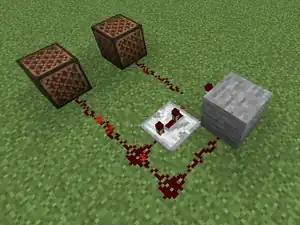
Note blocks can be activated in a variety of different ways following normal redstone principles. In Java Edition, after activating the note block, it sends a block update immediately and plays a sound after a start delay. Note blocks conduct redstone power, which means they activate blocks next to them when directly powered, including other note blocks.
In Java Edition, an observer facing a note block will trigger whenever the note block is used, activated with redstone power or the note block's instrument changes. This makes note blocks very flexible when used with observers, especially since note blocks can conduct power to other redstone devices. They can serve as activation switches or a means to control how and when observers are triggered in circuits.
Interaction with allays
If an allay hears a note block play within 16 blocks of its location, it tries to pathfind to it. It will then spend 30 seconds near that particular note block, seeking items around it and dropping them near the note block instead of its player. After 30 seconds, the allay returns to targeting its player unless the note block is played again. A vibration particle emanates from the note block and reaches the allay to indicate the allay has locked on to the note block. Because the allay and the note block interact via a vibration particle, placing wool between the note block and the allay can prevent this interaction. Allays ignore note blocks which do not make sounds, with the exception of note blocks with player heads on top.
Fuel
Note blocks can be used as fuel in furnaces, smelting 1.5 items per block.
Sounds
wood sound type | ||||||||
|---|---|---|---|---|---|---|---|---|
| Sound | Subtitles | Source | Description | Resource location | Translation key | Volume | Pitch | Attenuation distance |
| Block broken | Blocks | Once the block has broken | block | subtitles | 1.0 | 0.8 | 16 | |
| Block placed | Blocks | When the block is placed | block | subtitles | 1.0 | 0.8 | 16 | |
| Block breaking | Blocks | While the block is in the process of being broken | block | subtitles | 0.25 | 0.5 | 16 | |
| Something falls on a block | Entity-Dependent | Falling on the block with fall damage | block | subtitles | 0.5 | 0.75 | 16 | |
| Footsteps | Entity-Dependent | Walking on the block | block | subtitles | 0.15 | 1.0 | 16 | |
wood sound type | |||||
|---|---|---|---|---|---|
| Sound | Source | Description | Resource location | Volume | Pitch |
| Blocks | Once the block has broken | dig | 1.0 | 0.8-1.0 | |
| Blocks | When the block is placed | dig | 1.0 | 0.8 | |
| Blocks | While the block is in the process of being broken | hit | 0.23 | 0.5 | |
| Players | Falling on the block with fall damage | fall | 0.4 | 1.0 | |
| Players | Walking on the block | step | 0.3 | 1.0 | |
| Blocks | Jumping from the block | jump | 0.12 | 1.0 | |
| Blocks | Falling on the block without fall damage | land | 0.18 | 1.0 | |
Data values
ID
| Name | Identifier | Form | Translation key |
|---|---|---|---|
| Note Block | note_block | Block & Item | block |
| Name | Identifier | Numeric ID | Form | Item ID[i 1] | Translation key |
|---|---|---|---|---|---|
| Note Block | noteblock | 25 | Block & Giveable Item[i 2] | Identical[i 3] | tile |
| Name | Savegame ID |
|---|---|
| Block entity | Music |
Block states
| Name | Default value | Allowed values | Description |
|---|---|---|---|
| instrument | harp | banjobasedrumbassbellbitchimecow_bellcreepercustom_headdidgeridoodragonfluteguitarharphatiron_xylophonepiglinplingskeletonsnarewither_skeletonxylophonezombie | The instrument of the note block. |
| note | 0 | 0123456789101112131415161718192021222324 | The pitch of the note block |
| powered | false | falsetrue | True if the note block is currently activated. |
Block data
In Bedrock Edition, a note block has a block entity associated with it that holds additional data about the block.
See Bedrock Edition level format/Block entity format.
Achievements
| Icon | Achievement | In-game description | Actual requirements (if different) | Gamerscore earned | Trophy type (PS) | ||
|---|---|---|---|---|---|---|---|
| PS4 | Other | ||||||
 |  | Birthday Song | Have an Allay drop a cake at a noteblock | Tame an allay by giving it a cake while having dropped cake items and play a note block nearby. | 10 | Bronze | |
Advancements
| Icon | Advancement | In-game description | Actual requirements (if different) |
|---|---|---|---|
 | Birthday Song | Have an Allay drop a Cake at a Note Block | Give an allay a cake and then use a note block to make the allay drop the cake at a note block. This is a hidden advancement, meaning that it can be viewed by the player only after completing it, regardless of if its child advancement(s), if any, have been completed. |
Video
History
Java Edition
| Java Edition Beta | |||||||
|---|---|---|---|---|---|---|---|
| 1.2 | 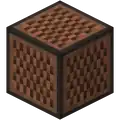 Added note blocks. Added note blocks.
| ||||||
| Note blocks have 5 instruments: "Harp", "Bass", "Bass drum", "Snare drum", "Click". "Pling" is also added in the sound files, but is currently unused. | |||||||
| Java Edition | |||||||
| 1.0.0 | Beta 1.9 Prerelease 6 | Note blocks are now broken faster using an axe. | |||||
| 1.2.4 | release | Spruce planks, birch planks, and jungle planks can now be used to craft note blocks. | |||||
| 1.7.2 | 1.7.1 | Acacia planks and dark oak planks can now be used to craft note blocks. | |||||
| 1.12 | 17w16a | Added sound events (but not the sounds themselves) for additional instruments (bell, chime, flute, guitar, xylophone) to note blocks. | |||||
| 17w17a | Added sounds for additional instruments to note blocks. | ||||||
| 1.13 | 17w47a | Note blocks can now be pushed by pistons. | |||||
| 1.14 | 18w43a | The texture of note blocks has been changed. | |||||
| 19w09a | Added sounds to note blocks for additional instruments (iron xylophone, cow bell, didgeridoo, bit, banjo), and implemented the "Pling" instrument into the game. | ||||||
| 1.16 | 20w06a | Crimson planks and warped planks can now be used to craft note blocks. | |||||
| 1.19 | 22w11a | Mangrove planks can now be used to craft note blocks. | |||||
| 22w13a | Note blocks now generate as part of ancient cities. | ||||||
| Note blocks can now be silenced only with wool or carpets on top. | |||||||
| 22w15a | The change to note block silencing mentioned above for 22w13a has now been reverted. | ||||||
| 1.19.3 Experiment | 22w42a | Bamboo planks can now be used to craft note blocks. | |||||
| 22w46a | Heads can now be placed on note blocks to play the respective mob sound. | ||||||
| 1.19.4 Experiment | 23w03a | Heads can now be placed on note blocks without sneaking. | |||||
| 23w07a | Cherry planks can now be used to craft note blocks. | ||||||
| 1.21.2 Experiment | 24w40a | Pale oak planks can now be used to craft note blocks. | |||||
Bedrock Edition
| Pocket Edition Alpha | |||||||
|---|---|---|---|---|---|---|---|
| v0.13.0 | build 1 | Added note blocks. | |||||
| v0.15.0 | build 1 | Note blocks can now be moved by pistons. | |||||
| Bedrock Edition | |||||||
| 1.10.0 | beta 1.10.0.3 | The texture of note blocks has been changed. | |||||
| 1.13.0 | beta 1.13.0.9 | Added all new note block sounds from Java Edition 1.12 and 1.14. | |||||
| 1.18.30 Experiment | Preview 1.18.30.23 | A note block played near an allay becomes its favorite note block for 30 seconds. | |||||
| Placing a block on top of a note block no longer mutes it, with the exception of wool blocks. | |||||||
| 1.19.0 | Preview 1.19.0.27 | The previous change has been reverted. | |||||
| 1.19.60 Experiment | Preview 1.19.60.20 | Heads can now be placed on note blocks to play the respective mob sound. | |||||
| 1.20.10 | Preview 1.20.10.20 | Note blocks with soul soil underneath now produces the "harp" sound instead of "snare". | |||||
Legacy Console Edition
| Legacy Console Edition | |||||||
|---|---|---|---|---|---|---|---|
| Xbox 360 | Xbox One | PS3 | PS4 | PS Vita | Wii U | Switch | |
| TU1 | CU1 | 1.00 | 1.00 | 1.00 | Patch 1 | 1.0.1 | Added note blocks. |
| TU9 | Spruce planks and birch planks can now be used to craft note blocks. | ||||||
| TU12 | Jungle planks can now be used to craft note blocks. | ||||||
| TU25 | CU14 | 1.17 | 1.17 | 1.17 | Acacia planks and dark oak planks can now be used to craft note blocks. | ||
| TU53 | CU43 | 1.49 | 1.50 | 1.49 | Patch 23 | 1.0.3 | Added new note block sounds. |
| 1.90 | The texture of note blocks has been changed. | ||||||
New Nintendo 3DS Edition
| New Nintendo 3DS Edition | |||||||
|---|---|---|---|---|---|---|---|
| 0.1.0 | Added note blocks. | ||||||
Data history

| Java Edition | |||||||
|---|---|---|---|---|---|---|---|
| 1.8 | 14w06a | Note blocks now use the newly-implemented model json file models/block/cube.json; previously the geometry was defined in the game code itself. | |||||
| 1.9 | 15w34a | The power state of note blocks is now controlled through the powered tag, and therefore can now be controlled independently of any redstone signal. | |||||
| 1.11 | 16w32a | The block entity ID of note blocks has been changed from Music to noteblock. | |||||
| 1.13 | 17w47a | The ID has been changed from noteblock to note_block.
| |||||
Note blocks are no longer block entities and instead are defined by the note, powered, and instrument block states.
| |||||||
| Prior to The Flattening, this block's numeral ID was 25. | |||||||
Issues
Issues relating to "Note block" or "Noteblock" are maintained on the bug tracker. Issues should be reported and viewed there.
Trivia
- Because a note block is a wooden-type block, a note block directly on top of another one produces a string bass sound when playing notes.
- In Java Edition, note blocks have the second highest number of possible block state combinations, at 1150, beating fire's 512 and behind redstone dust's 1296.
Gallery
Screenshots
-
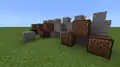 Redstone linked to note blocks, playing a simple melody when the button is pressed.
Concept artwork
-
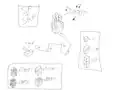 A concept sketch tweeted by Notch depicting what would eventually become the note block.
In other media
-
 Sunny using a piglin head on a note block.
 -

-
 Efe placing a zombie head sneakily on the note block.
 -
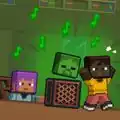 Makena waking up startled at the sound of zombies being played on the note block.
See also
- Tutorial:Redstone music
- Tutorial:Redstone music/Doorbell
 Jukebox
- Minecraft Note Block Studio – A music editor for Minecraft.
References
- ↑ Original chart by cookingfat
- ↑ Original /playsound pitch chart by kwerti
- ↑ MC-212976 — Parity issue: Note blocks placed above honeycomb blocks don't play the flute instrument
External links
- Block of the Week: Note Block – Minecraft.net on June 1, 2018
- Search YouTube for the many songs played on note blocks
 Redstone Redstone
| |||||||||||||||||||||
|---|---|---|---|---|---|---|---|---|---|---|---|---|---|---|---|---|---|---|---|---|---|
| |||||||||||||||||||||
| |||||||||||||||||||||


.png)


.png)


