Dungeons:Controls

This article needs cleanup to comply with the style guide.
[discuss]
Please help improve this page. The talk page may contain suggestions.
Reason: The presentation of the page should be cleaned up.
Reason: The presentation of the page should be cleaned up.
This page would benefit from the addition of more images.
Please remove this notice once you've added suitable images to the article.
The specific instructions are: Needs the mobile controls for Xbox Cloud Gaming.
The specific instructions are: Needs the mobile controls for Xbox Cloud Gaming.
Minecraft Dungeons can be played with either a keyboard and mouse on Windows and Xbox platforms, a gamepad on all platforms, or the touchscreen on mobile platforms. These are the default controls that can be changed in the Settings menu.
Keyboard & Mouse
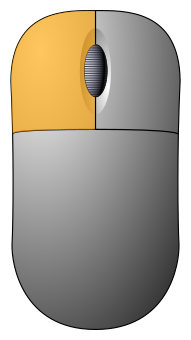
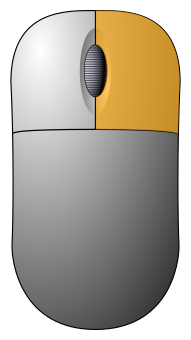
| Default | Left-Handed | Function |
|---|---|---|
| Combat | ||
|
|
Move / Melee Attack / Interact |
|
|
|
Ranged Attack |
| 1 | 8 | Use Item No. 1 |
| 2 | 9 | Use Item No. 2 |
| 3 | 0 | Use Item No. 3 |
| E | H | Heal |
| Left ⇧ Shift | Right ⇧ Shift | Root Player / Elytra Dive |
| Space bar | Forward Roll | |
| Thumb mouse button | Directional Roll | |
| Online | ||
| F1 | F9 | Teleport |
| F2 | F6 | Teleport to Friend 1 |
| F3 | F7 | Teleport to Friend 2 |
| F4 | F8 | Teleport to Friend 3 |
| T | Chat Wheel | |
| Other | ||
| Esc | Pause Menu | |
| F | Friends Menu | |
| M | Full Map | |
| Tab ↹ | ` | Map Overlay |
| I | Open Inventory | |
| F5 | Show/Hide Modifiers | |
| V | Emote | |
| Chat | ||
| R | Come Here! | |
| K | Thanks | |
| N | OK! | |
| Y | Need arrows | |
| U | Wait | |
| Z | Need Health | |
| Q | No | |
| W | Supplies here! | |
Controller
| Default | Function | ||||||
|---|---|---|---|---|---|---|---|
   
|

|

|

| ||||

|

|
 │ │ 
|

|

| |||
| Full controls | Sideways Joy-Con | ||||||
| Combat | |||||||

|

|

|
/
|

|

|

|
Move / Aim |

|

|

|

|

|

|

|
Melee Attack / Interact / Elytra Dive |

|

|

|

|

|

|

|
Ranged Attack |

|

|

|

|

|

|

|
Use Item No. 1 |

|

|

|

|

|

|

|
Use Item No. 2 |

|

|

|

|

|

|

|
Use Item No. 3 |

|
|

|

|

|

|

|
Heal |

|
|

|
 / /
|

|

|

|
Forward Roll |

|

|
|
N/A | 
|

|

|
Directional Roll |
| Online | |||||||

|
|
|
N/A |
|

|

|
Teleport |

|

|

|

|

|

|
Chat Wheel | |
| Other | |||||||

|

|

|
Quick Actions Menu (see below) |

|

|

|
Pause Menu |

|

|

|

|

|

|
Friends Menu | |

|

|
 / /
|

|

|

|
Open Map[a] | |

|

|
 / /
|

|

|

|
Open Inventory | |

|

|
 / /
|

|

|

|
Emote | |
| N/A | /
|
N/A | Quick Actions Menu | ||||
- ↑ Press once to toggle "Map Overlay". Press and hold to open "Full Map". "Map Overlay" is not toggleable when using a sideways Joy-Con or Joy-Con 2 controller.
-
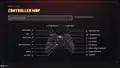 Default Xbox controller diagram
 -
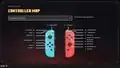 Default Nintendo Switch controller diagram
 -
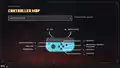 Default Joy-Con (L) controller diagram
 -
 Default Joy-Con (R) controller diagram
 -
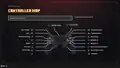 Default PS4 controller diagram
| Gameplay | |||||
|---|---|---|---|---|---|
| Seasonal Events | |||||
| Seasonal Adventures | |||||
| Downloadable content |
| ||||
| Tutorials | |||||
| Books |
| ||||
| Soundtracks | |||||
| Miscellaneous | |||||