29

I need to reset the root password of my local mysql installation but it woudln't let me. I've tried this:

$ sudo /etc/init.d/mysql stop
 * Stopping MySQL database server mysqld                                                                                                              [ OK ] 
[1]-  Exit 1                  sudo /usr/sbin/mysqld --skip-grant-tables --skip-networking
[2]+  Exit 1                  sudo /usr/sbin/mysqld --skip-grant-tables --skip-networking
reg@regDesktopHome:~$ sudo mysqld --skip-grant-tables &
[1] 13651
reg@regDesktopHome:~$ 140627 19:02:02 [Warning] Using unique option prefix key_buffer instead of key_buffer_size is deprecated and will be removed in a future release. Please use the full name instead.

reg@regDesktopHome:~$ mysql -u root mysql
ERROR 1045 (28000): Access denied for user 'root'@'localhost' (using password: NO)
reg@regDesktopHome:~$ sudo mysql -u root mysql
ERROR 1045 (28000): Access denied for user 'root'@'localhost' (using password: NO)
[1]+  Exit 1                  sudo mysqld --skip-grant-tables

How can I get the password reset? edit 1 I got this:

$ ps ax| grep mysql
16515 ?        Ssl    0:00 /usr/sbin/mysqld
16551 pts/23   S+     0:00 grep --color=auto mysql
reg@regDesktopHome:~/semios/v3upgrade$ sudo kill -9 16515
reg@regDesktopHome:~/semios/v3upgrade$ ps ax| grep mysql
16678 ?        Ssl    0:00 /usr/sbin/mysqld
16715 pts/23   S+     0:00 grep --color=auto mysql
reg@regDesktopHome:~/semios/v3upgrade$ mysql -u root
ERROR 1045 (28000): Access denied for user 'root'@'localhost' (using password: NO)

looks like a process is automatically restarting mysql as soon as I kill it...

stdcerr
  • 1,100
  • 5
  • 20
  • 37

6 Answers6

44

First please try using

mysql -u root -p

and enter your password (if you remember) at the prompt to login as the sql-root user (note the switch -p is for password).

If you really have to reset your root password for mysql, here's an easy way - reconfigure the package with dpkg-reconfigure.

Easy steps to reset mySQL root password:

  1. Check the version of your mysql-server;

    apt-cache policy mysql-server
    

    and see for the line which shows the installed version among other information. e.g. for my install it's:

    Installed: 5.5.37-0ubuntu0.12.04.1
    

    (From this I know that I have mysql-server-5.5 installed in my system.)

  2. Start the reconfiguration with:

    sudo dpkg-reconfigure mysql-server-*.*
    

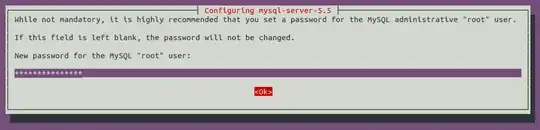
    where mysql-server-*.* should be replaced by the version that you have. (for me it'd be mysql-server-5.5). This will stop the database daemon. A prompt will then appear where you'd have to enter your new password and confirm the reconfiguration.

    snap1

    The daemon will be automatically started after the reconfig completes.

  3. You can then log in with:

    mysql -u root -p
    

    and start your database admin tasks.

References:

  1. https://help.ubuntu.com/community/MysqlPasswordReset [Which would soon be cleaned up as indicated in the page.]

  2. Ubuntu Server Guide related to your specific version.

muru
  • 207,228
rusty
  • 16,917
22

Reference taken from this blog:

Step 1: Stop MySQL Service.

sudo service mysql stop

Step 2: Kill all running mysqld.

sudo killall -9 mysqld

Step 3: Starting mysqld in Safe mode.

sudo mysqld_safe --skip-grant-tables --skip-networking &

Step 4: Start mysql client

mysql -u root

Step 5: After successful login, please execute this command to change any password.

FLUSH PRIVILEGES;

Step 6: You can update mysql root password .

UPDATE mysql.user SET Password=PASSWORD('newpwd') WHERE User='root';

for mysql > 5.7 use this instead of above:

UPDATE mysql.user SET authentication_string=PASSWORD('newpwd') WHERE User='root';

Step 7: Please execute this command.

FLUSH PRIVILEGES;

Step 8: Exit mysql console

exit

Step 9: Kill mysqld_safe and start mysql

sudo killall mysqld_safe && sudo service mysql start
Mehraban
  • 1,315
Anvesh
  • 591
9

Under Ubuntu 16.04 and mysql-server-5.7, the correct answer is the last comment of olafure, dpkg-reconfigure mysql-server-5.7 no longer works.

sudo service mysql stop
sudo killall mysqld
sudo mysqld_safe --skip-grant-tables --skip-networking &
mysql -u root

Now in mysql console >mysql

USE mysql;
UPDATE user SET authentication_string=PASSWORD('newpass') WHERE user='root';
FLUSH PRIVILEGES;
\q

Restart the good mysql process

sudo killall mysqld
sudo service mysql start

Check your new password

mysql -u root -p
Enter password: newpass
mysql>
Evan Carroll
  • 7,703
3

Starting with MySQL 5.7, during initial installation, if you leave password empty, then for that user, authentication will be based on auth_socket plugin.

The correct way to change password will be:

ALTER USER 'root'@'localhost' IDENTIFIED WITH mysql_native_password BY 'test';

https://www.percona.com/blog/2016/03/16/change-user-password-in-mysql-5-7-with-plugin-auth_socket/

Barun
  • 725
1

Nothing from the rest of the answers seemed to work for me. This is my solution:

sudo service mysql stop
sudo mysqld_safe &
sudo mysql -u root

In there:

ALTER USER 'root'@'localhost' IDENTIFIED BY 'MyNewPass';
FLUSH PRIVILEGES;
QUIT;

Then:

sudo killall mysqld
sudo service mysql start
sudo mysql -u root -p
Wtower
  • 467
0

Create a file with this:

UPDATE mysql.user SET Password=PASSWORD('MyNewPass') WHERE User='root';
FLUSH PRIVILEGES;

Stop the mysql server and run this:

mysqld_safe --init-file=/home/me/mysql-init &

Check here for more details: http://dev.mysql.com/doc/refman/5.0/en/resetting-permissions.html

user.dz
  • 49,176
elier
  • 101