I never used Ubuntu, and now I installed Ubuntu 18.04, and I have a problem with connection to Database.
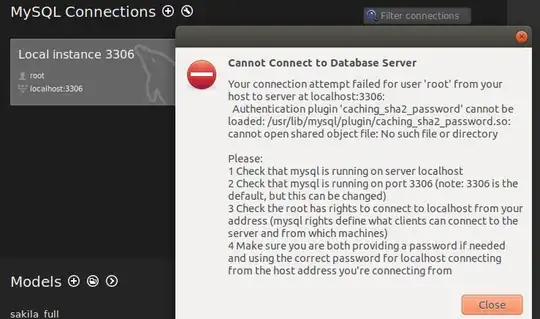
I'm not so familiar with the working with servers and things like that, so can anyone tell me what the problem is and how to fix it?
I never used Ubuntu, and now I installed Ubuntu 18.04, and I have a problem with connection to Database.
I'm not so familiar with the working with servers and things like that, so can anyone tell me what the problem is and how to fix it?
Check that your mysql server is running, if not enable it. From a terminal,
$ sudo systemctl enable mysql

Synchronizing state of mysql.service with SysV service script with /lib/systemd/systemd-sysv-install.
Executing: /lib/systemd/systemd-sysv-install enable mysql

$ sudo systemctl status mysql

● mysql.service - MySQL Community Server
   Loaded: loaded (/lib/systemd/system/mysql.service; enabled; vendor preset: enabled)
   Active: active (running) since Mon 2018-06-25 10:23:56 PDT; 56min ago
 Main PID: 1364 (mysqld)
    Tasks: 28 (limit: 4915)
   CGroup: /system.slice/mysql.service
           └─1364 /usr/sbin/mysqld --daemonize --pid-file=/run/mysqld/mysqld.pid
Check that you have it listen on port 3306.
$ sudo netstat -plunt

Active Internet connections (only servers)
Proto Recv-Q Send-Q Local Address           Foreign Address         State       PID/Program name
tcp        0      0 127.0.0.1:3306          0.0.0.0:*               LISTEN      1364/mysqld
If not, you'll have to modify /etc/mysql/mysql.conf.d/mysqld.cnf
Check that you have root access, enter password when prompted.
$ mysql -u root -p
If you don't have root access or need to reset root password, follow the steps from here. Which basically says the simplest way is do the following and choose a new root password.
$ sudo mysql_secure_installation

Securing the MySQL server deployment.

Enter password for user root:
Now, if you want simply want to connect to a remote database, specify the host and port along with the login user/password when creating the mysql connection.
If you run into password validation problem, you may consider moving validate_password plugin
$ mysql -h localhost -u root -p
Enter password:
Welcome to the MySQL monitor.  Commands end with ; or \g.
Your MySQL connection id is 8
Server version: 5.7.22-0ubuntu18.04.1 (Ubuntu)

Copyright (c) 2000, 2018, Oracle and/or its affiliates. All rights reserved.

Oracle is a registered trademark of Oracle Corporation and/or its
affiliates. Other names may be trademarks of their respective
owners.

Type 'help;' or '\h' for help. Type '\c' to clear the current input statement.

mysql> uninstall plugin validate_password;


