Pokémon Photo Booth
| Pokémon Photo Booth | |
|---|---|
 Pokémon Photo Booth icon | |
Basic info
| |
| Platform: | iOS, Android |
| Category: | Entertainment |
| Players: | 1 |
| Connectivity: | None |
| Developer: | NotWithoutUs |
| Publisher: | The Pokémon Company International |
| Part of: | Generation VI spin-off |
Ratings
| |
| CERO: | N/A |
| ESRB: | E |
| ACB: | N/A |
| OFLC: | N/A |
| PEGI: | N/A |
| GRAC: | N/A |
| GSRR: | N/A |
Release dates
| |
| Japan: | N/A |
| North America: | February 24, 2016 (iOS) April 9, 2016 (Android) |
| Australia: | February 24, 2016 (iOS) April 9, 2016 (Android) |
| Europe: | February 24, 2016 (iOS) April 9, 2016 (Android) |
| South Korea: | N/A |
| Hong Kong: | N/A |
| Taiwan: | N/A |
Websites
| |
| Japanese: | N/A |
| English: | Pokémon.com (archived) |
Pokémon Photo Booth (listed as Pokememe on the phone's home screen and system menus) is a free app provided by The Pokémon Company International for iOS and Android. It was released in North America, Europe, and Australia on February 24, 2016 for iOS and on April 9, 2016 for Android in celebration of the Pokémon 20th Anniversary.
The app allows users to personalize pictures with a variety of captions in the style of classic Pokémon games, or use custom designs to create Pokémon profile images. The images can then be saved and shared.
Available content
There are two modes in the app: Add a Caption and Profile Pic. After editing a picture, it can be shared on Twitter, Facebook, Instagram, or on other services.
Add a Caption
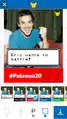
In Add a Caption mode, the image chosen or taken can be cropped, rotated, or flipped to fit within a square frame.
One of nine filters can then be applied to the image.
- Pixelate
- Mono
- Tonal
- Noir
- Fade
- Chrome
- Process
- Transfer
- Instant
One of six possible captions can be chosen to be displayed on the image. Up to fifteen characters can be used to fill each blank; however, profane text may not be entered.
- "_____ wants to battle!"
- "A wild _____ appears!"
- "_____ is evolving!"
- "_____ used _____. It was super effective!"
- "_____ used _____. It was not very effective."
- "_____, I choose you!"
One of six possible bars can be displayed at the bottom of the image.
- (no bar)
- Black #Pokemon20
- Red #Pokemon20
- Blue #Pokemon20
- Green #Pokemon20
- Yellow #Pokemon20
- White #Pokemon20 with logo
Profile Pic
In Profile Pic mode, the image chosen or taken can be cropped, rotated, or flipped to fit within a square frame. A red and white image of a Poké Ball is superimposed on the image.
One of six captions can be chosen to be displayed on the image.
- NO CAPTION
- Like No One Ever Was!
- I'm a Trainer!
- Gotta Catch 'Em All!
- Prepare for Trouble!
- Pokémon Champion!
- Train On.™
Gallery
-
 Add a Caption
 -
 Profile Pic
In other languages
| ||||||||||||||||||
External links
Related articles
Pokémon Masters Arena • Pokémon PC Master • Pokémon Team Turbo
Pokémon Team Rocket Blast Off • Pokémon Poké Ball Launcher • Pokémon Seek & Find
Pokémon Garden • Pokémon Medallion Battle • Pokémon Tower Battle
Pokémon Scoop Disc (2004 Winter, 2004 Summer, 2006 Spring)
Pokémon Jukebox • Learn Real English Through Pokémon: XY Translation Scope
Pokémon Shuffle Mobile • Dancing? Pokémon Band • • Pokémon GO
Pokémon Duel • Pokémon: Magikarp Jump • Pokémon Playhouse • Pokémon Quest • Pokémon Pass
Pokémon Masters EX • Pokémon Wave Hello • Pokémon Smile • Pokémon Café ReMix
Pokémon UNITE • Pokémon Sleep • Pokémon Friends • Play! Pokémon Access • Pokémon Events
Pokémon: Crayon Kids • Pokémon: Wobbuffet Fell Down! • Pokémon Get Round and Round
Pokémon Tug of War Tournament: Absolutely Get Medal! • Pokémon Medal World
Pokémon Card Game Gacha • Pokémon: Battle Nine • Pokkén Tournament • Pokémon Corogarena
Core series • Side series • Spin-off series • Standalone spin-offs • Pokémon mini • Betas • Demos

|
This article is part of Project Sidegames, a Bulbapedia project that aims to write comprehensive articles on the Pokémon Sidegames. |