94

I am in a LAN and there are 3 Ubuntu, 2 Kubuntu, 2 Windows XP and 2 Windows 7. What commands or tools are available to see what PCs are connected to the LAN that it shows the name of the PC and the IP. Similar to tools like Angry IP that show all PCs in a LAN.

Note that I do not know the IPs or names of the computers connected to the LAN. So the tool or command should look for them to.

Luis Alvarado
  • 216,643

8 Answers8

66

Arp-scan works great for me too...

If using Wi-Fi:

sudo arp-scan -l --interface=wlan0

-or if using ethernet:

sudo arp-scan -l --interface=eth0

(this last is practically identical to what Rajesh Rajendran posted; the -l standing for --localnet)

If you don't have arp-scan (it doesn't come with Ubuntu by default), just pull up a terminal and type:

sudo apt-get install arp-scan
Manuel
  • 779
54

Taken from Finding All Hosts On the LAN From Linux/Windows Workstation

for ip in $(seq 1 254); do ping -c 1 192.168.1.$ip>/dev/null; 
    [ $? -eq 0 ] && echo "192.168.1.$ip UP" || : ;
done

But for a great tool, Nmap. Great for mapping networks.

αғsнιη
  • 36,350
rdh
  • 866
52

The simplest thing is

$ sudo arp-scan --localnet
martinho
  • 277
  • 2
  • 6
37

I always use nmap. To scan for all devices in your network, use:

nmap -sP 192.168.0.1/24

More here: https://www.cyberciti.biz/networking/nmap-command-examples-tutorials/

It is a great tool to know about. You may want to install nmap using:

sudo apt-get install nmap if you are using Debian or

sudo pacman -S nmap if you are using Arch.

Ruraj
  • 952
17

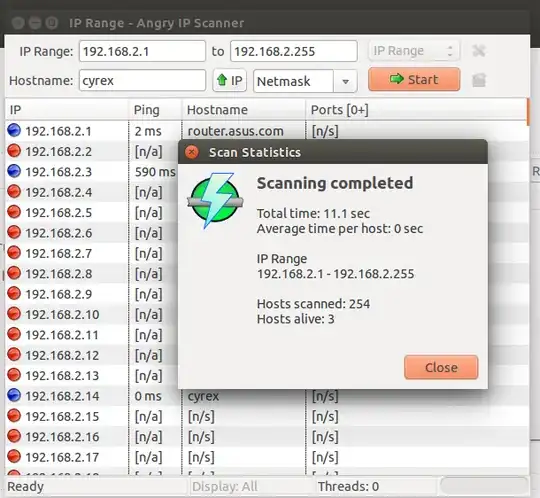
As a possible GUI option, the best one I have seen is Angry IP as found in http://angryip.org/download/#linux

Simply download the latest DEB package and install. Then run ipscan from Dash. Here is a screenshot:

enter image description here

Luis Alvarado
  • 216,643
11

arp

Address                  HWtype  HWaddress           Flags Mask            Iface
iPhone-von-me.fritz.box  ether   12:55:05:30:3c:df   C                     wlp3s0
android-abcdefghijklmno  ether   11:66:3f:71:04:d6   C                     wlp3s0
fritz.box                ether   00:11:3f:46:37:c2   C                     wlp3s0
Blupiblu.fritz.box       ether   71:88:cc:bb:dc:a6   C                     wlp3s0

ip neigh

ip neigh and hosts. NO nmap / sudo required.

Building on this, you can build a Python script:

#!/usr/bin/env python

"""List all hosts with their IP adress of the current network."""

import os

out = os.popen('ip neigh').read().splitlines()
for i, line in enumerate(out, start=1):
    ip = line.split(' ')[0]
    h = os.popen('host {}'.format(ip)).read()
    hostname = h.split(' ')[-1]
    print("{:>3}: {} ({})".format(i, hostname.strip(), ip))

Download via

wget https://gist.githubusercontent.com/MartinThoma/699ae445b8a08b5afd16f7d6f5e5d0f8/raw/577fc32b57a7f9e66fdc9be60e7e498bbec7951a/neighbors.py
Martin Thoma
  • 20,535
7

If broadcast isn't disabled on your router...

You can ping the broadcast address.

ping -b 192.168.0

Will broadcast the ping command to every host within the 192.168.0/24 subnet.

Note: It's probably a good idea to keep broadcasting turned off though as that's how hackers can exploit a network using a DDOS Smurf attack. Basically, ping the broadcast address with a packet that has a spoofed destination address (ie the ip address of the victim). There's a little more to it than that but that's what Google is for.

Note: The same also works on Windows but you ping the actual broadcast address (not the subnet).

ping -b 192.168.0.255
Evan Plaice
  • 1,966
3

Nmap is your friend

nmap -sP 192.168.0.1/24

If you have any question, nmap help is full of information.

Zanna
  • 72,312
craken
  • 196