How to open Ubuntu unity dash when hitting the top-left corner of the screen(i am working on Ubuntu 11.10), Just like in Gnome-shell(i love this feature). using compiz or anything else.
Asked
Active
Viewed 2,006 times


1 Answers
5
- Install
xmacro. - Install
compizconfig-settings-manager. - Open
ccsmand click the Commands button (not the tick in front of it).
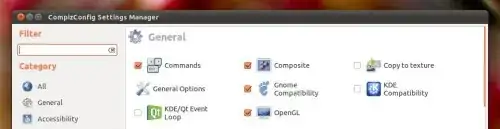
- Go to the Commands tab and copy-paste this line into an empty box:
echo “KeyStrPress Super_L KeyStrRelease Super_L”| xmacroplay -d 1 :0.0 &> /dev/null.

- Go to the Edge bindings tab and click the button labeled None next to the corresponding command number.
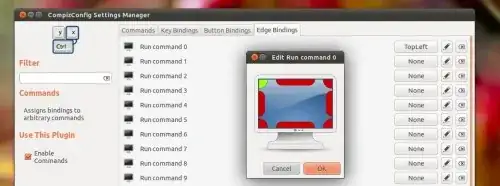
That should've done the trick.
Source: http://www.omgubuntu.co.uk/2011/08/open-unity-dash-compiz-edge-binding-gnome-shell-style/

RobinJ
- 9,020