I would like to hide all items that I don't need from appearing in App Lens.
For example: XTerm, File Roller and the Home Folder.
Is this possible?
I would like to hide all items that I don't need from appearing in App Lens.
For example: XTerm, File Roller and the Home Folder.
Is this possible?


For any app that you don't want displayed in the Dash it needs a line in it's .desktop, -
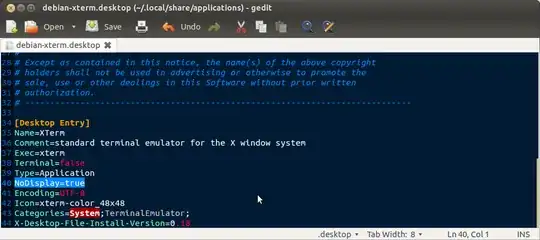
NoDisplay=true
If NoDisplay=false is there then in a text editor simply edit to true, if the line doesn't exist then add it
Most app's .desktops will be found in /usr/share/applications & can be edited there in a root text editor. Alternately you can copy the .desktop to ~/.local/share/applications & edit there instead with your normal (non root) text editor.
When copied there it is protected against updates & only applies locally to that user
Example in screen of adding line to debian-xterm.desktop