5

I have recently installed Ubuntu 14.04 LTS on my MacBook Pro. But whenever I use more than 20 minutes it gets scorching hot. I tried installing laptop mode but apparently it doesn't exist.

I found something about running on efi vs bootcamp. Is that the reason why? If so can anyone explain how to fix it or suggest a link?

Could it be other reasons?

Also I had Yosemite so I used rEFInd

JayC
  • 73

3 Answers3

6

You need to install Nvidia driver and also a switch utility.

Run in terminal

sudo apt-get install nvidia-331 nvidia-prime

and reboot.

Without the driver both Nvidia and Intel adapters consume power and that is why the laptop is heating.

You can check which adapter is working by

prime-select query

Switch to Nvidia by

sudo prime-select nvidia

switch to Intel by

sudo prime-select intel

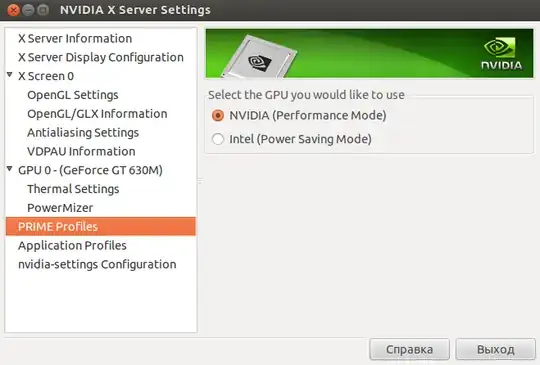
Or do in in GUI Nvidia-Settings program.

enter image description here

Pilot6
  • 92,041
3

The problem got sorted out for me.
I am running 16.04 on Macbook pro retina 2015

sudo add-apt-repository ppa:mactel-support
sudo apt-get update
sudo apt-get install macfanctld

After installing it, view its manual by running

man macfanctld

it will show the config file path. Mostly it will be the below path

 /etc/macfanctl.conf

Open the config file and edit it according to your needs. I will post my config file here which is working perfectly fine for Macbook Pro 13 inch retina.

# Config file for macfanctl daemon
#
# Note: 0 < temp_X_floor < temp_X_ceiling
#       0 < fan_min < 6200       

fan_min: 4000

temp_avg_floor: 30
temp_avg_ceiling: 40

temp_TC0P_floor: 30
temp_TC0P_ceiling: 40

temp_TG0P_floor: 30
temp_TG0P_ceiling: 40

# Add sensors to be excluded here, separated by space, i.e.
# exclude: 1 7
# will disable reading of sensors temp1_input and temp7_input.

exclude:

# log_level values:
#   0: Startup / Exit logging only
#   1: Basic temp / fan logging
#   2: Log all sensors  

log_level: 0

Save the config file and restart for safety. This package seems to run like a daemon on the background and control the fan speed. I can hear fan speeds dynamically changing from the fan noise.

0

Yes, enabling EFI mode has worked for some people: My ubuntu macbook pro feels warm, can I solve this?

Here is the link to install laptop mode: http://samwel.tk/laptop_mode/packages/tarball

You can disable animations and effects from CompizConfig Settings Manager so that your laptop runs cooler.

http://www.rodsbooks.com/ubuntu-efi/index.html gives you a lead how to boot your mac with EFI.

aprado
  • 41
  • 2