4

I have struggled with this problem for three days and I have tried many ways to solve it but not successful yet. I hope you guys can help me...

I have an GUI application. I want to start this application automatically. And when it goes down or closed unexpectedly, I want to reopen this application.

I tried to use upstart script, however although there is no problem about services with upstart, GUI application is not starting with upstart script. It says cannot connect X server.

Should I add or change some settings to open with upstart or is there any way to open GUI application automatically when unexpected exit or shut down occurs (not just once after login I mean not with Startup) ?

Tim
  • 33,500
goGud
  • 195

2 Answers2

5

Create a file $HOME/.config/upstart/myGuiStart.conf

Content:

start on desktop-start
stop on desktop-end

respawn

exec firefox

or another example with a delay:

start on desktop-start
stop on desktop-end

respawn

script
    sleep 30
    firefox 
end script

description of respawn:

 respawn
         A service or task with this stanza will be automatically started
         if it should stop abnormally.  All reasons for a service stopping,
         except the stop(8) command itself, are considered abnormal.  Tasks
         may exit with a zero exit status to prevent being respawned.

More info:

http://ifdeflinux.blogspot.de/2013/04/upstart-user-sessions-in-ubuntu-raring.html

http://upstart.ubuntu.com/

Respawn bug? -> https://askubuntu.com/a/62461/265974

TuKsn
  • 4,440
4

The problem you are facing is that when upstart (or systemd, or the scripts in /etc/rc.d/) are run, there is normally no graphic service ("the X server") running.

Moreover, the availability of the graphic subsystem in Unix is strictly bond to the concept that a user has done a graphic login, and just this user has the right to use the graphic environment. It is customary NOT to start a graphic subsytem for root --- and the upstart scripts are run by root.

To automatically start a graphic application at the start of the system, my approach would be:

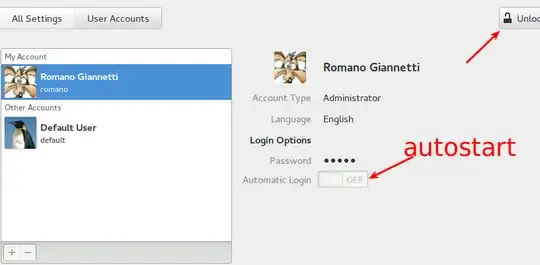
  1. create a user for this purpose. Set it up so that its session will autostart.
    enter image description here

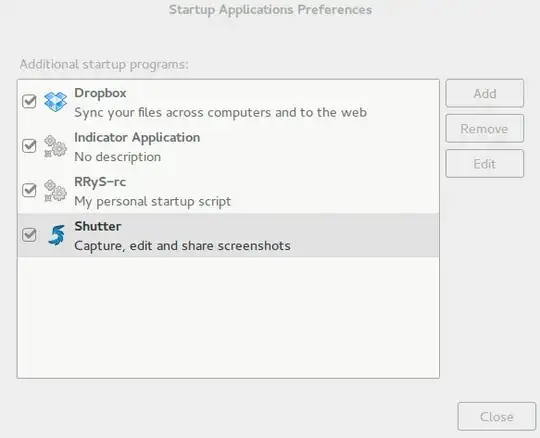
  2. set up a startup application for this user with the program you want; choose "startup application" in the dash: enter image description here
  3. for restarting the application when it exits/crashes, you can simply embed it in a script:

         #!/bin/bash
         #
         while true; do 
              /full/path/to/start_myapp.sh    # NO background (&)!
              # if we land here it exited
              sleep 5
         done
    

If you use this script, it is really important that the command start_myapp.sh should not launch the application in background. Otherwise, more complex strategies are required to auto-restart...

Notice that you can use your normal user in parallel too; just choose "switch user" from the panel (adapt to your flavor of Ubuntu) and you will have another graphical login screen; you can switch back-an-forth using CTRL-ALT-F7 and CTRL-ALT-F8...

Rmano
  • 32,167