19

My Firefox spellchecker was complaining this morning that I spelled 'neighbor' in the American English style, not the British English style ('neighbour'). Same is true for color (colour), analyze (analyse), etc. I've checked in the edit->preferences->content->language tab, and en-us is selected. I also found this link here:

http://ubuntuforums.org/showthread.php?t=1013043

Suggesting that there's some kind of system panel I can use to ensure that I've got the right language, but I can't see where that is (I guess that's for an older Ubuntu that let people get to system settings).

So either the dictionary for Firefox for en-us is corrupted, just a copy of the British English dictionary, or somehow the setting isn't propagated properly. How can I get the American dictionary back?

mmr
  • 423

5 Answers5

15
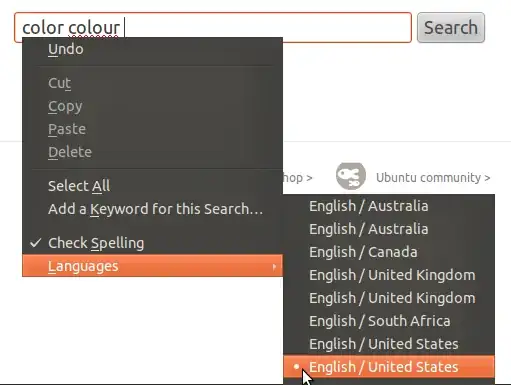
  1. In a text field, open a context menu by pressing the right mousebutton.
  2. Select Check Spelling if needed
  3. In the Languages menu, select English / United States

Firefox spellchecker

If this did not work, (re-)install the hunspell-en-us package.

Lekensteyn
  • 178,446
8

For Firefox, put "about:config" in the address bar and go there. Search for "spell", and find the variable "spellchecker.dictionary". If its value is something other than "en_US" (mine said "en_AU"), right click the entry and modify the value to "en_US".

Greg
  • 81
1

I had ongoing problems with Firefox "jumping" from one dictionary to another. To fix it, I run this command after each Ubuntu install:

sudo rm /usr/share/hunspell/en_{GB,AU,ZA,CA}.*

Obviously, this can be edited for any dictionary.

0

There are multiple bugs in Ubuntu that are tracing back to Mozilla: Firefox is not following the system locale setting. Consider posting a sighting to https://bugzilla.mozilla.org/show_bug.cgi?id=776028.

dannyman
  • 648
-1

Firefox seems to randomly use any one of the installed dictionaries. Several English dictionaries get installed by default in Ubuntu. The solution is to remove all but the US English dictionary using apt-get.

From How can I change Firefox's default dictionary?, Insperatus posted this useful command.

sudo apt-get remove myspell-en-au myspell-en-gb myspell-en-za hunspell-en-ca && sudo apt-get install myspell-en-us

Before:

firefox spelling language before removal

After:

firefox spelling language after removal