I am using xubuntu atm and my biggest issue is, that ristretto show pictures in 100% zoom.
When I run a slideshow, I want it to expand to full screen.
I can only enable that for one picture at a time, and this gets reset if I switch to antother picture.
Asked
Active
Viewed 2,794 times
5

karel
- 122,292
- 133
- 301
- 332

davidbaumann
- 1,915
3 Answers
1
Settled on mirage; it has features of risttreto plus a lot more customizability, including remembering last settings - both on next image, and on next open.
package-manager install mirage
Tried viewnoir, but it no thumbnail preview is a dealbreaker.

MeowMeow
- 111
1
I do not use Ristretto (a little at my Linux life start only) and people often suggest "eliminate this utility" (quote). And despite this fact if I right figure out you need to know where exist such checkbox alike first at Ristretto Menu > Edit > Preferences:
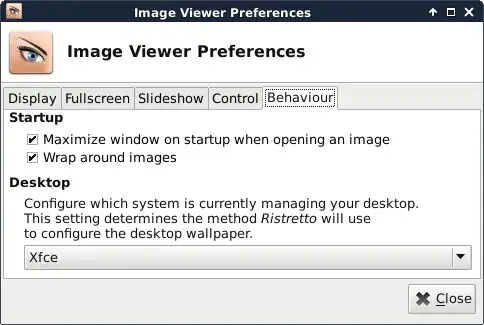
I think more settings for Ristretto you can find at Settings Editor (xfconf GUI), and you can see ristretto exists at settings channels list:
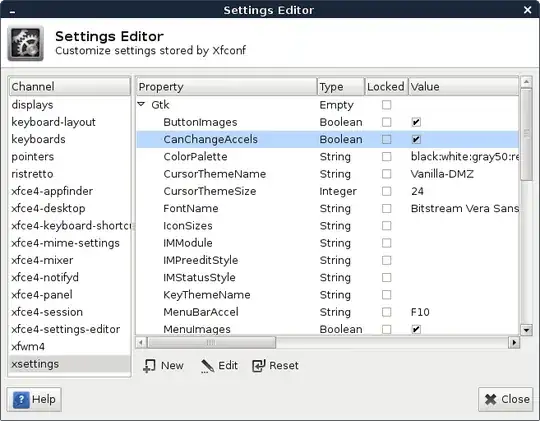
Alternatively I do not know what to suggest. If I'll needed to use XFCE I'll chosen Feh which also lightweight also image also viewer however Feh it is "barebone" image viewer and can be a bit difficult for plain user.
So, look if interesting Feh
Hope it help you.

swift
- 3,291
1
OK, I was looking for this in ristretto, but I gave up. Don't know how to set stretching image to screen without clicking it at every image. Shotwell also was beyond my skills.
However, I may found satisfying solution for your needs.
To create presentation with stretched and fitted images simply run vlc (which I consider to be basic video player on every computer) hit ctrl+shift+O and add image files you want to be in slide show.
Tricky thing is duration of single slide: hit ctrl+P mark Show settings ⇒ All and then go to: Input/Codecs ⇒ Demuxers ⇒ Image ⇒ Duration is seconds (by default 10 seconds).
If you want to infinitely repeat presentation, just hit loop button.
Hope it helps.

Michał Pietrzak
- 138