so I have a simple sh file I want to run whenever someone logs in. I tried adding it to startup applications. This didn't work. I tried editing the .desktop file for the startup application to set Terminal=true. This made it open temporarily but shut it down. I tried editing .bashrc by adding the command bash /path/to/my/file.sh and it had the same effect. This seems like it should be really simple to do, even in linux, but I have tried lots of ways and had no success. I am on Ubuntu 14.something.
Asked
Active
Viewed 4,440 times

2 Answers
0
Solution for Question --> "so I have a simple sh file I want to run whenever someone logs in. I tried adding it to startup applications."
Suppose path of your file is /home/foster/Desktop/script.sh
First make it executable by :
$ chmod +x /home/foster/Desktop/script.sh
Now just Add path of the script to file "/etc/rc.local" :
sh /home/foster/Desktop/script.sh
exit 0

vivekyad4v
- 534
0
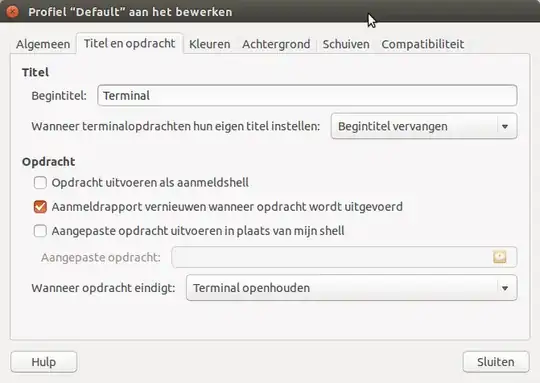
When you set Terminal=true in the desktop file, the terminal window by default closes after the "the job has finished". An easy solution is to change your (terminal-) profile settings:
- open a terminal window, choose Profile Preferences
- choose "Title & Command" (at least that is what it is in Dutch, the second tab)
- in the section "when the command has finished" choose "keep terminal window open"
And of course, like you did, in the desktop file, set Terminal=true

Jacob Vlijm
- 85,475