0

this question has been asked in a general way before, but this is my first week with Ubuntu and I can't understand all the instructions here: How to associate a file with a program installed in wine Danne's answer was: 'Right click, Open with other application. If your application is not available in the list, use custom command and put wine ~/.wine/drive_c/Program\ Files/Yourapp/Yourapp.exe in the box.' What is 'custom command'?

I also saw the instructions at https://help.ubuntu.com/community/Wine#Creating_file_associations But the other way looks easier..

In particular I want to open pdf files with Sumatra PDF. I have Ubuntu 14.04.

Thanks for your help,

Andrew

user5412
  • 11
  • 6

1 Answers1

0

Lets create an association file!

Open up your Terminal and execute command:

gedit ~/.local/share/applications/ViewInSumatra.desktop

You will get the text editor. There, paste something like below:

[Desktop Entry]
Name=Sumatra
Exec=wine /home/$USER/.wine/c_drive/Program\ Files/Sumatra/sumatrapdf.exe %F
Icon=evince
Type=Application
Categories=Viewer StartupNotify=false
Terminal=false
MimeType=application/pdf

NOTE: You must replace /home/$USER/.wine/c_drive/Program Files/Sumatra/sumatrapdf.exe with the real path of Sumatra PDF Reader.

Once done save the text file.

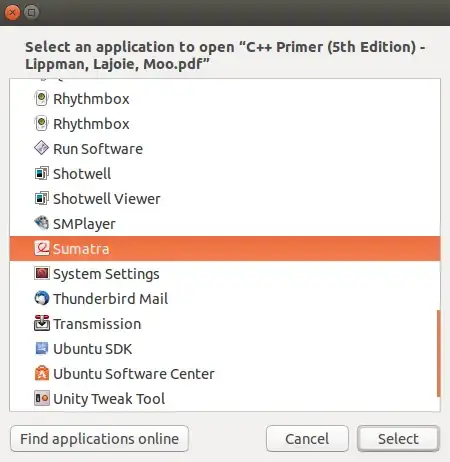
Now, right click a PDF file > choose Open With > CLick View All Applications
From the application list, choose Sumatra:

enter image description here

Now all the PDF files should be opened with Sumatra

With that said, I must say that Sumatra PDF is no match for KDE's Okular

Naveen
  • 9,551