I run Ubuntu 12.10 32-bit and (if this is relevant) use the Cinnamon desktop. When I first installed Ubuntu about a year and a half ago, the software updater would pop up automatically whenever updates are available and prompt me to confirm that I wanted to install the updates. Now, however, it never pops up and I have to launch the updater manually to check for and install updates. I have not changed any settings for the updater and, in fact,it appears to be set to automatically notify when updates are available. Any insights on why it's not doing so and how I may be able to configure it to do so, as it did when I first installed Ubuntu? Thanks!
Asked
Active
Viewed 156 times


1 Answers
0
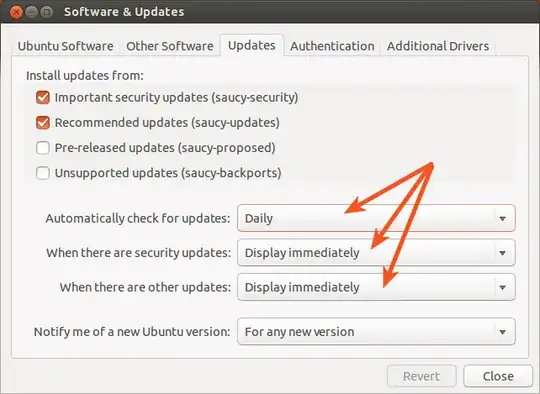
Open Software & Updates, go to Updates tab and be sure that you select automatically check for updates and when these to be displayed as in the following image:

Radu Rădeanu
- 174,089
- 51
- 332
- 407