How can I make "compact view" the default for all directory views in File Manager, instead of "icon view" ?
Asked
Active
Viewed 4,260 times


3 Answers
7
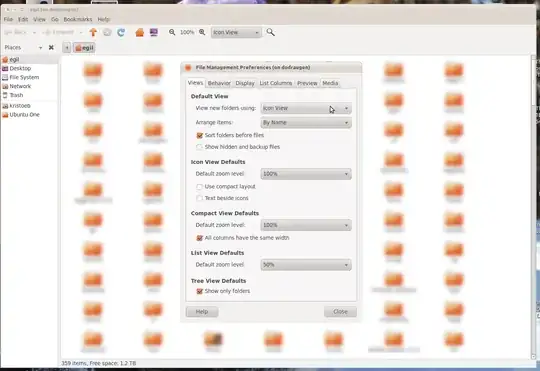
Open File Management Preferences by clicking Edit->Preferences.
Under Default View, choose your preferred option under View new folders using:

mwfearnley
- 3,497

Egil
- 14,522
5
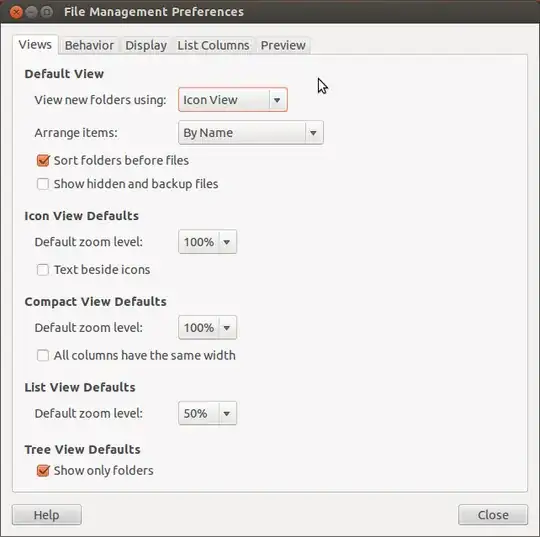
Yes it is, if you open your preferences its under the starting tab "Views" Then under the first section "default view" click on "view new folders using" and you can select your default view. However it doesn't seem to update your current folder. Don't know why, you'll have to change that setting in the view tab below I have provided a screen shot.

Weylin Schreck
- 654
3
Egil's answer works fine for new folders, but won't take care of folders you manually assigned a view to.
If you want to delete those previously saved (per-folder) views, you can delete the files in ~/.local/share/gvfs-metadata. Next time you start Nautilus, all folders should use the view type you set in the preferences.

