I use Notepad++ on Windows 7 and I want to know if there is a good substitution for it on Ubuntu.
I want something that is good for editing html files.
I use Notepad++ on Windows 7 and I want to know if there is a good substitution for it on Ubuntu.
I want something that is good for editing html files.


Actually you can install Notepad++ by installing wine first:
sudo apt-get update; sudo apt-get install wine
But some good alternatives are:
Of these, Geany and GEdit are my favorites, but it depends on your needs. If you are looking for something more complex, there is the Aptana Studio which I mentioned in detail as an answer in this question: Basic Web Development IDE/Editor like Dreamweaver?
Good luck!

Thanks to the work of Daniel Di Sardi there is an editor inspired to Notepad++ for Linux:
Notepadqq is a Notepad++-like editor for the Linux desktop.
Notice that the start of the GitHub page says, since May 27, 2023:
This project is not actively maintained anymore. New maintainers are welcome.
-- Daniele

As another option, SciTe is based on the same "editing building block" of Notepad++, Scintilla.

It is actually possible to install Notepad++ on Ubuntu. Just run the following commands:
sudo apt-get update
sudo apt-get install wine
Then, download the Notepad++ Windows installer, right click it, and select Open With -> Wine Windows Program Loader. Follow the typical installation process and you should be able to open Notepad++ from your Dash.

Nowadays I would recommend Visual Studio Code. It's free, open-source and runs everywhere!
Wikipedia says:
Visual Studio Code is a source code editor developed by Microsoft for Windows, Linux and macOS. It includes support for debugging, embedded Git control, syntax highlighting, intelligent code completion, snippets, and code refactoring. It is also customizable, so users can change the editor's theme, keyboard shortcuts, and preferences. It is free and open-source, although the official download is under a proprietary license.
Visual Studio Code is based on Electron, a framework which is used to deploy Node.js applications for the desktop running on the Blink layout engine. Although it uses the Electron framework, the software is not a fork of Atom, it is actually based on Visual Studio Online's editor (codename "Monaco").
I would recommend Atom. Advantages:

Other alternatives which have rich features including easy-to-use macro tools:
☞ http://www.webupd8.org/2014/03/kkedit-text-editor-inspired-by-bbedit.html
☞ https://github.com/KeithDHedger/KKEdit
☞ http://linux-apps.com/content/show.php/KKEdit?content=158161
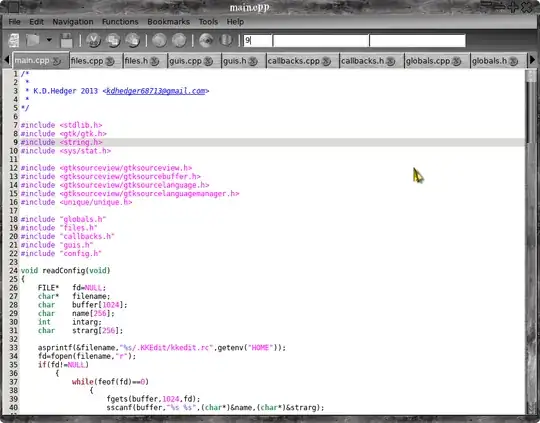

Configurable syntax highlighting.
Configurable keyboard accelerators.
Multiplatform - works on unix and windows.
Plugins: can be written in C, Python, or Lua.
Configurable tools available from the main and context menus. They can be written in - Python or Lua, or it can be a shell script.
Regular expression search/replace, grep frontend, builtin file selector, etc.

Three other alternatives:
Bluefish is very good for HTML and CSS in my opinion.

Did you try Atom? https://atom.io/
sudo add-apt-repository ppa:webupd8team/atom
sudo apt-get update
sudo apt-get install atom
Or, did you try Sublime Text?? http://www.sublimetext.com/
sudo add-apt-repository ppa:webupd8team/sublime-text-3
sudo apt-get update
sudo apt-get install sublime-text-installer
Sublime is not free and sometimes when using it displays a notification to buy it. But, you can "evaluate it" as much as you want. (Sublime website says "There is currently no enforced time limit for the evaluation" )

I've not been able to get notepad++ to work with wine/ubuntu. Nevertheless, you can install notepadd++ as a snap and it works just fine.
Go to https://www.ubuntu.com/desktop/snappy and follow the links. Snaps are available for a variety of containerized software packages. The snap "store" is located at https://snapcraft.io/store. The homepage is https://snapcraft.io .
Or check out https://linuxconfig.org/a-beginner-s-introduction-to-snaps-the-universal-linux-package-format or https://en.wikipedia.org/wiki/Snappy_(package_manager).

Notepad++ (notepad-plus-plus) is a snap package in the default repositories of all currently supported versions of Ubuntu. To install Notepad++ open the terminal and type:
sudo snap install notepad-plus-plus
To add Notepad++ navigation to other drives besides the default drive:
sudo snap connect notepad-plus-plus:removable-media

Even though the window title says [Administrator] this file is opened with normal user permissions in Notepad++.

Try eric4.
I use both notepadd++ on windows and eric4 on Debian. Eric is superior in many ways to notepad++ in my opinion and is free.

Have a look at scribes. Features:

Brackets is a modern, open source text editor that understands web design. It's crafted from the ground up for web designers and front-end developers.
It is available for many OSs and works pretty good with Ubuntu. To install Brackets in all currently supported versions of Ubuntu open the terminal and type:
sudo snap install --classic brackets


