30

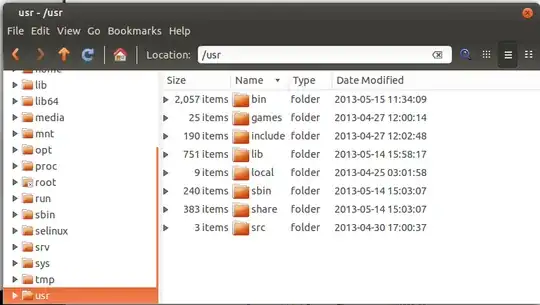
In nautilus (or nemo) file manager, the "Size" column shows the filesize for files and the number of items contained in a folder for subdirectories:
enter image description here

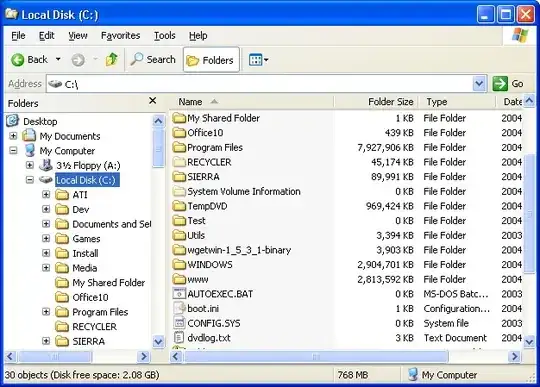
Number of items is not that important for me, it would be more useful if I could make this column show the total size contained under the directory. I had an extension on windows called foldersize which shows what I mean:
enter image description here

I think it involved a service which ran in the background monitoring filesystem modifications in order to make sure the column was kept up to date.

I am interested to know if there is any similar extension to nautilus, I would also be open to switching to another file manager to get this functionality. I am aware of the Disk Usage Analyser in Ubuntu, but what I'm looking for is a solution with file manager integration.

wim
  • 13,088

5 Answers5

2

Not sure if this will help as it's not exactly what you're looking for, but you can display the file size under the icon:

  1. Open the file explorer
  2. Go to places
  3. Select preferences
  4. Select display tab

http://www.ubuntugeek.com/how-to-tweak-nautilus-to-display-size-of-files-under-their-name.html

However, this is probably a more direct answer to your question: Show current folder size in Nautilus

1

I found two tools!

GUI: Double-Commander, will add the "deep" sizes if you hit Alt+Shift+Enter. Unfortunately, it's not sticky, need to be done again when you change to another folder :-(

CLI only: vfn

Alt+Z configures it to show deep folder sizes; AND it's sticky!

It feels a little like ncdu, but with file management stuff too.

A little counter-intuative on the UI front to me, (e for erase (rather than a delete), h for help; ? launches a sub-shell), but it does the job.

vfu is the winner for me; I'll get used to the odd key-bindings!

dsz
  • 559
1

Always calculating the disk usage of a directory accurately (including hardlinks etc.) would slow you down, so it is not done. (With large directories I even have to wait quite a while to get the number of items.)

If you want to analyze disk usage try gdmap or baobab. There are even more tools.

not-a-user
  • 148
  • 3
0

Dolphin, at least as of version 24.02.2, will show the total size contained under directories. On the main menu, under Configure, select "Configure Dolphin...". Choose the "View" panel, and then the Content Display tab. There will be a radio button for "Folder size displays" from which you can choose "Size of contents" and configure how many levels deep in the directory tree it will search.

-1

Krusader will calculate the size of one or directories. This is very useful when you are trying to figure out how much data you can fit on a a CD or DVD data archive disk.