5

I'm using the Ambiance theme in Ubuntu 10.04 which I am generally quite happy with but I would like to change the tooltip color or font. I sometimes find it hard to make out the white text on the black background, so I would like to be able to change this to make it more readable.

So how can I change the tooltip color or font in the Ambiance theme?
2 Answers2

6

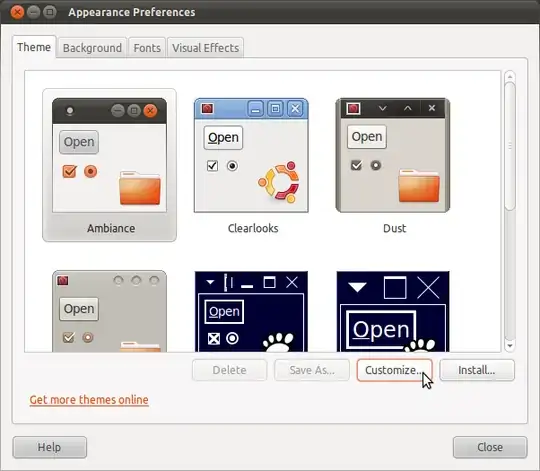
Goto System -> Preferences -> Appearance. In Themes select the Ambiance theme and hit the Customize... button.

enter image description here

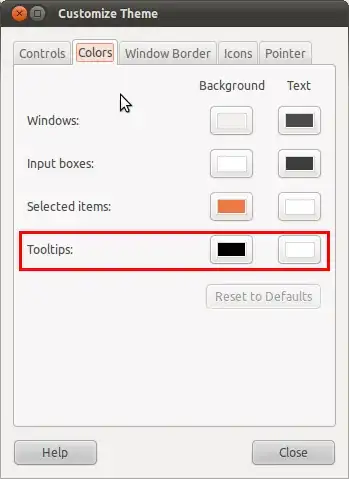
In the just popped up Customize Theme window select the Colors tab.

enter image description here

Now edit the colors to your desired value. The Tooltips colors are highlighted on the screenshot.

Note: I'm using 10.10 but it should be similar on 10.04

Octavian Helm
  • 14,515
1

In 11.10/Oneiric, the method changed, since the configuration dialog is not available anymore.

Modify the /usr/share/themes/Ambiance/gtk-2.0/gtkrc file. In the gtk-color-scheme string at the very top of the file, change the tooltip_bg_color and selected_fg_color entries and add a tooltip_fg_color entry.

http://ubuntuforums.org/showpost.php?p=11345748&postcount=2

Christoph
  • 3,138