17

I was trying to add the installed matlab to the menu of Applications under Ubuntu 10.10.

I clicked Gnome-Menu -> Preference -> Main Menu -> Programming -> New Item, where I input the Matlab file .../MatlabR2010b/bin/matlab as the command, and selected the type to be "Application". Then I finished.

But when I click the item in the menu of Applications, the Matlab icon shows up for a few seconds and then nothing else happens.

If I select the type to be "Application in Terminal", then in the last step of adding Matlab to the Applications Menu, after I click the item in the menu of Applications, there will be firstly a terminal window and then the Matlab command window.

So I was wondering how to solve the problem of Matlab not starting when the type has been selected to be "Application"? Also is there a way to eliminate the terminal appearing when the type has been selected to be "Application in Terminal"?

Jorge Castro
  • 73,717
Tim
  • 26,107

6 Answers6

16

I found some useful instructions which work for me (Ubuntu 10.04).

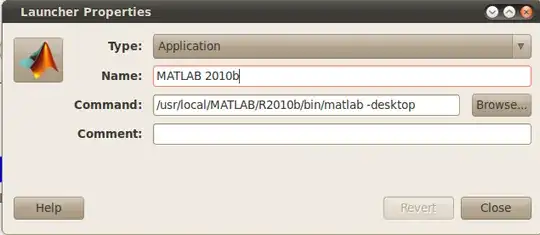
Screeshot of the Launcher Properties The command to copy-paste after having checked your version: /usr/local/MATLAB/R2012b/bin/matlab -desktop

Agmenor
  • 16,394
Vassilis
  • 2,957
10

Although I'm using a more recent version of Ubuntu (and Matlab), this worked great for me: I just installed Matlab 2012b on Ubuntu 12.10 and followed up by installing the matlab-support package in the Ubuntu Software Centre:

sudo apt-get install matlab-support

(As per this answer in a related question: https://askubuntu.com/a/140078/16835)

This will add a desktop icon/launcher, as well as allow you to fix the compiler linking problem.

amc
  • 7,292
3

Its also nice to not have two icons in the launcher while MATLAB is running. To accomplish this, edit the *.desktop file containing the launcher for MATLAB (grep for matlab in ~/.local/share/applications) add add the following line to the bottom

StartupWMClass=com-mathworks-util-PostVMInit
Clark
  • 230
2

you need use -desktop parameter after the command which means you should write in command like bin/matlab -desktop.

Raja G
  • 105,327
  • 107
  • 262
  • 331
1

As Kaustubh P said, it could well be a script. The best way to tell is to try head -1 .../MatlabR2010b/bin/matlab and see if it starts with #!/bin/sh or similar.

If it is a script you may wish to set your gnome menu entry to "Application" and setting the command to

/bin/sh -c .../MatlabR2010b/bin/matlab
Jon Brett
  • 379
1

Ok, try this:

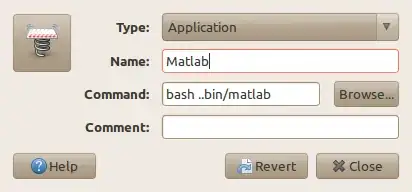
Right click on an empty part on your Gnome Panel, click Custom Application Launcher

Make sure the entries are similar to the ones in the image.

Launcher

Let us know i it worked!

theTuxRacer
  • 16,533