I would have expected System ▸ Administration ▸ Login Screen ▸ Play login sound to control this, but unchecking it does not prevent the drum beat sound from playing.
Asked
Active
Viewed 6.6k times


15 Answers
64
For Ubuntu 12.04+
LightDM Way (works in Ubuntu Unity 22.10)
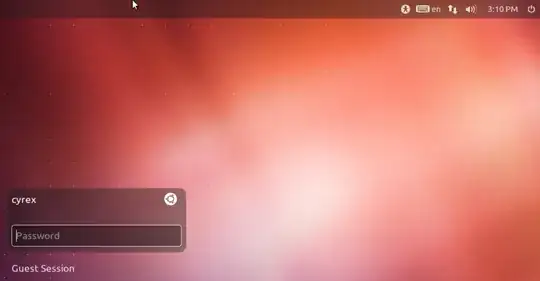
Also known as the FluteFlute Slap, the LightDM Way involves having to logout and on the LightDM Login Screen you can change the volume or even mute the sound.
In the Login Greeter you can see the Volume on the top right. Adjusting the volume there does not affect the volume when the session starts, so you can MUTE the sound in the Greeter without muting the sound when your session starts:
Ubuntu Tweak Way (not available in Ubuntu Unity 22.10)
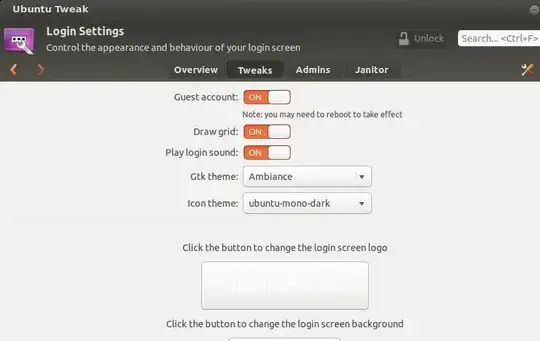
The Ubuntu Tweak way involves having to download the Ubuntu Tweak app and then disabling the sound from there. Do the following steps and you can do it this way:
sudo add-apt-repository ppa:tualatrix/ppa
sudo apt-get update
sudo apt-get install ubuntu-tweak
Open Ubuntu Tweak and on the Tweak Tab select "Login Settings" option, you should see the Play Login Sound option. Yo need to click on the Lock button above to be able to change this.
For Ubuntu 11.10 and Below
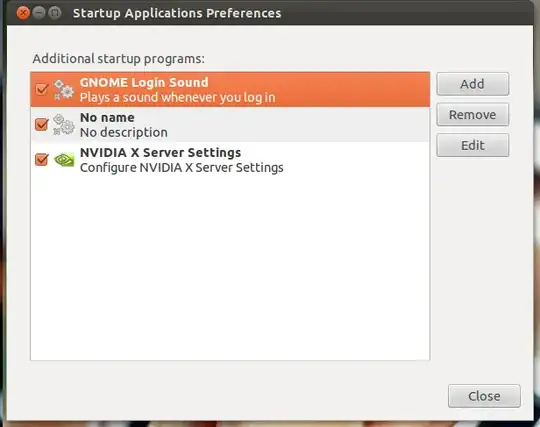
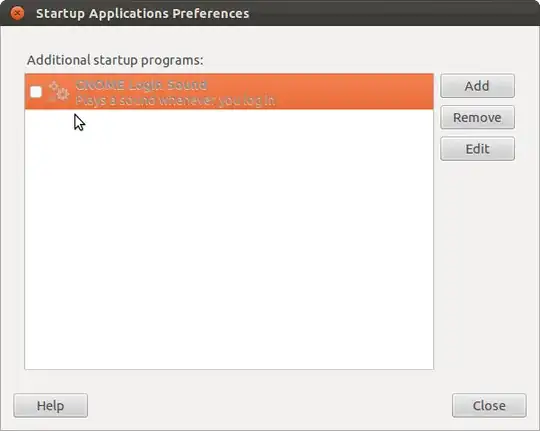
Go to System -> Preferences -> Startup Applications
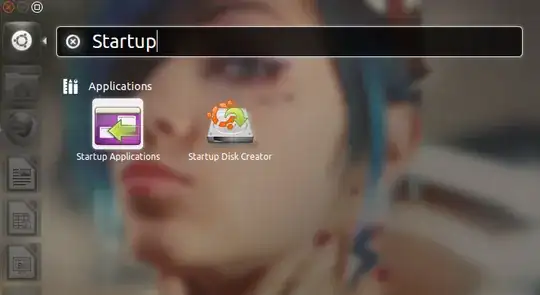
Disable the one called GNOME Login Sound
(uncheck the box and click close)
you can also go to System -> Preferences -> Sound and disable the whole sound system (Like windows sounds, alerts, etc..)
In older version you could go to the Sound Preference part and select each sound and what you wanted to do. It was removed around 9.04 or 9.10. It would be good if it came back.

Archisman Panigrahi
- 38,814

Luis Alvarado
- 216,643
61
The start-up sound can be disabled editing the Unity Greeter configuration. Running the following from a terminal will do this:
echo -e '[com.canonical.unity-greeter]\nplay-ready-sound = false' \
    | sudo tee -a /usr/share/glib-2.0/schemas/50_unity-greeter.gschema.override
sudo glib-compile-schemas /usr/share/glib-2.0/schemas/
If you are running Ubuntu 12.04 LTS make sure you have updates installed as this feature was added in an update.

Piotr Findeisen
- 103

Andrejs Cainikovs
- 5,969
56
12.04 - 16.10 (LightDM)
Here is what worked for me after I installed 12.04 last week.
The steps are these, adapted from http://www.liberiangeek.net/2012/05/disable-the-ready-drum-sound-in-ubuntu-12-04-precise-pangolin/:
sudo nano /usr/share/glib-2.0/schemas/50_unity-greeter.gschema.override
Add these lines:
[com.canonical.unity-greeter]
play-ready-sound = false
Save, then run:
sudo glib-compile-schemas /usr/share/glib-2.0/schemas/
Reboot and enjoy.
Edit: gksu and gksudo were removed in 18.04 but the linked article describes how to edit system files without them. I have updated the first terminal command to demonstrate how one might edit the file from the command line. Replace nano with the editor of your choice.

K. P. MacGregor
- 1,176
21
11.10 (LightDM and GDM)
Quick solution:
Open a terminal and run the command
sudo mv /usr/share/sounds/ubuntu/stereo/desktop-login{,-disabled}.ogg
The lightdm drum sound for system ready can be disabled in a similar fashion
sudo mv /usr/share/sounds/ubuntu/stereo/system-ready{,-disabled}.ogg


11
For 12.04
By default, it is turned off. To enable it, open a terminal and run
gksudo gedit /usr/share/gnome/autostart/libcanberra-login-sound.desktop
Then change the value for X-GNOME-Autostart-enabled to "true", i.e.
X-GNOME-Autostart-enabled=true
For 11.10
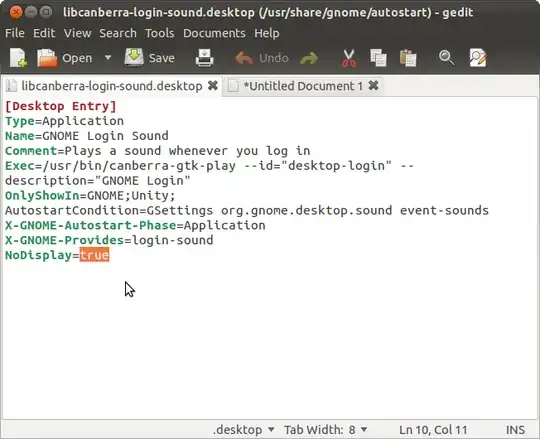
Type on a terminal gksudo gedit /usr/share/gnome/autostart/libcanberra-login-sound.desktop and change the value NoDisplay from true to false:
Now go to your startup applications and you should see and be able to disable the necessary option:

Jorge Castro
- 73,717

Bruno Pereira
- 74,715
10
10.10 (GDM)
There appears to be a bug in the Login Screen about this. I can't find an official report, however, this forum post confirms a fix.
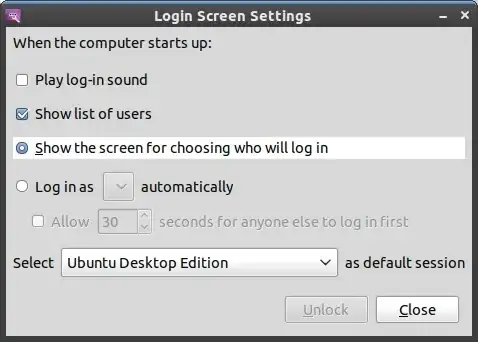
Go to System/Administration/Login Screen. Unlock it, then tick "Play login sound".
Close the window, then, go back into the app again, unlock it, then untick the same option.

7
If you are using GDM with 12.04
To disable the login sounds, the event-sounds key under org.gnome.desktop.sound for the gdm user must be set to false.
For this, we must first give GDM ownership of its own home directory. Open a terminal, and type: sudo chown -R gdm:gdm /var/lib/gdm
Then run:
sudo xhost +SI:localuser:gdm
sudo -u gdm gsettings set org.gnome.desktop.sound event-sounds false
and logout (or reboot).
If you are using LightDM with 12.04
Open a terminal with Ctrl+Alt+T, and type/paste the following, one line at a time:
sudo xhost +SI:localuser:lightdm
sudo su lightdm -s /bin/bash
gsettings set com.canonical.unity-greeter play-ready-sound false
exit
What this does is disable the play-ready-sound setting for the login screen/desktop manager user (lightdm).

5
11.10 (LightDM and GDM)
For removing the startup sound :
mv /usr/share/sounds/ubuntu/stereo/system-ready.ogg /usr/share/sounds/ubuntu/stereo/system-ready.ogg.old
For enabling the startup sound
mv /usr/share/sounds/ubuntu/stereo/system-ready.ogg.old /usr/share/sounds/ubuntu/stereo/system-ready.ogg
For removing the Login Sound (After you login) :
mv /usr/share/sounds/ubuntu/stereo/desktop-login.ogg /usr/share/sounds/ubuntu/stereo/desktop-login.ogg.old
For enabling it again :
mv /usr/share/sounds/ubuntu/stereo/desktop-login.ogg.old /usr/share/sounds/ubuntu/stereo/desktop-login.ogg


1
11.04 and earlier (GDM)
Run this command in a terminal?
sudo -u gdm gconftool-2 --set /desktop/gnome/sound/event_sounds --type bool false

jokerdino
- 41,732
Jorge Castro
- 73,717
1
12.10 (LightDM)
Run the same command Jorge Castro gave, only with gdm replaced for lightdm:
sudo -u lightdm gconftool-2 --set /desktop/gnome/sound/event_sounds --type bool false

C Schilder
- 171
1
12.10 (GDM)
None of the above works for me with gdm. If I disable the system-ready sound (the bongos), it still makes a short drum sound (one beat).
The way to disable it is:
Boot up, get into gdm.
Switch to the console (Ctrl + Alt + F1)
Login
Enter:
  export DISPLAY=:0
  sudo -H -u gdm pavucontrol
Switch back to gdm (Ctrl + Alt + F8)
Disable sound in the mixer. I muted it in "Playback" and "Output Devices".
Close the mixer, you might get an error about writing the config file, this is harmless.
Switch back to the console and enter
sudo service gdm restartto test, and
exitto logout.

1
The easiest way is just to mute sound in the greeting. Just click volume and click "mute".
This will mute sound only in the greeter.

Pilot6
- 92,041
0
12.04 (LightDM)
The LightDM bongo sound cannot be disabled via any GUI option in 12.04 and there is a bug report here:
The command line methods above can disable it.
The sound after login can easily be disabled with the answers above.

Eric Nemchik
- 121