3

This is about an older computer (Toshiba Satellite M70 that a friend wants to keep afloat) on which (beside Win XP) was installed the Xubuntu 11.10 system that would not work for some reason: now the idea would be to format/repartition the non-windows space and to install Lubuntu 12.10.

But the installation procedure stops indefinitely immediately after setting the internet connection: enter image description here after "Continue" it would just lag. Renouncing to use an internet connection has the same results.
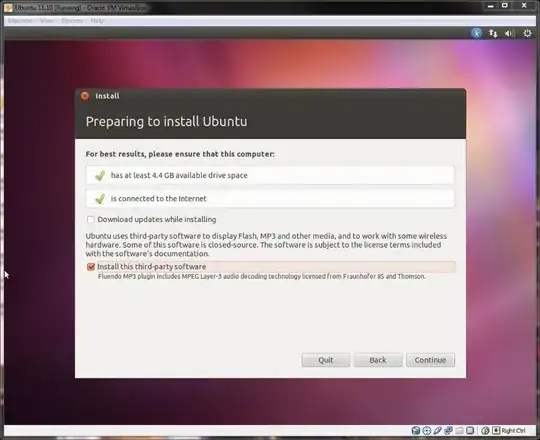
This computer does not support USB-boot so I have to use the live cd. Gparted shows the following configuration: enter image description here
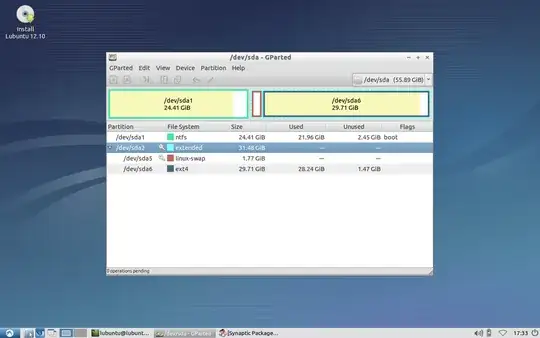
I see that the previous installation was on an extended partition. A very useful answer that I have received here said that a system should not be on an extended partition.

Is this the cause why the installation stops?

(My idea is to use a live GParted cd to format and repartition the space according to the answer above - create two primary partitions and select mount point as / and /home.)

Computer specs: http://paste.ubuntu.com/1528395/

Edit/Update: In gparted live environment was able to delete one by one the swap and the ext4 partition and afterwards the extended partition. But the same problem happened, even after trying a different cd with a different iso, Lubuntu 12.04: until in this case I have renounced connecting to the internet - see my answer

4 Answers4

2

I am afraid, the answer you received is, strictly speaking, incorrect. An extended partition is just a container that holds logical partitions. You can't install anything on it, even if you wanted to. Primary and logical partitions are used to install OSs, so, in your case, Lubuntu can be installed either to the primary /dev/sda1 or the logical /dev/sda6, though, obviously, you'll have to let the installer format it.

PS: Can you post the hardware specs of the machine.

mikewhatever
  • 33,013
1

What I would try is to choose the something else option in the installer, then in gparted, I would format /dev/sda6 and set it as mount point /.

The previous attempt of installing Xubuntu might be interfering with the new installation.

This said, I suspect that the issue might by another one, but it's worth giving a try.

On other possible problem is too little RAM for the normal installer. So I would try the alternate install CD which needs less RAM.

On the other hand, if you do not want to loose Windows XP, do not touch partition /dev/sda1.

To Do
  • 15,833
1

Although you should be able to install Lubuntu on extended/logical partition, it might still be a good idea to unmount linux-swap partition, delete the extended/logical partition(s) and create instead 2 primary partitions for linux-swap and Lubuntu, and then try installation again.

However, your installation problem may also be caused by some problem in your live CD or by the fact that the computer in question does not meet the system requirements to install Lubuntu 12.10.

Sadi
  • 11,074
0

Trying to install from a different cd (Lubuntu 12.04 Desktop) it stopped at the same step but after renouncing the internet connection the installation procedure was able to continue - including creating new swap and primary partitions: system (/) and home (/home).

Thanks everybody for their quick responses. I do not know what the cause was and now i do not think it could be found.

It should be closed I guess but kept accessible for possible similar occurrence..