As I understand it, the differences between ~/.profile, ~/.bash_profile, and /etc/profile are as follows:
~/.profileis sourced by login shells of a specific user at startup if no shell-specific configuration file such as~/.bash_profileor~/.zprofileexists.~/.bash_profileis sourced by Bash login shells of a specific user at startup./etc/profileis sourced by all login shells of all users at startup.
When I log in to Ubuntu via the display manager, a desktop environment is started instead of a login shell. So I would expect that these three shell startup files are not executed. Surprisingly, however, they are.
For testing purposes, I filled the three files as follows:
~/.profile:
export FROM_PROFILE="Hello from ~/.profile"
echo ~/.profile executed
~/.bash_profile:
export FROM_BASH_PROFILE="Hello from ~/.bash_profile"
echo ~/.bash_profile executed
/etc/profile:
export FROM_ETC_PROFILE="Hello from /etc/profile"
echo /etc/profile executed
I then restarted the system. I did not source the files myself.
When I now open a terminal window in the desktop environment, the environment variables from ~/.bash_profile and /etc/profile are available in the shell:
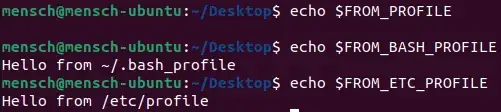
mensch@mensch-ubuntu:~/Desktop$ echo $FROM_PROFILE
mensch@mensch-ubuntu:~/Desktop$ echo $FROM_BASH_PROFILE
Hello from ~/.bash_profile
mensch@mensch-ubuntu:~/Desktop$ echo $FROM_ETC_PROFILE
Hello from /etc/profile
If I delete the ~/.bash_profile, the environment variable from the ~/.profile is available:

mensch@mensch-ubuntu:~/Desktop$ echo $FROM_PROFILE
Hello from ~/.profile
mensch@mensch-ubuntu:~/Desktop$ echo $FROM_BASH_PROFILE
mensch@mensch-ubuntu:~/Desktop$ echo $FROM_ETC_PROFILE
Hello from /etc/profile
But it is not a login shell, which can also be seen from the fact that the outputs of the echo commands are not displayed. So the scripts must have been executed before, but where? Even the precedence of ~/.bash_profile and ~/.profile was respected. It seems that everything works exactly as if I had logged in via a terminal, but I have not.

