22

I'm looking to find a way to test my internet speed at home through ssh. Does anyone know a terminal app that can give me calculations similar info to speedtest.net?

It would also be really cool if there was something that would do tests based on common internet ports too (i.e. web, torrent, etc) so you can see if you're getting throttled by your ISP.

Jorge Castro
  • 73,717
wajiw
  • 2,506

6 Answers6

17

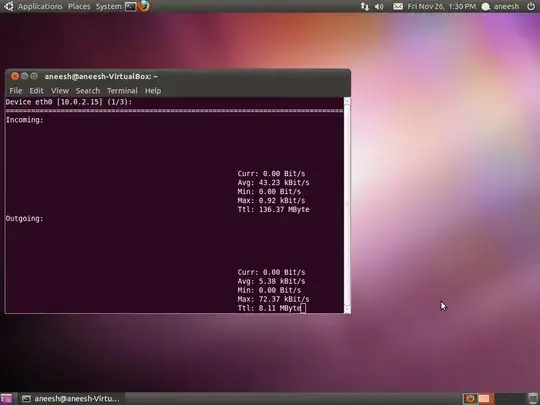
You may use nload (Install nload) for this purpose. Sample output:

alt text

You can install nload by this command:

sudo apt-get install nload

Also available in software center.

David Foerster
  • 36,890
  • 56
  • 97
  • 151
aneeshep
  • 30,949
9

Update Nov 2016: I discontinued it. Please use another provider i.e. Init7 with http://speedtest.init7.net/10GB.dat

Original answer:

There is also this easy "speedtest":

wget -O/dev/null speedtest.pixelwolf.ch

This gives you the current speed and it is available up to 100 megabits per second.

thonixx
  • 882
6

How about netperf? http://manpages.ubuntu.com/manpages/maverick/man1/netperf.1.html

netperf Install netperf

Quoting from the man page:

Netperf is a benchmark that can be used to measure various aspects of networking performance. Currently, its focus is on bulk data transfer and request/response performance using either TCP or UDP, and the Berkeley Sockets interface. In addition, tests for DLPI, and Unix Domain Sockets, tests for IPv6 may be conditionally compiled-in.

OpenNingia
  • 3,323
5

The simplest solution I know is to simply use

wget -O/dev/null http://releases.ubuntu.com/saucy/ubuntu-13.10-desktop-i386.iso

wget will provide you with file size, download time, and download speed.

If you need more complex solution, have a look at iperf. This solution is however more complicated, because it requires more set-up, and is not straight-forward (for example it requires a server with higher speed than yours).

2

you also can use iftop while transferring files

jet
  • 7,452
0
scp username@remoteserver.com:/some-file.ext .

will show something like :

some-file.ext
24% 16KB 13.0KB/s 00:03 ETA^