0

Third install of Ubuntu on 3rd machine. Never had an issue getting Japanese language (kana) input, but suddenly I can't find the settings I'm used to!

Trying to get Anthy installed, but it's not showing up in the Region & Language options. When searching for Japanese input sources, my options are:

  • Japanese
  • Japanese (Dvorak)
  • Japanese (Kana 86)
  • Japanese (Kana)
  • Japanese (Macintosh)
  • Japanese (OADG 109A)
  • Japanese (PC-98)

Installing Japanese and Japanese (Kana) has given me the option to select them in my input methods, but input remains English.

Where can I find the settings/files to input text in Japanese kana?


This question can be considered a precursor to the solutions provided in this related question:

Enabling/installing Japanese input

1 Answers1

1

After install the japanese language on a Gnome/Ubuntu 18.04:

  1. Install, at least one, IMF (ibus comes by default on Ubuntu):
    • sudo apt install ibus, and/or;
    • sudo apt install fcitx
  2. Install, at least one, japanese IME for your IMF:
    • if using ibus:
      • sudo apt install ibus-mozc, and/or;
      • sudo apt install ibus-anthy, and/or;
      • sudo apt install ibus-kkc, and/or;
      • sudo apt install ibus-skk.
    • if using fcitx:
      • sudo apt install fcitx-mozc, and/or;
      • sudo apt install fcitx-anthy, and/or;
      • sudo apt install fcitx-kkc, and/or;
      • sudo apt install fcitx-skk.

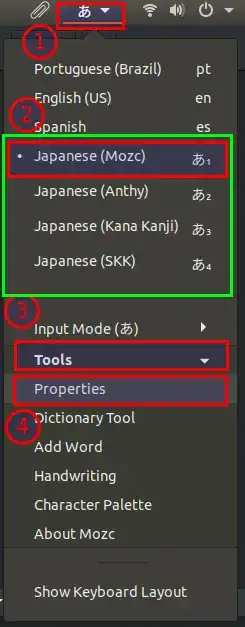
With that, select the input method (IME) from your language selector on icon tray (IMF).

  • the IMF (ibus) on Gnome Status Menu (is represented by a language icon selector).
  • all (my) selectable IMEs (portuguese, spanish, english, japanese-mozc, japanese-anthy, japanese-kkc, japanese-skk) from this IMF (ibus).

ibus menu and selectables IMEs

Or you can use the Gnome shortcut to fast-switch between IMEs: hold Super and press Space.

gnome menu shortcut to select IMEs