63

I'm trying to link my new laptop running 11.10 to my old laptop running 8.04 through my router using SSH.

This question is asked and answered on ubuntuforums here:

http://ubuntuforums.org/showthread.php?t=1648965

I thought it would be helpful to have a more definitive answer here.

Note: I needed to first install openssh-server on the laptop I was trying to connect to and open up the SSH port in my firewall using firestarter.

klenwell
  • 4,219

3 Answers3

76

You can restrict access to your ssh server in many ways.

IMO the most important is to use ssh keys and disable password authentication.

See the following wiki pages for details

You can restrict access to a specific subnet in several ways. I will assume your ssh server is on subnet 192.168.0.0/16 with an ip address of 192.168.0.10 , adjust accordingly ;)

Router

One line of defense is to use a router. Be sure to disable UPnP and do not allow port forwarding.

SSH configuration

You can set several options in /etc/ssh/sshd_config. One is the listen address. If You set a listen address on your subnet. A private IP address is not routable over the internet.

ListenAddress 192.168.0.10

You can also use the AllowUsers

AllowUsers you@192.168.0.0/16

Somewhat related, you can also change the port

Port 1234

See: http://manpages.ubuntu.com/manpages/precise/man5/sshd_config.5.html

TCP wrapper

As outlined on the forums post, you can use TCP Wrapper . TCP wrapper uses 2 files, /etc/hosts.allow and /etc/hosts.deny

Edit /etc/hosts.allow and add your subnet

sshd : 192.168.0.

Edit /etc/hosts.deny , and deny all

ALL : ALL

See also: http://ubuntu-tutorials.com/2007/09/02/network-security-with-tcpwrappers-hostsallow-and-hostsdeny/

Firewall

Last you can firewall your server. You can use iptables, ufw, or gufw.

iptables

sudo iptables -I INPUT -p tcp --dport 22 -s 192.168.0.0/16 -j ACCEPT
sudo iptables -A INPUT -p tcp --dport 22 -j REJECT

Please do not use DROP in iptables.

ufw

sudo ufw allow from 192.168.0.0/16 to any port 22

ufw has a graphical interface: gufw
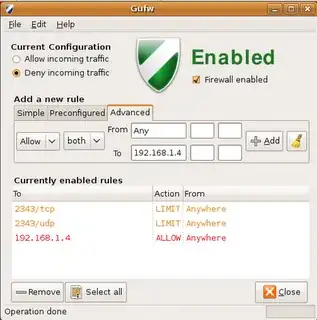
GUFW

Pablo Bianchi
  • 17,371
Panther
  • 104,528
40

2020 UPDATE

Since this question, a less complex approach is now possible using the Match keyword, introduced in OpenSSH 6.5/6.5p1 (2014):

In the sshd config file (/etc/ssh/sshd_config in Debian and derived OS such as Ubuntu)

# Disable all auth by default
PasswordAuthentication no
PubkeyAuthentication no

[.. then, at the end of the file ..]

Allow auth from local network

Match Address 192.168.1.* PubkeyAuthentication yes # if you want, you can even restrict to a specified user AllowUsers stephan

Tip: it's better to put your custom rules onto a file in /etc/ssh/sshd_config.d folder. Typically /etc/ssh/sshd_config.d/local_network_only.conf. This prevents conflicts when upgrading to a new version of ssh-server package changes sshd config file.

man sshd_config for more details

NOCARRIER
  • 103
brunetton
  • 524
0

ssh(secure shell) is used to access and transfer data securely(used RSA_KEYS pair). You can access data using ssh in two ways 1. Command line 2. using file browser

Command Line: For this you don't need to install anything. First task is log-in into other computer.

ssh other_computer_username@other_computer_ip

This command will ask for a password which is the other computer's password(for specific user-name). You have just logged in to other computer's shell. Think this terminal is like your computer shell terminal. You can do everything using shell to other computer that can you do in your computer

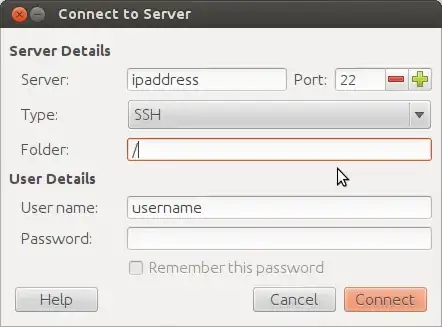
File browser: You need to install openssh-server

sudo apt-get install openssh-server

To log-in go to file->connectToServer

enter image description here

shantanu
  • 8,835