I'd like to know the equivalents of Mathematica, Maple, or MATLAB on Ubuntu, since all are costly.
Asked
Active
Viewed 9,493 times


9 Answers
15
Octave provides a lot of the functionality of Matlab, and can run some Matlab programs. Sage is the open source "equivalent" of Mathematica.

Eliah Kagan
- 119,640

pestilence
- 1,625
6
I use QT Octave as GNU Octave does not have a nice GUI. Though most of the commands work out pretty well, some functions may not work as expected in MATLAB

prasadkumar013
- 198


4
I would suggest python with appropriate libraries as a good option.
It is not quite a replacement, since the python language is not as specialised for mathematics as matlab/mathematica syntax, but it combines a relatively good syntax for interactive mathematics with a fully-capable programming language.
You will want to install the packages:
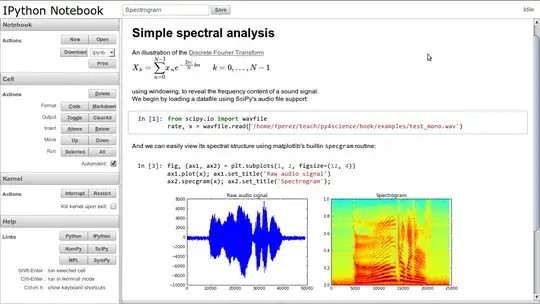
ipython- a much nicer version of the standard python shell, with session saving, tab-completion, etc. See their website. You might also wantipython-notebookwhich provides a browser-based interactive session (see image below).
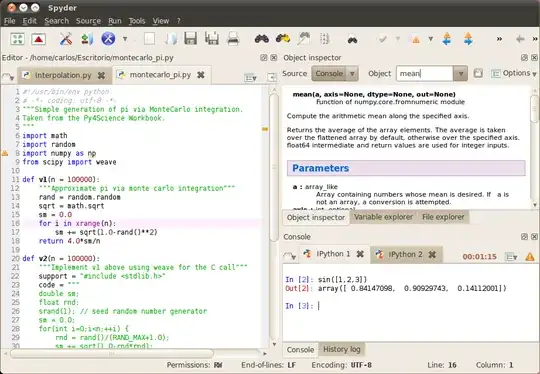
python-numpy python-scipy python-matplotlib- Core scientific python libraries; Numpy provides efficient arrays for handling large amounts of data; Scipy provides algorithms, eg clustering, FFT, numerical integration, linear algebra; and Matplotlib provides a wide variety of plotting functions (including an interface designed for interactive use).spyder- I normally just use these libraries with a text editor and a ipython terminal session, but if you are more comfortable with an integrated environment you may look at spyder, an IDE designed in the vein of matlab/mathematica using the above libraries. See screenshot below.


2
Freemat is a good alternative. It can handle most of the Matlab m-scripts.
Eliah Kagan
- 119,640

Bernard Decock
- 476
1
Both Mathematica and Matlab are very bloated as they try to do too much and be sort of a silver bullet. As I said, they try.
Most open source libraries and tools however, focus on a particular problem or domain area and do it the best and fastest way, while making sure that they import and export to appropriate formats so you can work with several different tools and pass your data from one to another.
You will likely receive much more useful response to your question by specifying the specific domain you want to work in, or the specific type of tools you need as opposed to trying to find a clone of something like Matlab, which I wouldn't use even if it was free.

Aras
- 819
1
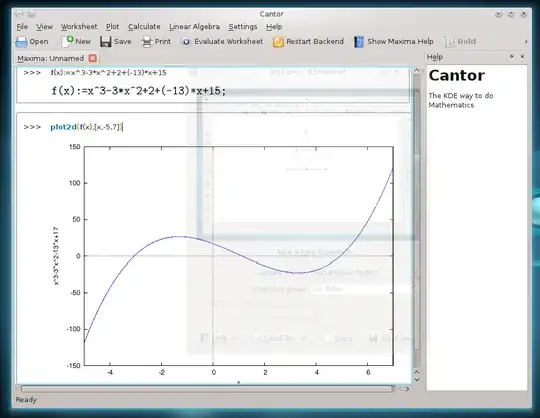
I would suggest installing Cantor which supports four different environments (Maxima, R, SAGE and KAlgebra).
sudo apt-get install cantor
It has a very simple interface and it is easy to use.

Zanna
- 72,312

Alfredo Hernández
- 2,213
0
I have several suggestions:
For some users, xcas can also be an option. It has a general purpose computer algebra system and a graphical user interface. There is also a web version available.
GeoGebra is also an option. You can use the old unmaintained version 4 which has no restrictions for commercial use, or download either version 5 from GeoGebra's official website (this package is currently unsupported), or version 6 as a community maintained Flathub package. Eventually, you can try GeoGebra Discovery (maintained by me) which is a fork of GeoGebra 5 with some additional experimental features. These versions can be used only under certain conditions.
If it is acceptable for you to use an online version of GeoGebra, you can simply visit its official website. It works on all major platforms and has more or less the same features as version 6.If you need only the command line version of Mathematica (Wolfram Engine for Developers, also known as Wolfram Engine Community Edition), it is available for developers free of charge: https://www.wolfram.com/developer/, https://www.wolfram.com/engine/faq/.

andrew.46
- 39,359