Item Network
The Item Network is composed of multiple items such as Storage Bridges, Repeaters, and others. There are multiple functions to the Item Network: Check back on this page occasionally to get an idea of what you can do with the item network.
Example - Basic Dropbox
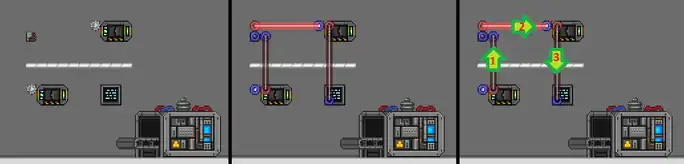
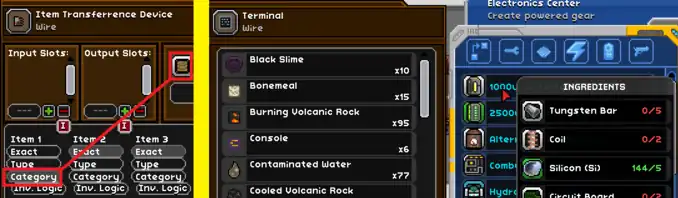
This basic setup creates a "dropbox". Players can drop blocks/liquids into the initial box, the Item Transferrence Device (ie; Router) pulls the blocks and places them into any connected chests. All items that have been dropped off can then be accessed via the Terminal, which can be placed at a key location such as next to a workbench. This kind of system can be expanded to include things such as crafting materials, seeds, etc.
Note: Always leave some spacing between chests/routers/storage-bridges. If they are too close, they sometimes interact with each-other and can get messy.
Example - Advanced Dropbox
(Explanation below image)
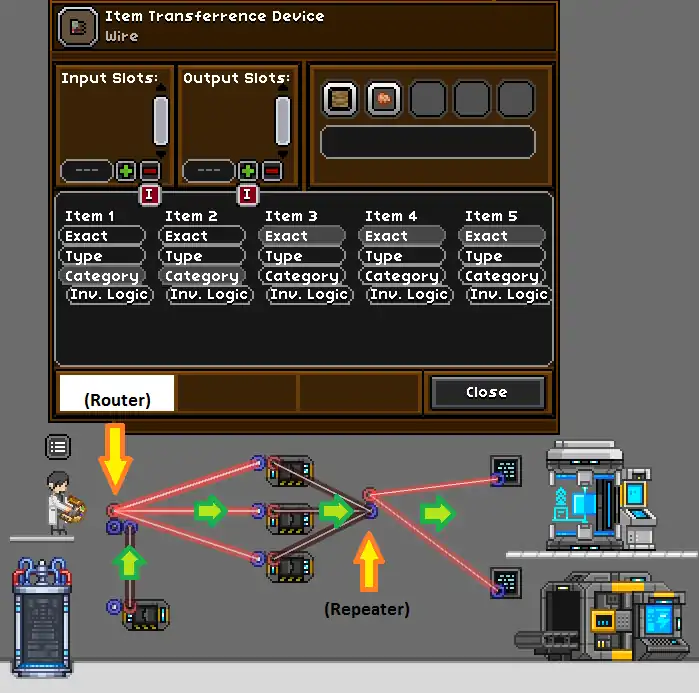
Teleport in, throw everything in the dropbox, then run over to your terminals and pull the exact mats you need without every worrying where those mats actually are.
The advanced dropbox above features handling for blocks/liquids, as well as crafting materials (ores, crystals, spores, etc). Additionally, we've added more chests, a Repeater, and more terminals!
- The router seems to choose the destination chest randomly, but generally 5-6 wall chests is plenty to handle most all the crafting materials/blocks that exist in FU
- A Repeater helps to keep wiring more manageable. Think of it as a way to merge multiple wires into a single wire.
- Since the Repeater is connected to all the wall chests, any connected Terminal will see the contents of ALL the wall chests as well. NOTE: Terminals are client-side and can only see on-screen chests.
See also
- Advanced guide: https://steamcommunity.com/sharedfiles/filedetails/?id=1618972523 (warning: it was written in 2019, so it is somewhat outdated, e.g. there are no Oil oceans today)
- Video guide: https://www.youtube.com/watch?v=AR_tUkO6Y24