Mobile System GB
- This article is about the Mobile System GB. For more general information on the Mobile System GB, see Mobile Game Boy Adapter.
|
The subject of this article has no official English name. The name currently in use is the official English translation of the Japanese name. |
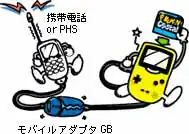
The Mobile System GB (Japanese: モバイルシステムGB Mobile System GB) was a paid online service used by the Mobile Game Boy Adapter. It was used by the Japanese versions of Pokémon Crystal and Pokémon Stadium 2. The service could be used by connecting to a compatible Japanese mobile phone using the Mobile Game Boy Adapter.
The system was never implemented outside of Japan. This may have been due to the lack of standardized and cheap mobile phones available overseas at the time, and the fact that most younger players could not have access to such devices.
In May 2002, Nintendo announced that it would shut down the Mobile System GB service by December 14, 2002.[1][2] The closure of the Mobile System GB service makes it impossible for players to link to the server; however, it was still possible to link with friends through peer-to-peer communication until the network services themselves were also shut down.
Access
To unlock most of the Mobile System GB-related features in the Japanese version of Pokémon Crystal, the player only has to have the Mobile Game Boy Adapter itself connected to their Game Boy Color, Game Boy Advance, or Game Boy Advance SP.[3] Once the game detects the adapter, Mobile Mode (Japanese: モバイルモード) is enabled on the cartridge.[4] This causes the Mobile System GB logo to be shown every time the game is started from then on, even if the adapter is no longer connected.
Upon selecting "CONTINUE" or "NEW GAME" for the first time on a cartridge in Mobile Mode, the player will be asked to fill out their mobile profile. All of the services required the player to set up their profile, and this data would be sent online to other players for the Battle Tower and Pokémon News. After delivering the Mystery Egg to Professor Elm, the "MOBILE" entry becomes accessible from the main menu.
To unlock Mobile Stadium, a Pokémon Crystal cartridge with Mobile Mode enabled needs to be inserted into the Transfer Pak. Upon starting Pokémon Stadium 2, both the Mobile Stadium feature in Pokémon Stadium 2 and the "MOBILE STADIUM" option on the main menu in Pokémon Crystal will be unlocked.
Features
There were two major kinds of services offered: Mobile for Everyone (Japanese: みんなでモバイル) and Mobile with Friends (Japanese: ともだちとモバイル). When using Mobile for Everyone, the game connected via their carrier and the internet provider DION to the now defunct gameboy.datacenter.ne.jp server hosted by Nintendo Network Service Development. When using Mobile with Friends, the game used peer-to-peer communication with another player via their wireless carrier.
Several fees were charged to players for using these services: mobile phone/PHS data charges were paid to the wireless carriers, DION connection fees were paid at a rate of ¥10 per minute, and service charges were paid separately for some services.[5][6] While Mobile with Friends only incurred carrier service fees, using Mobile for Everyone also incurred connection fees and service charges, as well as requiring an initial registration fee of ¥400 to sign up with DION.
The Mobile System GB offered the following services for Pokémon Crystal:[7]
| Type | Service | Launch date | Service charge | |
|---|---|---|---|---|
| Mobile for Everyone | Odd Egg | なぞのタマゴ | January 27, 2001 | Free |
| Pokémon Trades | ポケモントレード | January 27, 2001 | ¥10 | |
| Pokémon News | ポケモンニュース | January 27, 2001 | ¥100/month | |
| Battle Tower | バトルタワー | January 27, 2001 | ¥10 | |
| Mobile Stadium | モバイルスタジアム | February 8, 2001 | Ranged from free to ¥20 | |
| Mobile with Friends | Pokémon Trades | ポケモン交換 | January 27, 2001 | N/A |
| Pokémon Battles | ポケモンバトル | January 27, 2001 | N/A | |
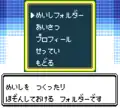
The Mobile (Japanese: モバイル Mobile)[8] entry in the main menu allows players to access the Card Folder, Messages, Profile, and Settings menus.
- The Card Folder (Japanese: めいしフォルダー Name Card Folder) allows the player to save up to 40 Cards, enter their phone number on their Card, and trade their Card with friends. It is protected by a four-digit Passcode, and is retained even after starting a new game. The Card Folder can still be deleted if the Passcode is forgotten, however.
- The Messages (Japanese: あいさつ) option allows the player to enter a self-introduction for their Card and the News, as well as for the start of battle, winning a battle, and losing a battle for mobile battles using the easy chat system.
- The Profile (Japanese: プロファイル Profile) option allows the player to edit their mobile profile. It includes the player's gender (only when starting a new game), age (ranging from 0 to 100 years old), address (one of the 47 prefectures of Japan), and postal code (localized as Zip Code in the English version).
- The Settings (Japanese: せってい) option allows the player to select which Mobile Center to connect to when going online, as well as change the Log-In Password used when connecting to the Mobile Center.
-
 The Mobile menu
 -
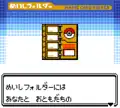 The Card Folder
 -
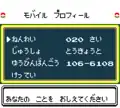 The mobile profile
Mobile Stadium
- Main article: Mobile Stadium
Recorded battles from various tournaments could be downloaded to the Japanese version of Pokémon Crystal, and could subsequently be viewed in the Japanese version of Pokémon Stadium 2.
Pokémon Communication Center
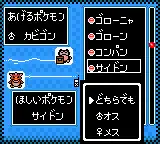
- Main article: Pokémon Communication Center
The Pokémon Center in Goldenrod City is replaced by a larger building called the Pokémon Communication Center, which includes two facilities that take advantage of the Mobile System GB:
- The Trade Corner allowed players to deposit a Pokémon and request a Pokémon of a particular species and gender in return. The Egg Ticket could also be redeemed here for an Odd Egg.
- The Pokémon News Machine was a service which was updated monthly that would broadcast news and compile the data of other players across Japan. Most news segments included a quiz or mini-game that allowed players to win various items. One such news segment distributed the GS Ball, which could then be used to obtain Celebi in Ilex Forest by visiting Kurt.
Battle Tower
- Main article: Battle Tower (Generation II)
The Battle Tower near Olivine City also makes use of the Mobile System GB in the Japanese version. Players could fight against other players who had battled in the Battle Tower the previous day.
Mobile trades and battles
On the second floor of any Pokémon Center, players could hold trades and battles by mobile phone, in addition to the Game Link Cable as before. Unlike the other features, mobile trades and battles used peer-to-peer communication with friends rather than connecting to a central server. A friend could be selected from the Card Folder or by dialing their phone number directly.
Legacy
The Mobile System GB and its related features were Game Freak's first attempt at providing wireless linking to players. This experiment, along with the Game Boy Advance Wireless Adapter in Pokémon FireRed, LeafGreen, and Emerald, helped the company shape the now standard multiplayer features of the current core series games, which are now more practical due to the use of the built-in Wi-Fi in Nintendo's modern handhelds.
External links
References
- ↑ モバイルシステムGB (earliest archived copy)
- ↑ Nintendo to withdraw Mobile System GB service - Telecompaper
- ↑ 【NHM】4度目の正直なるか?携帯電話+"モバイルアダプタGB"でネット戦略! - YouTube
- ↑ Pokémon Crystal Version Map & Pokédex: Nintendo Official Guidebook (ポケットモンスタークリスタルバージョンマップ&ずかん:任天堂公式ガイドブック), page 39 (Shogakukan, 2001)
- ↑ Shonan Cable Network - モバイルアダプタGB通信
- ↑ GBClover - サービス終了 モバイルアダプタGB
- ↑ Mobile System GB - Pokémon Crystal Version (archive)
- ↑ Pokémon Crystal Version: Mobile Guide (ポケットモンスター クリスタルバージョンモバイルのてびき), page 44 (Nintendo, 2001)

|
This game mechanic article is part of Project Games, a Bulbapedia project that aims to write comprehensive articles on the Pokémon games. |