43

The terminal for Windows Subsystem for Linux (WSL) is fairly minimal. I have not used the terminal on Windows very much - I generally use Ubuntu or OSX - but I am surprised that the default terminal is so bare.

Is it possible to either:

  1. Connect a Windows terminal program to WSL or

  2. Launch the Ubuntu terminal program from WSL as an X window?

Kevin Bowen
  • 20,055
  • 57
  • 82
  • 84

12 Answers12

28

I personally do the latter: use VcXsrv as my X server in multiple windows mode, then launch the xfce4-terminal (because gnome-terminal had visual issues that I didn't care to try to learn how to fix), and suddenly I have a competent terminal with font and color support.

I found I needed to add these to my bashrc...

export DISPLAY="localhost:0"
export TERM=xterm-256color

Do the fix from this reddit for dbus:

sudo sed -i 's$<listen>.*</listen>$<listen>tcp:host=localhost,port=0</listen>$' /etc/dbus-1/session.conf

I also installed compiz and I use the cbwin project to run windows programs from my xfce4-terminal shell.

I am very happy with this setup and use NeoVim + lots of native linux plugins even though my "for-work" machine must be Windows. :)

It is also possible to start an SSH server in Bash-on-Linux-on-Windows and then connect to it, say from MinTTY like from Cygwin.

PS: to make launching xfce4-terminal painless and without the extra bash cmd window, I wrote a program that does nothing but start the bash process with arguments to start xfce4-terminal without a console window. I did this in C# - basically use arguments "UseShellExecute" false and "CreateNoWindow" true. I then pinned that to my taskbar and it's almost seemless.

EDIT: The answer with VBScript is brilliant. Here's that same script, but a JScript version...

WScript.CreateObject("WScript.Shell").run('bash.exe -l -c "DISPLAY=:0.0 xfce4-terminal"', 0, false);
aikeru
  • 706
23

It took a little while to figure out all the implied steps in the other answers, so here's a step by step summary:

  1. On Windows, install VcXsrv or XMing.
  2. In Bash for Windows, install the terminal: sudo apt-get install xfce4-terminal.
  3. Add export DISPLAY=:0 to your .bashrc. (Adding it to .profile or .bash_profile didn't work for me). This will allow you to start xfce4-terminal properly from bash, but is orthogonal to the command below.
  4. Run the following in a shortcut or in the Run prompt (as @OhJeez suggested in the comments):

    powershell -windowstyle hidden -Command "iex \"bash ~ -c 'DISPLAY=:0 xfce4-terminal'\" "
    

Other notes:

  • The ~ starts bash in your home directory, you can remove it to start in whatever directory the .vbs file is in, instead. So it's convenient to put it in C:\Users\foo, for example.
  • Note that XMing has to be running for the script to work; in order to start it automatically with Windows you can follow the instructions in this article.
  • Emacs 24 (included with Ubuntu 14.04) doesn't seem to work with XMing; I had to install a newer version as suggested in this post.
Andrew Mao
  • 1,801
  • 1
  • 19
  • 19
15

Today, you are suggested to use "Windows terminal" which is open sourced by Microsoft.

The official build can be obtained from Windows Store in mid June this year.

But you can also experience it using below preview version. https://github.com/yanglr/WindowsDevTools/blob/master/awosomeTerminal/WindowsTerminal_SelfSigned_x86_x64_arm64.7z

After installed, the running results are below:

pic1

pic2

pic3

pic4

Cuty Boy
  • 251
12

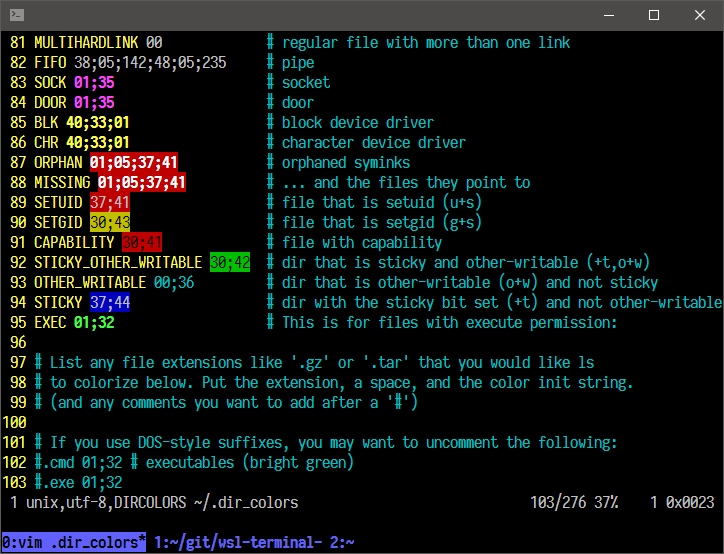
I created (and use) an open source terminal for Windows Subsystem for Linux (WSL) called wsl-terminal, it is based on mintty and wslbridge.

screenshot

Gore Liu
  • 119
6

On a fresh Ubuntu install, I've just installed XMing (in Windows) then (in Ubuntu) xfce4-terminal, and after I export DISPLAY=:0, it worked.

To get rid of Windows's default console, this VBS script does the job:

WScript.CreateObject("WScript.Shell").run "bash -l -c xfce4-terminal", 0, True

(With $DISPLAY set in your .profile.)

edit: And to make the script pin'able, create a shortcut with target wscript "C:\path\to\thescript.vbs".

n.caillou
  • 159
4

On Windows:

  • Click on the upper left corner of the bash window.
  • In the menu that opens select 'Properties'
  • Set options that you want like font etc.(there is even an Ubuntu mono font!)
  • After setting properties they will be applied for current window. To set them as default click the upper left of the window and click defaults.
  • You can press Alt+Enter to toggle full screen mode.

I hope this helps.

mohi
  • 41
4

ConEmu works great! Just install it and start a new {bash} console. I added cd ~ to my .bashrc to have it default to starting in my home directory.

Good explanation: https://conemu.github.io/en/BashOnWindows.html

ravery
  • 6,924
Bill Hoag
  • 141
2

Since the latest updates to Windows 10 (and WSL) everything seems to be working using "native" windows bash console. (And I am not talking about the (in)famous 1809 Windows update). This works even on Enterprise version at least for 1803 17134.345 build).

See the article at https://www.hanselman.com/blog/SettingUpAShinyDevelopmentEnvironmentWithinLinuxOnWindows10.aspx

A little caveat - to really use the bash console in Windows one should launch tmux - and everything will work as showed by Scott in his blog.

Adrian
  • 21
2

Extraterm is more than just a terminal emulator. It provides a toolbox for working with your terminal and command line applications.

  • Features
  • Supports Linux and macOS, on Windows WSL, CMD, PowerShell and Cygwin
  • xterm compatible
  • Multiple tabs and panes, split and tiled any way you like
  • Show images in the terminal
  • Unicode support
  • Color emoji
  • Keyboard friendly “Command Palette”
  • Configurable key bindings
  • Keyboard based selections
  • Shell integration; can isolate and ‘frame’ command output. (bash, zsh and fish supported)
  • Easy uploads and downloads using the shell integration
  • Command output is editable in place. Multi-cursor editing
  • Previous command output can be used as input for new commands
  • Supports iTerm2 and TextMate themes
  • Text zoom
nelaaro
  • 10,338
1

Extending answers of aikeru and n.caillou as neither of their VBScript/JScript solutions worked right away for me.

Call WScript.CreateObject("WScript.Shell").Run("bash.exe -l -c 'DISPLAY=:0.0 xfce4-terminal --working-directory $HOME'", 0, True).

The script needs to be prepended by Call when using parenthesis in the run command, see here. Also the ticks needed to be the other way round. Moreover, an additional argument to xfce4-terminal will start the terminal in the user's home folder. Sorry if this was actually working JScript code, I have no idea about these scripting languages.

Saving this as a file vbscript.vbs and executing from a cmd prompt by

wscript vbscript.vbs

then opens a xfce4-terminal window (given XMing or alike is running) after 2 seconds delay. Turning this into a shortcut as suggested by n.caillou's works indeed and clicking the shortcut will automatically spawn a new xfce terminal window with some delay.

David Foerster
  • 36,890
  • 56
  • 97
  • 151
1

https://hyper.is/

  • It is based on electron which makes it easy to develop and extend using javascript.
  • It does not use the default windows console in any way.
  • It allows you to choose your backend shell bash, cmd, PowerShell.

    the shell to run when spawning a new session (i.e. /usr/local/bin/fish)
    if left empty, your system's login shell will be used by default
    
    Windows
    - Make sure to use a full path if the binary name doesn't work
    - Remove `--login` in shellArgs
    
    Bash on Windows
    - Example: `C:\\Windows\\System32\\bash.exe`
    
    PowerShell on Windows
    - Example: `C:\\WINDOWS\\System32\\WindowsPowerShell\\v1.0\\powershell.exe`
    shell: 'C:\\Windows\\System32\\bash.exe',enter code here
    

Very nice themes and plugins

plugins: [
    //"hyper-dracula"
    //"hyper-solarized-dark"
    "hyper-material-theme"
],

Using this guide I was able to get my WLS, bash working very nicely.

nelaaro
  • 10,338
1

A terminal for a more modern age https://eugeny.github.io/terminus/

Terminus is a terminal heavily inspired by Hyper. It is, however, designed for people who need to get things done.

  • Runs on Windows, macOS and Linux
  • Theming and color schemes
  • Fully configurable shortcuts
  • Full Unicode support including double-width characters
  • Doesn't choke on fast-flowing outputs
  • Proper shell-like experience on Windows including tab completion (via Clink)
  • PowerShell (+Core), WSL (Bash on Windows), Git-Bash, Cygwin, Cmder and CMD support
  • Remembers your tabs
  • Integrated SSH client and connection manager
nelaaro
  • 10,338